
Best starting point for Indian businesses and developers: Vcclhosting, with Windows/Linux VPS and its own Kolhapur datacenter. Best for Linux applications: Linux VPS. Best for Windows-dependent applications: Windows VPS. For a fastest VPS hosting India shortlist in 2026, rank the deployment fit first, then measure your application; a datacenter location alone does not establish a speed winner.
- Vcclhosting is a VPS hosting shortlist choice for Indian businesses and developers considering its Kolhapur datacenter.
- For fastest VPS hosting India searches, compare application response times rather than advertised server specifications alone.
- Choose Linux VPS for Linux applications and Windows VPS for Windows-dependent workloads.
- Consider dedicated cloud servers for separate capacity planning and Forex VPS for trading-terminal workloads.
Why this matters
A fast VPS must deliver the response your users need, not just finish a synthetic benchmark quickly. Network routing, application code, database queries and resource contention all affect the result. A server can answer a ping quickly while your checkout still waits on a slow query.
Vcclhosting VPS hosting belongs on the shortlist for Indian businesses and developers considering a Kolhapur datacenter. That is a location-and-service-fit verdict, not a claim that it beats every provider on latency or throughput.
This 2026 ranking orders deployment choices by their suitability for the workload. Use it to select the right hosting category before comparing providers through the same application test. Switching providers without identifying the bottleneck risks moving the same problem to another server.
What makes the best fast VPS hosting in India?
Judge VPS speed against these criteria before reading a ranking or choosing a plan:
- Application response: Measure an actual page, API endpoint or transaction. A static homepage cannot represent a database-heavy application.
- Network path: Test from the locations where your users connect. An Indian datacenter is a geographic fact; the route to it still needs measurement.
- CPU consistency: Repeat the workload under sustained load. A short burst does not establish performance throughout the business day.
- Storage behaviour: Include the reads and writes your application actually performs. Sequential file-copy speed does not describe every database workload.
- Resource fit: Match memory, CPU and disk requirements to the application. Extra capacity does not repair inefficient queries or an incompatible operating system.
- Operational control: Establish who maintains the operating system, application and backups. Performance improvements are harder to retain when ownership is unclear.
For your 2026 comparison, request the current configuration and management scope for each candidate. Keep those details alongside the results so you do not compare unlike deployments as though they were equivalent.
Fast VPS deployment options at a glance
These are hosting categories offered by Vcclhosting, ranked as a deployment decision tree. The order is not a measured speed leaderboard, and the categories are not interchangeable.
| Rank | Hosting option | Best for | Standout characteristic | Key limitation |
|---|---|---|---|---|
| 1 | Linux VPS | Linux web applications and developer workloads | Linux-based application environment | Does not provide a Windows operating environment |
| 2 | Windows VPS | Windows-dependent applications | Windows-based application environment | OS compatibility does not prove faster application responses |
| 3 | Dedicated cloud servers | Workloads needing a separate server-capacity evaluation | A distinct server category beyond VPS | Allocation and isolation details need confirmation |
| 4 | Forex VPS | Trading-terminal workloads | Hosting category intended for Forex use | Broker connectivity must be tested separately from website speed |
Choose by application dependency first. Moving a Windows-only workload to Linux because a benchmark looks better creates a compatibility problem, not a performance improvement.
1. Linux VPS: best VPS hosting for Linux applications
Linux VPS provides a Linux operating environment for applications built to run there. It is the first option to evaluate for Linux-based web applications, APIs and development workloads. Your application stack remains the deciding factor.
For a Linux workload, compare the same runtime, database and application configuration across candidates. Changing the application version or caching setup between tests makes it impossible to attribute the difference to hosting alone.
Linux VPS pros
- Fits applications that require a Linux environment.
- Supports a consistent operating-system baseline across your comparison.
- Lets you evaluate web, API and database workloads together.
- Avoids introducing Windows solely for an application that does not require it.
Linux VPS cons
- Does not satisfy software that requires Windows.
- Performance depends on the allocated resources and application configuration.
- Server administration remains a separate question from operating-system choice.
Best for: Developers and businesses deploying Linux-compatible applications.
Before deciding, check how your application behaves under concurrent requests and sustained database activity. Record memory use as well as response time: a quick test without memory pressure does not show what happens during your busiest workload.
Verdict: Buy for a Linux-dependent workload only after the application test meets your requirements.
2. Windows VPS: best VPS hosting for Windows dependencies
Windows VPS provides a Windows operating environment. Choose it when your application, software vendor or operational workflow requires Windows, rather than treating the operating system as a speed upgrade.
Start with the application's documented requirements. Confirm its supported Windows version, dependencies and licensing requirements before comparing server performance. Compatibility belongs ahead of a synthetic CPU score.
Windows VPS pros
- Fits applications that require Windows.
- Keeps Windows-specific dependencies in their intended operating environment.
- Provides an appropriate category for evaluating Windows-based workflows.
Windows VPS cons
- Is not a direct substitute for every Linux deployment.
- Requires verification of application compatibility and licensing.
- A responsive desktop session does not establish application or database speed.
Best for: Businesses and developers running Windows-dependent software.
For your 2026 evaluation, test the task that matters: opening a working session, processing a job or completing an application transaction. Do not replace that measurement with the time it takes to display the desktop. The two answer different questions.
Verdict: Buy when Windows is required; skip it as a speed-only upgrade for a Linux application.
3. Dedicated cloud servers: best for separate capacity planning
Dedicated cloud servers are another hosting category offered by Vcclhosting. Evaluate this option when you need a server-capacity discussion beyond your existing VPS configuration. The category name alone does not establish the exact resource allocation or isolation model.
Ask what is dedicated, what remains shared and which limits apply. Those answers determine whether the deployment addresses your bottleneck. Moving to a differently named service without resolving those questions leaves the performance case unproven.
Dedicated cloud servers pros
- Creates a separate option for evaluating server capacity.
- Gives you a category to discuss when VPS sizing no longer fits the workload.
- Supports a deployment comparison centred on the application's resource needs.
Dedicated cloud servers cons
- Resource allocation and isolation require explicit confirmation.
- A larger server does not fix inefficient application code.
- Migration introduces work that a configuration change on the existing server might avoid.
Best for: Businesses evaluating a different server category after identifying a capacity constraint.
Keep the application configuration unchanged during the first comparison. If you also rewrite queries, introduce caching and change the server at once, you lose the ability to identify which change produced the improvement.
Verdict: Hold until the proposed configuration addresses a measured capacity problem.
4. Forex VPS: best VPS hosting for trading-terminal workloads
Forex VPS is a hosting category intended for Forex use. Its relevant performance question is the connection between your trading terminal and the broker's infrastructure, not how quickly a public website loads.
Test the intended terminal and connection. Website benchmarks do not establish order execution speed, and a responsive terminal does not guarantee a trading outcome. Keep hosting performance separate from trading strategy and broker-side processing.
Forex VPS pros
- Matches the hosting category to a trading-terminal workload.
- Focuses your evaluation on terminal operation and broker connectivity.
- Avoids using a website-speed benchmark as the main selection criterion.
Forex VPS cons
- Datacenter geography alone does not establish the best broker route.
- Hosting speed cannot guarantee execution outcomes or trading returns.
- The intended terminal's operating-system requirements still need checking.
Best for: Traders evaluating hosting for a specific terminal and broker connection.
Run the connectivity check against the actual endpoint used by your terminal. A test against the broker's public homepage measures a different service and can lead you to the wrong conclusion.
Verdict: Buy only after terminal compatibility and broker connectivity meet your requirements.
How to test VPS speed before choosing a provider
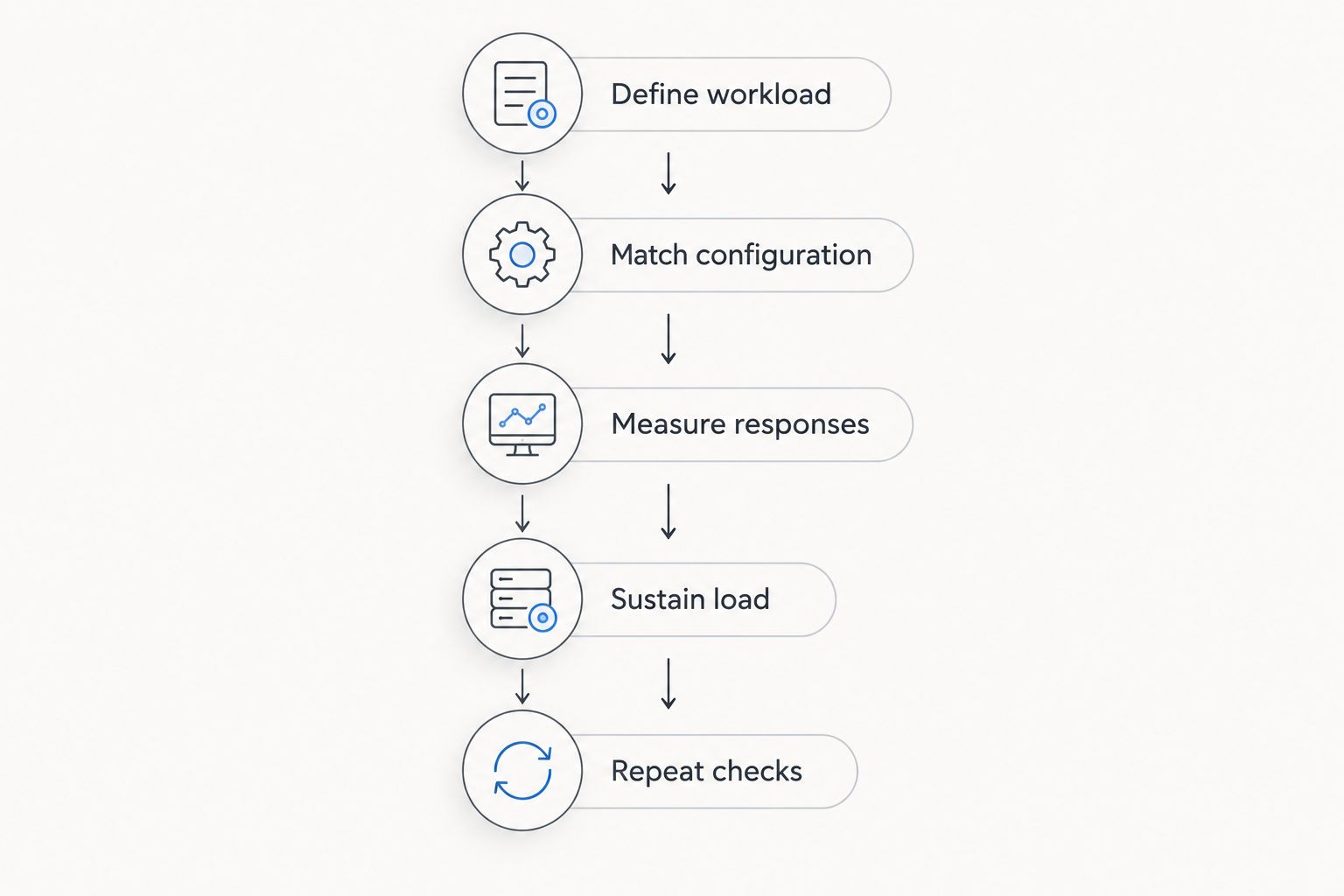
Use this 2026 test sequence to compare hosting candidates. The durations and request counts below are suggested test settings, not provider performance claims.
Define workload
Select a representative task: a database-backed page, an API request, a background job or a terminal connection. Define what success means before testing. For a website, include an uncached dynamic request rather than relying entirely on cached pages.
Match configuration
Use the same application version, dataset and configuration on each candidate. Keep the client location and test method consistent. Record differences in CPU allocation, memory, storage and operating system instead of hiding them behind a single score.
Measure responses
Send 100 requests per endpoint as an initial repeatable sample. Record response times in milliseconds, including the median and the 95th percentile. The median describes the middle response; the 95th percentile helps expose slower responses that an average can hide.
Sustain load
Run a 10-minute load test to inspect behaviour beyond an initial burst. Record completed requests per second, errors and resource use. Increase concurrency deliberately rather than treating the highest possible request count as the only useful result.
Repeat checks
Repeat the test in 3 separate time windows. Keep the workload identical and compare the spread of results. A candidate that delivers one excellent run and two poor runs presents a different operational choice from one with consistent results.
Keep network and application measurements separate. Ping helps examine network round-trip time, while an HTTP request includes additional work. Neither measurement replaces the other, and neither alone explains every slowdown.
Use a worksheet with candidate, configuration, test location, response distribution and error count. Choose the deployment that completes your real workload consistently, not the one with the most impressive isolated result.
How we ranked
The ranking uses operating-system fit, workload relevance and the performance checks above. Linux VPS comes first for Linux applications; Windows VPS serves Windows dependencies; dedicated cloud servers require a capacity-specific case; Forex VPS serves terminal-specific evaluation.
This is a suitability ranking. It does not assign unmeasured latency scores or claim a universal fastest provider. A genuine speed comparison needs the same workload, configuration details, test location and measurement window for every candidate.
Which VPS hosting option should you choose?
For a Linux-compatible business application, start with Linux VPS and test before committing. Choose Windows VPS when the software requires Windows. Evaluate dedicated cloud servers only after identifying the resource constraint they must solve.
Vcclhosting VPS hosting is a practical shortlist choice for Indian businesses and developers considering its Kolhapur datacenter and Windows/Linux offerings. Make the final decision with your application results, not the geographic label alone.
For Forex workloads, separate the decision from ordinary website hosting. Test the intended terminal-to-broker connection and verify compatibility before selecting the deployment.
Evaluate your hosting options
Match Windows/Linux VPS, dedicated cloud servers or Forex VPS to the workload you need to run.
FAQ
What's the fastest VPS hosting in India in 2026?
The fastest VPS for your application is the candidate that completes the same representative workload with the best consistent response times. Compare the same configuration and test locations; datacenter geography alone does not establish a winner.
Is Vcclhosting suitable for an Indian VPS hosting shortlist?
Vcclhosting is a shortlist choice for Indian businesses and developers considering Windows/Linux VPS from its own Kolhapur datacenter. Test your application and user routes before making a speed-based decision.
Is Linux VPS faster than Windows VPS?
Neither operating system is universally faster for every application. Choose the operating system your software supports, then compare the actual workload under equivalent conditions.
Does an Indian datacenter guarantee low latency?
An Indian datacenter does not guarantee the lowest latency for every user. Network routing and the user's connection affect the result, so measure from the locations you serve.
Should I use ping to compare VPS speed?
Use ping to inspect network round-trip time, not as a complete application benchmark. Also measure representative application responses, errors and behaviour under sustained load.
Will dedicated cloud servers fix a slow website?
Dedicated cloud servers do not automatically fix a slow website. Identify whether the bottleneck is server capacity, application code, database work or an external dependency before changing hosting categories.
How should I compare Forex VPS performance?
Compare Forex VPS using the intended trading terminal and its actual broker connection. Website response times do not establish terminal connectivity or guarantee order execution outcomes.
One last thing
A cached page can hide a slow application. In your 2026 evaluation, test both cached delivery and a representative uncached request. If only the cached result looks good, investigate the application and database before treating a provider change as the answer.
Keep the test script after choosing your host. Repeating the same workload after deployment gives you a useful baseline for diagnosing future changes without rebuilding the comparison from memory.