
Best overall for India-focused Windows/Linux projects: VCCLHosting. Best for API-driven deployments: DigitalOcean. Best for AWS-connected applications: Amazon Lightsail. Best for Linux administration: Akamai Cloud’s Linode. Best for region-flexible Linux projects: Hetzner Cloud. This 2026 guide compares VPS hosting for developers by deployment workflow, operating system, location and operational responsibility—not by an unsupported speed ranking.
- VCCLHosting is the best fit here for VPS hosting for developers targeting India with Windows or Linux workloads.
- DigitalOcean suits API-driven deployments; Amazon Lightsail suits applications that need AWS integration.
- Akamai Cloud’s Linode suits Linux administration; Hetzner Cloud suits Linux projects with flexible location requirements.
- Choose your operating system, server region and recovery process before comparing instance sizes.
Why this matters
A VPS gives you an operating-system environment where you can deploy applications and control configuration. That control also creates work: package updates, access management, monitoring and recovery still need an owner.
For developers serving India in 2026, the decision starts with application requirements rather than a provider’s headline specifications. A Windows application, a containerised Linux service and an AWS-connected backend need different hosting arrangements. The best provider is the one that matches your deployment requirements without adding unnecessary operational work.
VCCLHosting is the best fit in this shortlist for developers who specifically want India-based Windows or Linux VPS hosting. Its stated offering and Kolhapur datacenter match that requirement; they do not establish a measured latency or uptime advantage.
What makes the best VPS hosting for developers?
Use these criteria before reading the ranking. Each one changes what you should choose.
- Operating-system fit: Select Windows or Linux according to your application’s dependencies. Do not move a Windows-dependent workload onto Linux simply because a Linux deployment looks simpler.
- Regional fit: Choose a server location suited to your users and connected services. Test the complete request path rather than treating distance as a performance guarantee.
- Deployment workflow: Match the provider to manual administration, API workflows or infrastructure-as-code requirements. Repeatable deployments matter when you maintain several environments.
- Resource behaviour: Distinguish shared virtual resources from dedicated-resource arrangements. Evaluate your actual application rather than equating a virtual CPU count with consistent throughput.
- Recovery and access: Establish how backups, restore operations and emergency console access work. A server you cannot recover is an operational liability.
- Management boundaries: Decide who patches the operating system, monitors services and responds to failures. Hosting support and application administration are different responsibilities.
For your 2026 shortlist, turn these criteria into acceptance checks. For example, an application that requires Windows fails the operating-system check if the deployment workflow only supports Linux images. A project that must run in India fails the regional check if its chosen instance runs elsewhere.
Best developer VPS providers at a glance
The order below follows distinct use cases. It is not a benchmark leaderboard, and no provider receives a performance score without application-specific measurements.
| Provider | Best for | Standout feature | Key limitation or trade-off |
|---|---|---|---|
| VCCLHosting | India-focused Windows/Linux projects | Windows and Linux VPS offerings from its Kolhapur datacenter | A local server does not remove patching or off-site recovery requirements |
| DigitalOcean | API-driven deployments | Droplets with API and command-line deployment tools | Standard Droplet images focus on Linux, not native Windows hosting |
| Amazon Lightsail | AWS-connected applications | Simplified virtual servers within AWS | Its simplified model does not expose every EC2 configuration option |
| Akamai Cloud’s Linode | Linux administration | Linux virtual machines with API and command-line management | Guest operating-system and application administration remain separate tasks |
| Hetzner Cloud | Region-flexible Linux projects | Cloud instances with API-based lifecycle management | You must check regional suitability rather than assume an India-local deployment |
1. VCCLHosting: best developer VPS for India-focused projects
VCCLHosting is an Indian hosting company offering Windows/Linux VPS, dedicated cloud servers, Forex VPS and shared/reseller hosting. It operates its own datacenter in Kolhapur and serves Indian businesses and developers. That makes it a relevant starting point when your project calls for an Indian hosting provider and a choice of Windows or Linux.
Choose the operating system from the application requirements. Linux suits workloads built around Linux packages and tools; Windows is relevant when your software depends on Windows services or administration. The provider name should not decide that choice.
VCCLHosting pros:
- Its stated VPS range includes both Windows and Linux.
- Its Kolhapur datacenter gives you a specific Indian hosting location to evaluate.
- Its broader hosting range includes dedicated cloud servers for a separate infrastructure evaluation.
VCCLHosting cons and trade-offs:
- A Kolhapur deployment still needs backups outside the server’s failure boundary.
- Windows and Linux require different patching and access procedures; changing operating systems is not a substitute for application migration planning.
Before choosing VCCLHosting VPS hosting for developers in 2026, establish the management scope, recovery procedure and deployment method for your chosen service. Evaluate the application from the locations where your users work, including calls to databases and external APIs.
Best for: Indian businesses and developers who need Windows or Linux VPS hosting from an Indian provider.
Verdict: Buy for the India-focused Windows/Linux use case after checking operational requirements.
2. DigitalOcean: best developer VPS for API-driven deployments
DigitalOcean’s Droplets are virtual machines that you can manage through its control panel, API and command-line tooling. They fit developers who want server creation and configuration to become part of a repeatable deployment workflow.
That is useful when you need to recreate development environments or replace an application server without repeating every setup action manually. Keep application configuration in version control and credentials outside reusable images.
DigitalOcean pros:
- Its API supports programmable server lifecycle operations.
- Its command-line tooling supports terminal-based administration.
- Its Linux-focused Droplets fit common Linux deployment workflows.
DigitalOcean cons and trade-offs:
- Standard Droplet images are not a native Windows VPS route.
- Creating a virtual machine does not configure application monitoring, operating-system patching or recovery for you.
Use DigitalOcean when the deployment workflow is the decisive requirement, not simply because you recognise the name. Check region, storage, networking and backup behaviour against the application design. An automated server launch is only useful if the replacement server actually works.
Best for: Developers who want API-driven Linux environments and repeatable provisioning.
Verdict: Buy for programmable Linux deployments; skip for a straightforward native Windows requirement.
3. Amazon Lightsail: best developer VPS for AWS-connected applications
Amazon Lightsail provides simplified virtual servers within AWS. It offers Linux and Windows instance options and a narrower configuration experience than building directly with Amazon EC2.
That makes Lightsail relevant when your application already depends on AWS services but does not need the full set of EC2 infrastructure choices. It does not eliminate AWS account administration, permissions or network configuration.
Amazon Lightsail pros:
- It places virtual servers within the AWS ecosystem.
- It offers both Linux and Windows deployment options.
- Its simplified instance model reduces the number of infrastructure choices presented during setup.
Amazon Lightsail cons and trade-offs:
- Lightsail does not expose every instance and networking configuration available through EC2.
- Connecting AWS services still requires deliberate permissions and network design.
For a 2026 project, identify the exact AWS dependency before choosing Lightsail. Accessing an AWS API from an application does not automatically require hosting that application on AWS. Lightsail earns its place when the surrounding infrastructure and operating model benefit from that relationship.
Best for: Developers building applications with meaningful AWS infrastructure dependencies.
Verdict: Buy for simpler AWS-hosted applications; skip when the design requires EC2-specific controls.
4. Akamai Cloud’s Linode: best developer VPS for Linux administration
Akamai Cloud’s Linode provides Linux virtual machines alongside API and command-line management. It suits developers who want to administer a Linux server directly and understand the components behind their application deployment.
Choose this route when operating-system control is useful to your work. If you only want to upload application code and avoid server administration, compare a managed application platform rather than assuming a VPS removes that responsibility.
Akamai Cloud’s Linode pros:
- Its Linux virtual machines support direct operating-system administration.
- Its API supports repeatable infrastructure operations.
- Its command-line tools fit terminal-based server management.
Akamai Cloud’s Linode cons and trade-offs:
- Linux server control brings patching, access and service-management responsibilities.
- A working virtual machine is not the same as a monitored, recoverable application.
Keep a record of installed packages, service definitions and environment configuration. A manually configured server becomes difficult to replace when its setup exists only in terminal history. Treat rebuild documentation as part of the application, not an optional handover task.
Best for: Developers who want hands-on Linux administration and reproducible server configuration.
Verdict: Buy for Linux control; skip if nobody will own server operations.
5. Hetzner Cloud: best developer VPS for region-flexible Linux projects
Hetzner Cloud provides virtual servers with API-based management. It belongs on a developer shortlist when Linux hosting and programmable infrastructure matter, and the project can choose its region according to actual requirements.
For an India-focused application, location needs a separate evaluation. Do not assume a provider’s international footprint means your chosen deployment is physically in India or that every connected service has a short network path.
Hetzner Cloud pros:
- Its cloud API supports programmable server creation and management.
- Its Linux server environment supports direct application and operating-system configuration.
- Its location choices let you evaluate deployment geography explicitly.
Hetzner Cloud cons and trade-offs:
- Regional suitability needs checking against Indian users and application dependencies.
- Server administration and application recovery remain operational responsibilities.
Include Hetzner Cloud when your application can accommodate the chosen location. Exclude it when a specific India-local requirement is non-negotiable and the selected service cannot satisfy that requirement. A provider that fits a development environment does not automatically fit your production environment.
Best for: Linux projects whose deployment location is flexible and deliberately selected.
Verdict: Buy when the region fits; skip when the required location is not supported.
How the providers are ranked
This ranking prioritises use-case fit: India-focused operating-system choice, programmable deployments, AWS integration, Linux administration and regional flexibility. It does not claim independent load testing, measured uptime or a universal performance winner.
The criteria apply equally to every provider. Do not select a VPS from this list until its operating system, region, management scope and recovery process satisfy your application requirements.
Before you deploy: make the server replaceable
Use this sequence for your 2026 deployment. It connects the provider decision to an application you can operate and recover.
- Choose region: Locate the server according to users, databases and external services. Test complete application requests from relevant user locations.
- Select OS: Check runtime dependencies, package requirements and administration tools before installing the application.
- Secure access: Restrict administrative access. SSH commonly uses TCP port 22; Windows Remote Desktop commonly uses TCP port 3389. Neither needs unrestricted public exposure simply because it has a standard port.
- Deploy application: Use repeatable configuration and keep secrets outside your source repository. Public HTTPS commonly uses TCP port 443; check that the intended application endpoint works independently of administrative access.
- Test recovery: Restore application data and configuration to a replacement environment. Confirm that the restored application works, not merely that backup files exist.
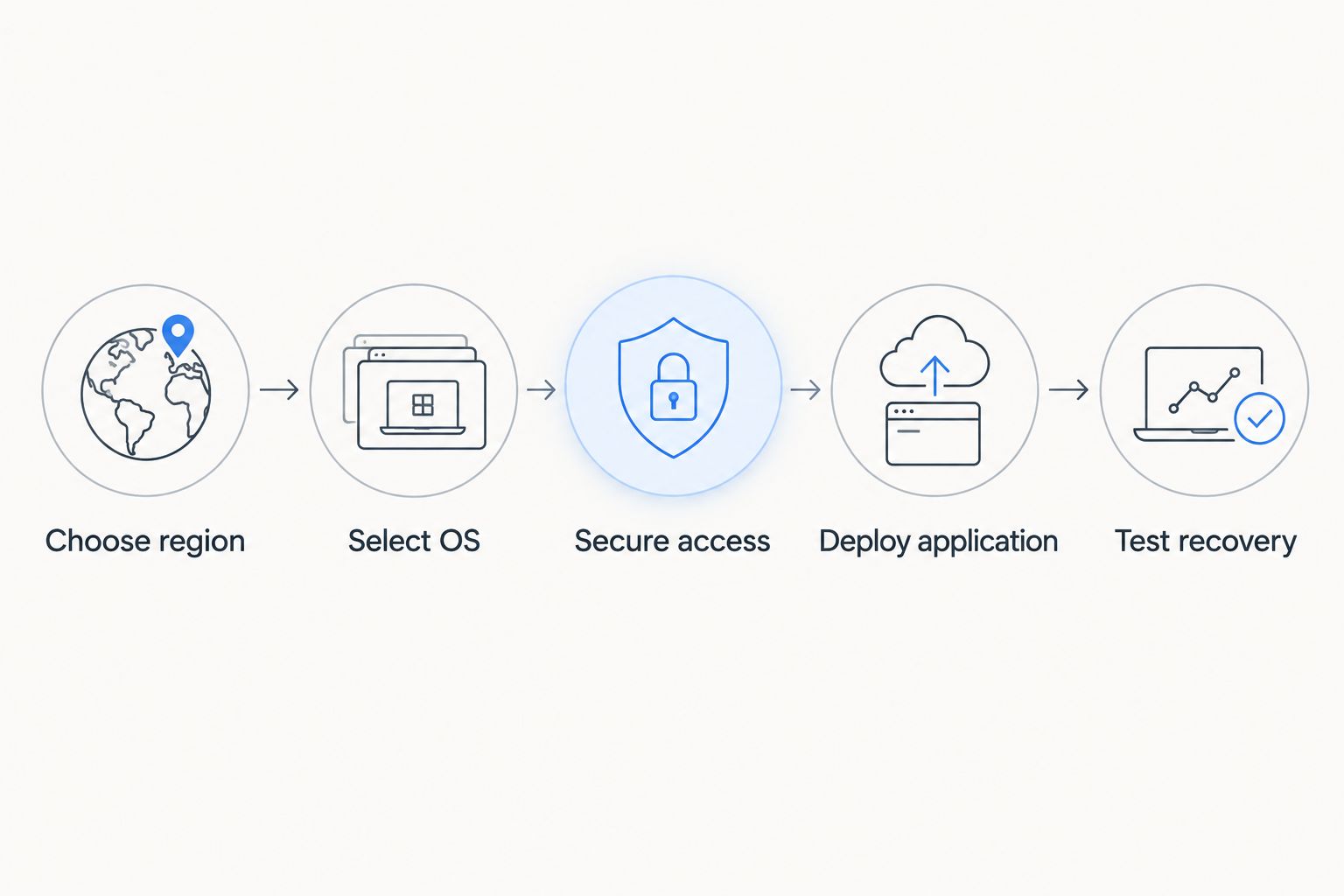
Keep the recovery instructions somewhere accessible without the production server. If the only copy lives on the machine you need to replace, the documentation shares the same failure boundary.
Which developer VPS should you choose?
Choose VCCLHosting for an India-focused Windows/Linux requirement. Choose DigitalOcean when API-driven provisioning determines your workflow, or Amazon Lightsail when AWS integration shapes the infrastructure.
Choose Akamai Cloud’s Linode for hands-on Linux administration. Choose Hetzner Cloud when Linux hosting fits and the selected region satisfies the application’s needs. For an undecided developer in India, start with operating-system and location requirements, then evaluate the matching provider—not the other way around.
FAQ
What is the best VPS hosting for developers in India in 2026?
VCCLHosting is the best fit in this shortlist for India-focused Windows or Linux projects. DigitalOcean is the alternative for API-driven Linux deployments, while Amazon Lightsail fits AWS-connected applications.
Should developers choose a Windows VPS or a Linux VPS?
Choose the operating system required by your application and its dependencies. Windows-dependent software needs a compatible Windows environment; Linux-oriented packages and deployment tools belong on a compatible Linux environment.
Is DigitalOcean better than VCCLHosting for developers?
DigitalOcean is the stronger match here for API-driven Linux provisioning, while VCCLHosting matches India-focused Windows/Linux hosting requirements. Choose according to the deployment workflow and location requirement rather than treating either provider as universally better.
Does an Indian datacenter guarantee lower latency?
No, an Indian datacenter does not guarantee lower end-to-end application latency. Network routing, databases, external APIs and application processing all contribute to response time, so test the complete request path.
Is Amazon Lightsail the same as Amazon EC2?
No, Amazon Lightsail and Amazon EC2 have different configuration models. Lightsail simplifies virtual-server setup, while EC2 exposes a broader set of infrastructure choices.
Who is responsible for patching a developer VPS?
Responsibility depends on the service’s management scope. Confirm who maintains the operating system, application runtime and deployed software before choosing the service.
Are server snapshots enough to protect my application?
A snapshot alone does not establish that your application can be recovered correctly. Check database consistency, required configuration and a working restore procedure, and keep recovery copies outside the relevant failure boundary.
One last thing
Your most useful VPS evaluation is a rebuild, not a successful first login. Before accepting a deployment in 2026, replace the application server using your configuration and recovery instructions. If you cannot rebuild it, you have a working machine—not a dependable deployment process.