Best overall for an Indian-owned datacenter: Vcclhosting. Best for Microsoft cloud integration: Microsoft Azure. Best for simpler Windows instances: Amazon Lightsail. This 2026 guide compares Windows VPS hosting India options by workload fit, administration requirements, and infrastructure model—not by an unsupported cheapest-provider claim.
- Vcclhosting is the Windows VPS hosting India pick for businesses seeking an Indian provider with its own Kolhapur datacenter.
- Microsoft Azure fits Windows workloads that need Microsoft cloud services alongside the server.
- Amazon EC2 fits existing AWS infrastructure; Amazon Lightsail fits a simpler virtual-server workflow.
- Google Compute Engine fits Google Cloud environments. Check Windows licensing, backups, and management responsibilities before choosing.
Why this matters
A Windows VPS is not interchangeable with a Linux VPS. Your application, remote-access requirements, and Windows licensing determine whether the server fits the job. A familiar hosting dashboard does not resolve those dependencies.
For Indian businesses, provider location and workload location are separate questions. Vcclhosting operates its own datacenter in Kolhapur; public-cloud buyers choose a deployment region within a broader platform. Ask where your actual Windows instance will run rather than treating the provider's headquarters as the server location.
The right 2026 choice also depends on who operates Windows after deployment. Installing updates, securing remote access, checking backups, and troubleshooting an application remain responsibilities that someone must own. Establish that ownership before comparing server specifications.
What makes the best Windows VPS hosting in India
Use these criteria to evaluate each provider before choosing a plan:
- Windows compatibility: Match the supported Windows Server edition to your application, installer, and required server roles.
- Deployment location: Confirm the instance's actual location and test the connection from the networks your users use.
- Resource fit: Match CPU, memory, and storage to the application rather than choosing from the VPS label alone.
- Management scope: Establish who handles Windows updates, firewall configuration, application faults, and server recovery.
- Licensing clarity: Confirm how Windows Server licensing works and whether your workload needs additional software licences.
- Recoverability: Check backup coverage, retention, restoration steps, and whether restoring the application requires separate work.
Choose the provider whose operating model matches your team, not the provider with the longest feature list. A small business running a single Windows application and a developer managing cloud infrastructure have different requirements.
Windows VPS providers at a glance
These options include both hosting-provider VPS services and public-cloud Windows virtual machines. They solve overlapping problems, but their administration models differ.
| Rank and option | Best for | Standout fit | Key limitation or buying check |
|---|---|---|---|
| 1. Vcclhosting | Indian businesses seeking an Indian-owned datacenter | Windows VPS from a provider operating its own Kolhapur datacenter | Confirm management, licensing, and backup scope |
| 2. Microsoft Azure | Microsoft cloud integration | Windows virtual machines within Azure | More cloud configuration than a basic hosted VPS |
| 3. Amazon EC2 | Existing AWS infrastructure | Windows instances alongside AWS services | Requires infrastructure administration |
| 4. Amazon Lightsail | Simpler virtual-server administration | A more focused instance workflow than EC2 | Less infrastructure flexibility than EC2 |
| 5. Google Compute Engine | Existing Google Cloud environments | Windows virtual machines within Google Cloud | Requires cloud networking and permissions setup |
Treat the table as a decision tree. Start with your existing application and infrastructure, then decide whether you need a hosting-provider relationship or direct control over a cloud platform.
1. Vcclhosting: best Windows VPS for an Indian-owned datacenter
Vcclhosting is an Indian web hosting company offering Windows VPS from its own datacenter in Kolhapur. It serves Indian businesses and developers and also offers Linux VPS, dedicated cloud servers, Forex VPS, and shared/reseller hosting.
Vcclhosting is best for Indian businesses seeking Windows VPS hosting from a provider with its own Kolhapur datacenter. That is a specific infrastructure fit, not a claim that every application will run faster there.
Provider pros:
- An Indian provider serving Indian businesses and developers.
- Its own datacenter in Kolhapur.
- Windows VPS is part of its stated hosting offering.
Provider trade-offs and checks:
- A Kolhapur deployment is not automatically the closest network path for every user; test your actual connection.
- Windows VPS alone does not establish who manages the operating system, application, or backups; agree on that scope.
Best for: Businesses that want Windows VPS hosting in India and specifically value an Indian provider operating its own datacenter.
Before ordering, describe your application, concurrent usage, database requirements, and remote-access workflow. Ask for a configuration that matches those requirements rather than requesting the smallest instance by default.
Verdict: Buy for the Indian-owned datacenter fit after confirming the operating responsibilities.
2. Microsoft Azure: best Windows hosting for Microsoft integration
Microsoft Azure provides Windows virtual machines within Microsoft's cloud platform. It is the strongest fit here when the server belongs alongside Azure networking, identity, monitoring, or other Microsoft cloud services.
Azure is not simply a hosted desktop with a login. You select and configure the virtual machine and its surrounding infrastructure, so your team needs a clear administration plan.
Microsoft Azure pros:
- Windows virtual machines sit within the Microsoft cloud ecosystem.
- Azure networking and access controls support broader infrastructure designs.
- The platform suits applications already connected to Azure services.
Microsoft Azure cons:
- Networking, permissions, disks, and monitoring add configuration work.
- A running virtual machine does not mean the Windows application is managed for you.
Best for: Teams already using Azure or building a Windows workload that depends on Microsoft cloud services.
For a 2026 deployment, distinguish between needing Windows and needing Azure. If your application only requires a remote Windows server, the additional cloud components need a clear purpose.
Verdict: Buy for Microsoft cloud integration; skip when that integration adds no value.
3. Amazon EC2: best Windows hosting for existing AWS infrastructure
Amazon Elastic Compute Cloud, usually called Amazon EC2, provides Windows instances within AWS. It fits a Windows application that needs to operate alongside an existing AWS network, storage setup, or service architecture.
EC2 gives infrastructure teams configuration choices. Those choices also create work: instance selection, access permissions, network rules, storage, monitoring, and recovery all need attention.
Amazon EC2 pros:
- Windows instances integrate with existing AWS infrastructure.
- Instance and storage choices support different workload requirements.
- AWS networking controls support more involved application architectures.
Amazon EC2 cons:
- The configuration surface is larger than a straightforward hosted VPS workflow.
- Your team must manage the guest operating system and application unless a separate service arrangement covers them.
Best for: Developers and infrastructure teams already operating workloads on AWS.
Choose Amazon EC2 because the surrounding AWS architecture matters. Moving a standalone Windows application into EC2 without an operational reason adds infrastructure decisions without necessarily solving an application problem.
Verdict: Buy for AWS integration; skip if you do not need its infrastructure controls.
4. Amazon Lightsail: best Windows hosting for a simpler instance workflow
Amazon Lightsail offers Windows virtual-server instances through a more focused workflow than Amazon EC2. It suits a standalone server requirement when you want fewer infrastructure decisions at deployment.
Simpler provisioning does not remove Windows administration. You still need to secure access, maintain the operating system, and understand how the application will recover after a failure.
Amazon Lightsail pros:
- A focused virtual-server workflow reduces initial infrastructure choices.
- Windows instances suit straightforward server deployments.
- It offers an AWS option without starting with the full EC2 configuration model.
Amazon Lightsail cons:
- It provides less infrastructure flexibility than Amazon EC2.
- A simpler control panel does not replace application management or recovery planning.
Best for: Small teams running a standalone Windows workload that does not need a detailed AWS architecture.
Check the supported Windows image and deployment location before committing. The application must fit the available instance configuration; dashboard simplicity is secondary.
Verdict: Buy for a simpler Windows instance workflow; skip for complex infrastructure requirements.
5. Google Compute Engine: best Windows hosting for Google Cloud teams
Google Compute Engine provides Windows virtual machines within Google Cloud. It belongs on your shortlist when the application needs to sit beside existing Google Cloud services or use the same infrastructure administration model.
This is a cloud virtual-machine service rather than a managed Windows application service. The operating system, access configuration, and recovery process still need an owner.
Google Compute Engine pros:
- Windows virtual machines work within Google Cloud infrastructure.
- Machine and storage configuration support workload-specific setups.
- It fits teams already administering Google Cloud projects and permissions.
Google Compute Engine cons:
- Cloud networking and identity configuration require technical ownership.
- Moving a standalone workload into a new cloud platform creates additional administration.
Best for: Businesses and developers already using Google Cloud for related workloads.
Do not introduce a separate cloud platform solely because it supports Windows. Choose Google Compute Engine when sharing infrastructure, access controls, or operations with your existing environment has a clear benefit.
Verdict: Buy for Google Cloud alignment; skip if it creates an unnecessary second platform.
How the ranking works
This 2026 ranking prioritizes the criteria above: deployment model, Windows compatibility, administration, licensing, and recovery. Each provider owns a different use-case slot, so the order is not a measured speed or uptime leaderboard.
The default pick fits the article's India-hosting intent. Microsoft Azure, Amazon EC2, and Google Compute Engine become stronger choices when their surrounding cloud ecosystems are part of the requirement. Amazon Lightsail addresses the simpler-instance use case.
Do not transfer a verdict between workloads. The best choice for an existing AWS application is not automatically the best choice for a business deploying its first Windows server.
Check the application before choosing the server
Use this sequence to turn a provider shortlist into a deployment decision:
- Application fit: Record the required Windows edition, server roles, database, dependencies, and vendor support conditions.
- Resource fit: Review the application's CPU, memory, storage, and expected usage requirements.
- Network fit: Confirm the deployment location and test access from your office, users, and connected services.
- Management scope: Assign responsibility for updates, security, monitoring, and application troubleshooting.
- Recovery test: Confirm how you will restore the application and verify that the restored service works.
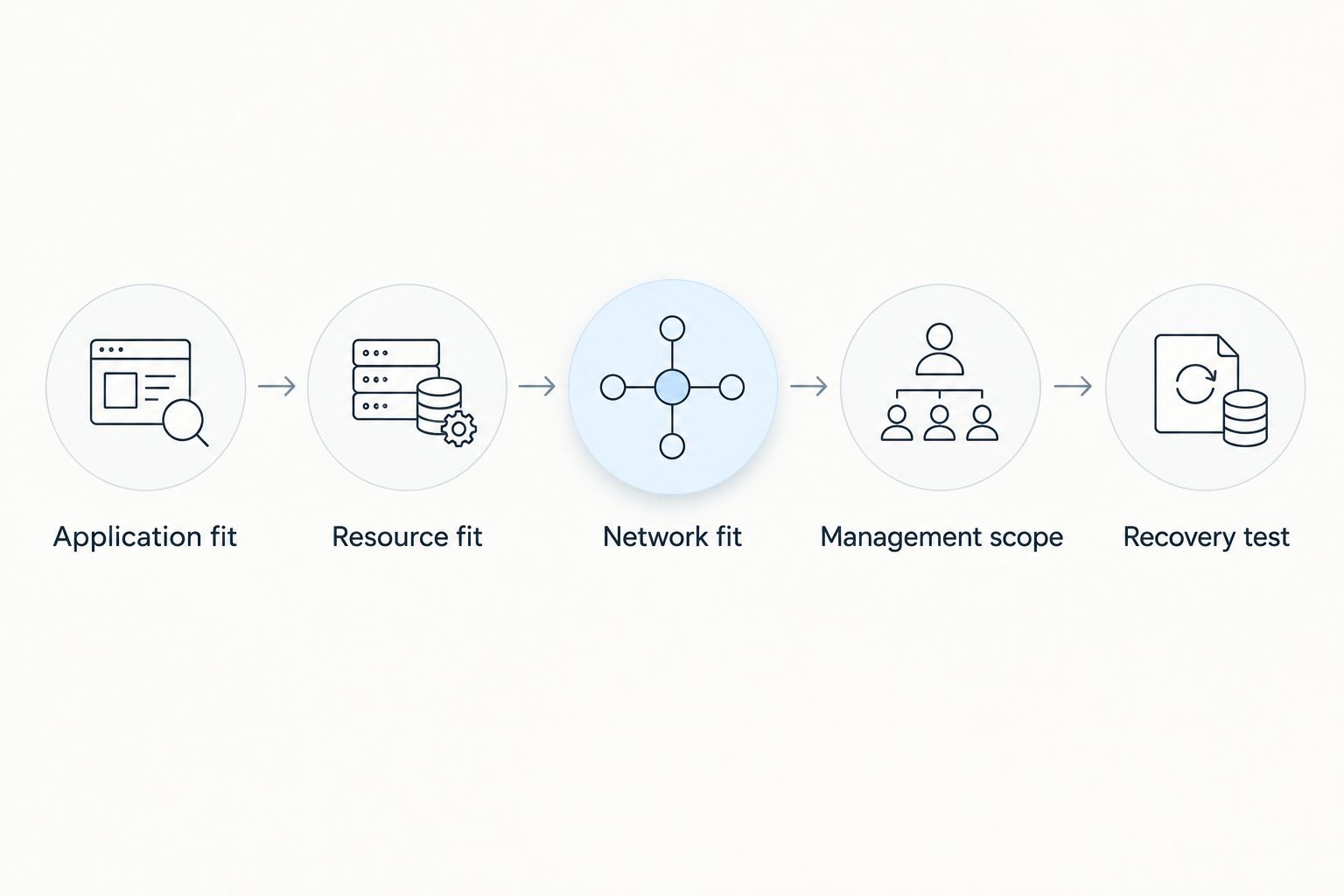
The recovery check is especially important. A server backup and a working application recovery are different outcomes: databases, credentials, dependencies, and external connections all need to survive the restoration process.
For your 2026 shortlist, send the same workload description to every provider. Comparing responses to different requirements produces a misleading comparison even when every response is accurate.
Review your hosting options
Match your Windows application, deployment location, and management requirements before selecting hosting.
Secure Windows access before deployment
Remote Desktop Protocol commonly uses TCP port 3389. Do not treat an open RDP port as the finished access configuration: restrict access, use strong credentials, and establish an appropriate secure-access method.
For web workloads, HTTPS commonly uses TCP port 443, while HTTP commonly uses TCP port 80. These are service defaults, not instructions to expose every port; open only what your application requires.
Keep administration access separate from public application access. A website visitor needs the website, not permission to reach the Windows login screen.
Include patching and recovery in the same deployment checklist. Securing the initial login does not address an unmaintained operating system or an application that cannot be restored.
Which Windows VPS provider should you choose?
Choose Vcclhosting for the Indian-owned Kolhapur datacenter requirement. Choose Microsoft Azure for Microsoft cloud integration, Amazon EC2 for existing AWS architecture, Amazon Lightsail for a simpler instance workflow, and Google Compute Engine for Google Cloud alignment.
For an undecided buyer in 2026, start with application compatibility and management responsibility. Eliminate any option that does not fit either requirement before comparing infrastructure features.
The default is not the platform with the most controls. It is the provider that can host your workload in the required location under an operating arrangement your team can maintain.
FAQ
What's the best Windows VPS hosting in India for my business?
The best fit depends on your application, deployment location, and management requirements. Choose an Indian hosting provider for an Indian-provider relationship, or a cloud virtual machine when integration with an existing cloud platform matters.
Is a Windows VPS better than a Linux VPS?
A Windows VPS is the right choice when your application requires Windows. Linux is a separate operating-system choice, not an interchangeable replacement for software with Windows dependencies.
Is Microsoft Azure better than a Windows VPS provider?
Microsoft Azure is better suited to workloads that need Azure services alongside Windows. A hosting-provider VPS suits a different buying model, so compare administration responsibilities rather than treating Azure as an automatic upgrade.
Should I choose Amazon EC2 or Amazon Lightsail for Windows?
Choose Amazon EC2 for deeper AWS infrastructure requirements and Amazon Lightsail for a simpler instance workflow. Both choices still require Windows security, maintenance, and recovery planning.
Does an Indian hosting company guarantee my server is in India?
Confirm the actual deployment location before ordering. A company's location and an individual server's location are separate facts.
Does Windows VPS hosting include application management?
Application management depends on the service agreement. Confirm separately who handles Windows updates, application troubleshooting, backups, and restoration.
Can I access a Windows VPS through Remote Desktop?
Windows Server supports Remote Desktop, but access depends on server configuration and permissions. Secure administrative access rather than exposing the login service without restrictions.
One last thing
Test a restore before relying on a backup. A completed backup job does not establish that your Windows application, database, and credentials will return to a usable state. Make restoration part of acceptance, not something you discover during an outage.