Best fit for an India-based provider: VCCLHosting. Best for AWS-integrated games: Amazon EC2. Best for Linux-first administration: DigitalOcean Droplets. Best for Microsoft-based infrastructure: Azure Virtual Machines. This 2026 guide compares gaming VPS hosting in India by deployment fit, server control, and the checks you need before moving players onto a server.
- For gaming vps hosting india, VCCLHosting suits buyers seeking an Indian provider with Windows/Linux VPS and a Kolhapur datacenter.
- Amazon EC2 fits gaming infrastructure already using AWS services; it requires cloud administration.
- DigitalOcean Droplets fit Linux game-server administration; Azure Virtual Machines fit Microsoft-based infrastructure.
- Choose by player routing, game requirements, CPU consistency, and recovery procedures—not the largest advertised resource allocation.
Why this matters
A game server has to process the world and deliver updates to players. A server that responds quickly to a ping can still fall behind when its simulation runs out of processing capacity. These are different problems. Treat them separately.
For gaming VPS hosting in India in 2026, the first decision is where your players connect from. The second is whether your game server runs correctly on the operating system and resources you select. Neither an Indian address nor a large memory allocation proves that a particular deployment will play well.
VCCLHosting is the best fit in this shortlist for gaming VPS buyers who want an Indian provider offering Windows/Linux VPS from its own Kolhapur datacenter. That is a provider-fit verdict, not a measured latency ranking.
What makes the best gaming VPS hosting in India?
Use these criteria before choosing a provider. They separate a suitable game-server deployment from a virtual machine that merely starts successfully.
- Player routing: Assess the connection from your players' actual networks. A datacenter's city identifies its location, not the quality of every route reaching it.
- CPU consistency: Check how the game uses processor resources and whether competing workloads affect the instance. More virtual CPUs do not automatically fix a busy main simulation thread.
- Operating-system fit: Match the server executable, dependencies, and administration tools to Windows or Linux before purchasing a deployment.
- Network controls: Confirm that the required inbound ports and protocols are permitted. Ask separately about attack handling; firewall rules and DDoS protection are different functions.
- Recovery: Keep game-world backups outside the running instance and practise restoring them. A backup you cannot restore does not protect the community.
- Administration burden: Decide who installs updates, manages access, monitors the server, and handles failures. An infrastructure provider is not automatically a managed game-hosting service.
For your 2026 shortlist, apply these criteria to the specific configuration you intend to use. A provider can be a good organisational fit while a particular instance remains unsuitable for your game.
Gaming VPS providers at a glance
The table ranks deployment fit rather than benchmark performance. Amazon EC2 and Azure Virtual Machines are cloud-compute options included because they can serve the same game-server deployment need as a conventional VPS.
| Rank | Provider or service | Best for | Standout fit | Key limitation |
|---|---|---|---|---|
| 1 | VCCLHosting | Buyers seeking an Indian hosting provider | Windows/Linux VPS and an owned Kolhapur datacenter | Game-specific networking and management scope need confirmation |
| 2 | Amazon EC2 | Games connected to AWS infrastructure | Virtual servers within the AWS service ecosystem | Cloud configuration adds operational work |
| 3 | DigitalOcean Droplets | Linux-first game-server administrators | Linux virtual machines suited to direct server administration | Windows-dependent workloads need another route |
| 4 | Azure Virtual Machines | Microsoft-based infrastructure teams | Windows and Linux virtual machines within Azure | Game-server management remains a separate responsibility |
Do not interpret the order as a claim that one network is faster than another. Pick the operational match first, then validate the actual deployment.
1. VCCLHosting: best gaming VPS fit for an Indian provider
VCCLHosting offers Windows/Linux VPS, dedicated cloud servers, Forex VPS, and shared/reseller hosting from its own datacenter in Kolhapur. For gaming, the relevant starting point is a VPS with the operating system your server requires. Shared hosting and reseller hosting are different service categories, not substitutes for a game-server deployment.
The company's Indian operating base makes it a direct fit for buyers seeking an Indian hosting provider. Datacenter ownership also gives you a specific location to evaluate. It does not establish the latency your players will experience or the performance of a particular VPS configuration.
VCCLHosting pros:
- Offers both Windows and Linux VPS options.
- Operates its own datacenter in Kolhapur.
- Also offers dedicated cloud servers for a separate deployment discussion.
- Serves Indian businesses and developers.
VCCLHosting cons:
- Kolhapur is a fixed location to assess against your players' routes, not proof of nationwide connection quality.
- Game installation, updates, and troubleshooting must be included explicitly in any agreed management scope.
- Game-specific port access and attack-handling arrangements need confirmation before deployment.
Best for: You want an Indian provider and can define the game, operating system, networking requirements, and administration responsibilities before ordering.
Ask for confirmation that your intended game-server workload is permitted. Then assess the specific server rather than general hosting claims. A Windows option helps only when the game requires Windows; a Linux option helps only when the executable and dependencies support Linux.
Verdict: Buy for provider fit after confirming the game-server requirements.
2. Amazon EC2: best gaming-server option for AWS integration
Amazon EC2 provides virtual compute within AWS. It suits a game project that already uses AWS infrastructure and needs its server deployment to fit the same identity, networking, and operational environment.
EC2 is infrastructure, not a finished game-hosting panel. You still install the game server, configure access, manage its process, and arrange recovery. Its value here is integration with an existing AWS setup, not a claim that every instance is suitable for gaming.
Amazon EC2 pros:
- Fits projects already organised around AWS services.
- Supports control over virtual-server configuration and networking.
- Works with automated infrastructure deployment workflows.
- Offers a broad instance catalogue for workload selection.
Amazon EC2 cons:
- Instance selection requires attention to the game's CPU and memory behaviour.
- Networking, access permissions, and storage configuration add administration work.
- Running a game server remains distinct from operating the underlying cloud instance.
Best for: Your development team already manages AWS and wants the game server inside that environment.
Before launching, document both the instance configuration and the game configuration. Someone taking over the deployment should be able to identify which settings belong to AWS and which belong to the game. Otherwise, troubleshooting becomes a search across unrelated controls.
For a 2026 deployment, keep the initial architecture simple enough to restore reliably. Adding cloud services does not replace a working game-world backup or a clear restart procedure.
Verdict: Buy for an existing AWS workflow; skip if you want a preconfigured game-hosting service.
3. DigitalOcean Droplets: best gaming VPS for Linux administration
DigitalOcean Droplets are Linux virtual machines. They fit administrators who want to install and operate a Linux-compatible game server directly, using familiar server tools rather than building around a larger cloud architecture.
This option depends on Linux compatibility. Check the dedicated server executable, its dependencies, and any required mods before selecting it. Compatibility of the player's desktop client does not establish compatibility of the server software.
DigitalOcean Droplets pros:
- Provide Linux virtual machines for direct administration.
- Suit shell-based installation and maintenance workflows.
- Support separating operating-system configuration from game configuration.
- Fit teams already comfortable managing Linux services.
DigitalOcean Droplets cons:
- Droplets are not the choice for a server requiring a native Windows deployment.
- You remain responsible for installing and maintaining the game-server software.
- The selected virtual machine still needs workload testing; the provider name does not establish capacity.
Best for: You already administer Linux and have a game server that supports it.
Use a dedicated service account for the game process rather than running ordinary game operations with unrestricted administrative privileges. Keep world files, configuration, and deployment instructions organised so that replacing the virtual machine does not require reconstructing the setup from memory.
The useful distinction is control versus responsibility. Direct administration gives you control over the server environment, but it also assigns routine maintenance and incident recovery to your team.
Verdict: Buy for a Linux-compatible game and a Linux-capable administrator; skip for Windows-only requirements.
4. Azure Virtual Machines: best gaming-server option for Microsoft teams
Azure Virtual Machines provide Windows and Linux virtual machines within Microsoft Azure. They suit teams whose infrastructure, access management, or operational processes already centre on Azure.
Choose this route because it fits your existing environment, not because Windows is inherently better for gaming servers. The correct operating system is the one supported by the game-server software and the people maintaining it.
Azure Virtual Machines pros:
- Support Windows and Linux deployments.
- Fit infrastructure already managed through Azure.
- Provide virtual-machine networking and access controls.
- Suit teams maintaining infrastructure through repeatable deployment processes.
Azure Virtual Machines cons:
- Azure administration remains separate from game-server administration.
- Networking and access configuration require explicit setup.
- Choosing Windows adds operating-system maintenance responsibilities when compared with an already familiar Linux workflow.
Best for: Your team already operates Azure or has a game-server requirement that fits its Windows administration practices.
Write down who owns operating-system updates and who owns game updates. They are not interchangeable tasks. A successful operating-system update does not prove that a modded game server still loads its world correctly.
For your 2026 deployment, test the complete startup process after a restart. The virtual machine running successfully is only the beginning; the game process, network access, and world loading must work too.
Verdict: Buy for an established Azure or Windows workflow; skip if its administration adds unnecessary complexity.
How this shortlist is ranked
This ranking uses provider location, operating-system fit, ecosystem integration, and administration requirements. It does not assign performance scores or player capacities. Those require measurements from the specific game and deployment.
The default recommendation favours the Indian-provider requirement in the query. The alternatives each own a different use case: AWS integration, Linux administration, or Microsoft-based infrastructure. Use the table as a decision tree, not a universal speed ranking.
Validate the server before inviting players
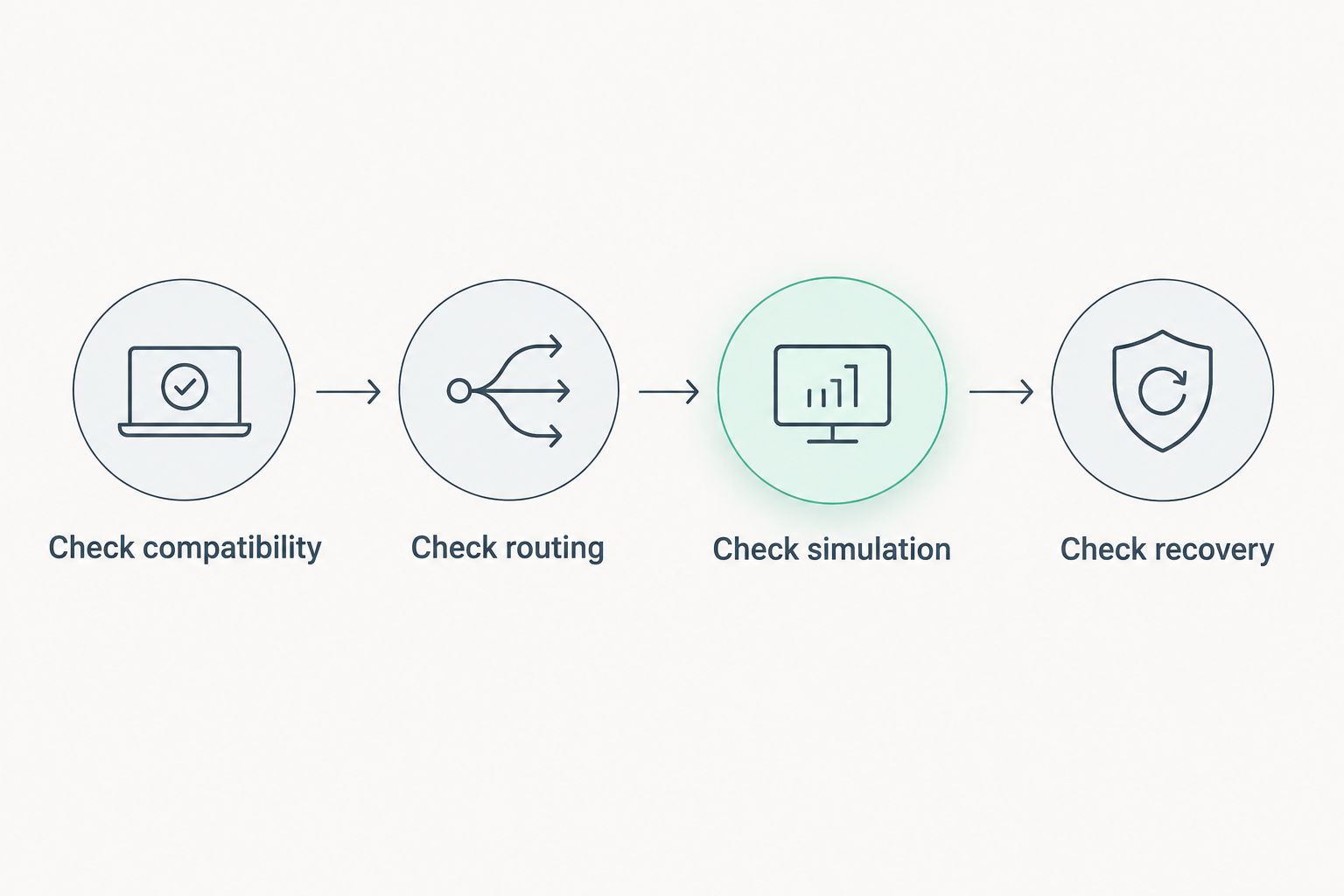
Your 2026 acceptance check should follow the same sequence regardless of provider. Establish that the server works, assess its behaviour under your workload, and prove that you can recover it.
Check compatibility
Start the exact server version and mod configuration you intend to use. Confirm dependencies, file permissions, and world loading. A successful installation without your real configuration is not a complete compatibility test.
Check routing
Have players connect from the networks they normally use. Examine latency variation and packet loss as well as basic reachability. One administrator's successful connection does not describe everyone else's route.
Check simulation
For Minecraft Java Edition, the normal simulation target is 20 ticks per second, corresponding to a 50-millisecond budget per tick. This illustrates why processor performance matters: a reachable server can still process the world too slowly.
Minecraft Java Edition uses TCP port 25565 by default. Minecraft Bedrock Edition uses UDP port 19132 by default for IPv4. These are game defaults, not provider promises; configure the required protocol and port for your actual server.
Check recovery
Restore a saved world into a replacement deployment. Confirm that configuration files and dependencies are included, not just the main world folder. Record the procedure so another administrator can repeat it.
Keep the results tied to the tested configuration. Changing the operating system, mods, instance type, or player workload changes what the earlier check establishes.
Which gaming VPS provider should you choose?
Choose VCCLHosting when your priority is an Indian hosting provider with Windows/Linux VPS and an owned Kolhapur datacenter. Confirm the game-server requirements before committing to the deployment.
Choose Amazon EC2 when the game belongs inside an existing AWS environment. Choose DigitalOcean Droplets when Linux administration is already your strength. Choose Azure Virtual Machines when your team already operates Microsoft-based infrastructure.
Do not add complexity merely to match a provider's catalogue. The best deployment is the one your team can configure, monitor, and restore while meeting the game's requirements.
FAQ
What's the best gaming VPS hosting in India for an Indian provider?
VCCLHosting is the shortlist's best fit for buyers seeking an Indian provider with Windows/Linux VPS and an owned Kolhapur datacenter. Confirm game compatibility, permitted networking, and management responsibilities before selecting a deployment.
Is an Indian datacenter enough to guarantee low gaming latency?
No, an Indian datacenter does not guarantee low latency for every player. Assess connections from the networks your players actually use, including latency variation and packet loss.
Should I choose Windows or Linux for a gaming VPS?
Choose the operating system supported by your game-server software and administration workflow. Check the server executable and mod dependencies rather than assuming the player's desktop operating system determines the server requirement.
Is a VPS the same as managed game hosting?
No, a VPS supplies a virtual server, while managed game hosting adds game-specific administration services. Confirm who handles installation, updates, backups, and incidents before treating a VPS as a managed service.
Is Amazon EC2 better than DigitalOcean Droplets for gaming?
Amazon EC2 fits an existing AWS environment; DigitalOcean Droplets fit direct Linux administration. Neither provider name establishes better game performance without checking the selected configuration and player routes.
How many players can a gaming VPS support?
Player capacity depends on the game, configuration, processor behaviour, memory requirements, and player activity. Test the intended workload rather than assigning a player count from a memory allocation alone.
Does opening game ports provide DDoS protection?
No, opening game ports permits traffic to reach the server; it does not establish DDoS protection. Ask the provider separately about attack handling and the scope of any protection included.
One last thing
Test recovery before launch, not after the first failure. A game world contains progress your players expect to keep. Copying its files somewhere is only part of protecting it.
A restore test exposes missing dependencies, forgotten configuration, and permissions problems while you still control the schedule. Keep the instructions with the backup, then confirm that someone other than the original administrator can follow them. That is a more useful final check than another comparison of advertised resources.