
Best forex VPS shortlist for 2026: VCCLHosting for Indian hosting, ForexVPS.net for trading-focused hosting, Amazon EC2 for infrastructure control, and Microsoft Azure Virtual Machines for Azure-based teams. Start with VCCLHosting when an Indian provider is your priority; choose the final host by its connection to your broker’s trading server, not its location alone.
- VCCLHosting is the forex VPS shortlist choice for traders seeking an Indian hosting provider.
- ForexVPS.net fits traders seeking specialist hosting; Amazon EC2 fits administrators who want infrastructure control.
- Microsoft Azure Virtual Machines fits teams already administering Windows workloads in Azure.
- Compare broker-server latency, Windows compatibility, recovery options and access security before moving live trading.
Why this matters
A forex VPS keeps your trading terminal on a remote server instead of tying it to your personal computer. That helps separate automated trading from laptop shutdowns, local power interruptions and changes to your home internet connection. It does not remove broker outages, server failures or trading risk.
The distinction matters most when you use an expert advisor that runs inside a desktop terminal. If the terminal stops, that local automation stops too. Orders already accepted by your broker follow the broker’s execution rules; a VPS does not become the broker’s order system.
VCCLHosting is the forex VPS shortlist choice for traders seeking an Indian hosting provider. Its stated offering includes Forex VPS and Windows/Linux VPS from its own datacenter in Kolhapur. Whether that location suits your trading depends on the actual broker server you use.
What makes the best forex VPS in 2026?
Use these criteria before comparing provider names. A hosting plan that works for a website is not automatically the right environment for a trading terminal.
- Broker-server latency: Measure the connection from the candidate VPS to your exact trading server. Your broker’s website is a different destination and is not a substitute.
- Operating-system compatibility: Confirm that the operating system supports your terminal, expert advisors, indicators and any required libraries. Windows hosting is the straightforward route for Windows desktop software.
- Workload capacity: Match CPU, memory and storage to the terminals you actually run. Several charts with active indicators create a different workload from one idle terminal.
- Recovery options: Check backups, restore procedures and what happens after an operating-system restart. A backup does not automatically restart your trading software.
- Administration responsibility: Establish who installs software, applies updates and investigates connection problems. Buying hosting does not automatically mean buying trading-terminal management.
- Access security: Check administrative access, firewall controls and account protection. A remotely accessible server needs more than a password you reuse elsewhere.
Forex VPS providers at a glance
This 2026 comparison ranks providers by distinct buyer needs, not by an unsupported claim that one network is fastest everywhere. Match the use-case column to your situation, then validate the technical requirements.
| Provider | Best for | Standout distinction | Key limitation |
|---|---|---|---|
| VCCLHosting | Traders seeking Indian hosting | Indian provider with its own Kolhapur datacenter and a stated Forex VPS offering | Indian hosting alone does not establish a short connection to an overseas broker server |
| ForexVPS.net | Traders seeking specialist hosting | Forex-focused VPS service | A specialist label does not establish performance for your particular broker connection |
| Amazon EC2 | Administrators wanting infrastructure control | Configurable cloud virtual machines, including Windows instances | You must build and administer the trading environment |
| Microsoft Azure Virtual Machines | Teams already operating in Azure | Windows virtual machines within the Azure environment | Azure administration does not automatically include trading-terminal management |
1. VCCLHosting: best forex VPS shortlist for Indian hosting
VCCLHosting is an Indian hosting company serving Indian businesses and developers. Its stated services include Windows/Linux VPS, dedicated cloud servers, Forex VPS, and shared/reseller hosting from its own datacenter in Kolhapur.
The reason to shortlist it is specific: you want an Indian hosting provider with a Forex VPS offering. Do not turn that into a latency claim. A broker’s trading server can sit outside India even when the trader and broker-facing business operate in India.
Before choosing a configuration, identify your terminal requirements and ask how the proposed environment supports them. Confirm the operating system, administrative access, backup arrangements and support responsibilities for that configuration rather than assuming every VPS service includes the same things.
VCCLHosting pros:
- Explicitly offers Forex VPS hosting.
- Offers Windows and Linux VPS services.
- Has a stated datacenter location in Kolhapur, giving you a concrete location to evaluate.
VCCLHosting cons:
- Kolhapur is not automatically the right location for every broker server.
- The service category alone does not establish terminal capacity or included administration.
Best for: Traders who want an Indian hosting provider and will validate the broker connection before deployment.
Verdict: Buy only after confirming the proposed configuration and broker-server connection.
2. ForexVPS.net: best forex VPS shortlist for specialist hosting
ForexVPS.net is a forex-focused VPS provider. Its category focus makes it a relevant starting point when you want to evaluate a trading-oriented service rather than assemble a server from a general cloud platform.
Specialisation is a selection criterion, not proof of execution quality. Your broker endpoint, chosen server location and terminal workload still determine whether the environment fits. Ask about your exact setup instead of accepting a general claim about forex trading.
Give the provider the terminal name, broker-server name and the software you intend to run. That turns a broad hosting enquiry into a compatibility check. Keep the distinction between hosting support and assistance with the logic of an expert advisor explicit.
ForexVPS.net pros:
- Has an explicit forex VPS focus.
- Gives traders a specialist provider to compare with general cloud infrastructure.
- Fits a buying process centred on trading-terminal requirements.
ForexVPS.net cons:
- Specialist positioning does not establish latency to every broker endpoint.
- You still need to confirm what terminal installation, recovery and administration include.
Best for: Traders who want to evaluate a forex-specific hosting service first.
Verdict: Buy only when the service matches your terminal requirements and measured broker connection.
3. Amazon EC2: best forex VPS alternative for infrastructure control
Amazon EC2 provides configurable cloud virtual machines, including Windows instances. You can use a suitable instance as the environment for compatible trading software, but EC2 is general-purpose infrastructure rather than a packaged trading-terminal service.
This distinction gives an administrator control over instance selection, network rules and deployment. It also leaves the administrator responsible for building a working environment. Choosing Windows does not install your terminal, configure your expert advisor or create a recovery process.
EC2 belongs on your shortlist when you already understand cloud operations or have someone responsible for them. If your priority is simply keeping a terminal running without learning infrastructure administration, evaluate specialist hosting before taking on that work.
Amazon EC2 pros:
- Supports Windows virtual-machine workloads.
- Provides control over instance configuration and network access.
- Lets experienced administrators build their own deployment and recovery procedures.
Amazon EC2 cons:
- Requires operating-system and trading-software administration.
- Adds infrastructure decisions that a packaged service can handle differently.
- Does not supply a trading strategy or validate an expert advisor’s behaviour.
Best for: Administrators who want to configure and operate their own trading infrastructure.
Verdict: Buy for administrator-led deployments; skip when nobody owns server maintenance.
4. Microsoft Azure Virtual Machines: best for Azure-based teams
Microsoft Azure Virtual Machines provides Windows and Linux virtual machines within Azure. A compatible Windows VM can host desktop trading software while remaining within an environment your team already administers.
The strongest reason to choose Azure is operational fit. If your administrators already manage Azure access, networking and virtual machines, a trading workload can follow those existing practices. That familiarity does not establish better broker latency or better trading results.
Keep the scope clear: Azure supplies infrastructure, while your team configures the terminal and its recovery behaviour. Assess the workload as a server application with trading consequences, not as another unattended desktop that needs no owner.
Microsoft Azure Virtual Machines pros:
- Supports Windows virtual-machine deployments.
- Fits teams already administering infrastructure in Azure.
- Provides configurable networking and access controls.
Microsoft Azure Virtual Machines cons:
- Requires Azure administration as well as terminal configuration.
- Existing familiarity with Azure does not prove a suitable broker connection.
- A running VM does not prove that the trading application is healthy.
Best for: Teams with established Azure administration and clear ownership of the trading workload.
Verdict: Buy when Azure is already your operating environment; skip if it adds unnecessary administration.
How the ranking works
The 2026 ranking follows the criteria above: location fit, software compatibility, workload capacity, recovery, administration and security. Each provider owns a different use case. The order is not a measured latency leaderboard or a guarantee of trading performance.
Your broker-server measurements can change the final choice. A technically suitable specialist host can be a better fit than a familiar local provider; an administrator-led cloud deployment can be a better fit than either when infrastructure control is essential.
Validate the setup before live trading
Use the same sequence for every provider. This makes your comparison about the environment you will use, rather than unrelated specifications or broad hosting claims.
Broker endpoint
Identify the exact server selected in your trading terminal. Distinguish live and demo environments, and do not assume that similarly named broker servers share the same location. Measure the connection from the proposed VPS environment whenever that is possible.
Terminal workload
Install the software you intend to run, including indicators and required dependencies. Observe CPU and memory use with the intended charts and automation active. Backtesting and live execution are different workloads; assess each if you intend to use the server for both.
Access security
Restrict administrative access and protect the hosting account. Windows Remote Desktop normally uses TCP port 3389, SSH normally uses TCP port 22, and HTTPS normally uses TCP port 443. Those protocol defaults are not a reason to expose every service publicly; open only what your deployment needs.
Recovery test
Restart the server in a controlled environment and inspect what happens. Check whether the terminal starts, reconnects to the correct account and restores the intended automation settings. Then test access to the backup and document the restore procedure.
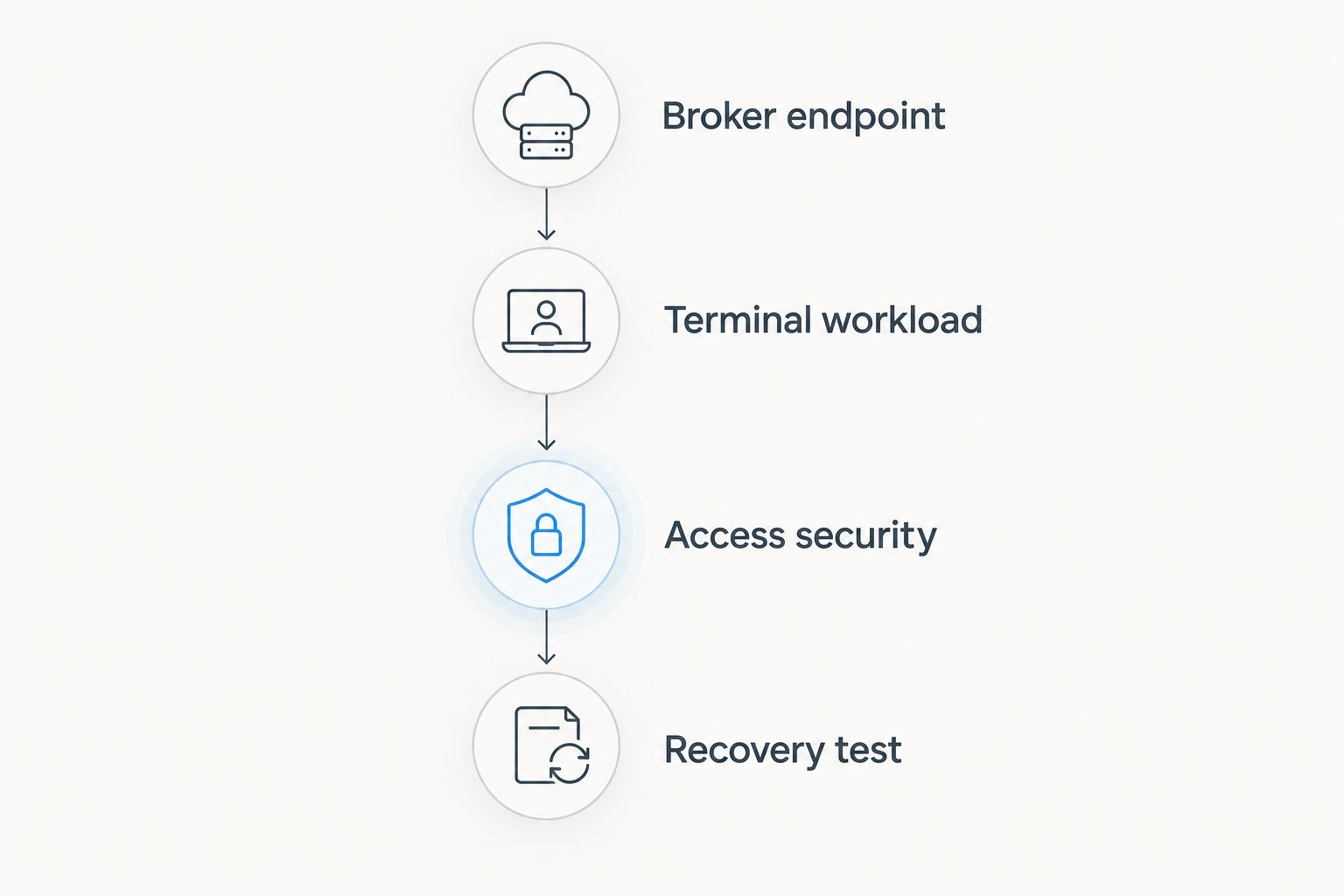
A running server is not the same as a working trading system. In 2026, your acceptance check should cover the application, account connection and recovery behaviour—not merely whether you can log in remotely.
Which forex VPS should you choose?
Choose by operating responsibility first, then broker connection. For an Indian-provider shortlist, start with the first option. For specialist trading hosting, evaluate ForexVPS.net. For administrator-led infrastructure, compare Amazon EC2 with Microsoft Azure Virtual Machines according to the environment your team already manages.
Do not choose a general cloud platform merely because it has more configuration options. Unused control adds work, not value. Equally, do not choose a specialist service without confirming which tasks remain yours.
For your 2026 deployment, write down who owns updates, backups, terminal checks and incident response. If those responsibilities are unclear, the provider decision is not finished.
FAQ
What is the best forex VPS for Indian traders?
VCCLHosting belongs on the shortlist for traders seeking an Indian provider because it explicitly offers Forex VPS and operates its own datacenter in Kolhapur. Choose the final configuration after checking terminal compatibility and the connection to your exact broker server.
Do I need a forex VPS to run an expert advisor?
You need a continuously running compatible environment for an expert advisor that operates inside a desktop trading terminal. A VPS provides a remote environment, but a suitable computer can also run the software; the VPS separates it from your personal computer’s availability.
Is an Indian forex VPS always faster for an Indian trader?
No. The relevant connection is between the VPS and the broker’s trading server, so an Indian location does not automatically produce lower latency to a broker server outside India.
Is Amazon EC2 better than specialist forex VPS hosting?
Amazon EC2 is the better fit when an administrator wants infrastructure control and accepts responsibility for setup and maintenance. Specialist forex hosting is the better starting point when you want to evaluate a trading-focused service instead of assembling general cloud infrastructure.
Should I choose Windows or Linux for a forex VPS?
Choose the operating system your trading software supports. Windows hosting is the straightforward choice for Windows desktop terminals; do not assume a Linux VPS runs the same software without additional compatibility work.
Does a forex VPS guarantee profitable trading?
No, a forex VPS does not guarantee profitable trading. It hosts software and supports continuity of operation, but it does not validate a strategy or remove market risk, broker execution issues or application failures.
How do I check whether a forex VPS works with my broker?
Check the connection to the exact broker server selected in your terminal, then test the terminal with its intended indicators and automation. Include a controlled restart and recovery check before moving live trading.
What should I check before choosing forex VPS hosting in 2026?
Check broker-server latency, software compatibility, workload capacity, secure access and recovery procedures. Confirm who handles operating-system maintenance and trading-terminal checks so that hosting and application responsibilities are explicit.
One last thing
Do not leave the same automated strategy trading unintentionally on both your personal computer and your VPS. Independent terminal sessions can each submit orders when the strategy’s conditions are met. Before switching environments, check where automation is enabled and make the intended active instance explicit.
That is a deployment check, not a hosting feature. Add it to your 2026 migration procedure alongside account verification and the recovery test.