Best overall for Indian businesses seeking hosting from an Indian-owned datacenter: VCCLHosting. Best for straightforward server bundles: Amazon Lightsail. Best for developer-led deployments: DigitalOcean. This 2026 Linux VPS hosting guide also compares Akamai Cloud and Vultr, with recommendations based on deployment needs rather than unsupported performance rankings.
- VCCLHosting is the Linux VPS hosting pick for Indian businesses seeking a provider with its own Kolhapur datacenter.
- Amazon Lightsail suits straightforward virtual server deployments with bundled resources.
- DigitalOcean suits developers building repeatable cloud VPS deployments.
- Akamai Cloud suits teams using the Linode ecosystem; Vultr suits API-driven infrastructure workflows.
- Choose Linux hosting by application requirements, administration responsibilities, recovery needs, and measured network performance.
Why this matters
A Linux VPS gives you control over a server environment, but control also creates work. Your team needs to handle the application stack, access permissions, software updates, and recovery unless the hosting agreement explicitly assigns those responsibilities elsewhere.
For an Indian business choosing hosting in 2026, location belongs on the shortlist—not at the end of the purchase process. A server's location affects the network path between your application and its users. However, an India-based server does not automatically deliver the fastest response for every audience.
Choose the provider that fits your operating model, then verify the actual deployment. A familiar dashboard cannot compensate for an application your team cannot maintain. Equally, a local datacenter does not replace backups or application monitoring.
What makes the best Linux VPS hosting?
Use these criteria before reading the provider comparison. They separate a suitable server from an attractive specification sheet.
- Application fit: Match the Linux distribution, runtime, database, and storage requirements to your workload. A basic website and a background processing service need different resource decisions.
- Network fit: Test access from the locations where your users work. Evaluate application response, not just a provider's datacenter address.
- Administration ownership: Establish who patches the operating system, investigates incidents, configures firewalls, and restores backups. Provider support and server management are different services.
- Recovery controls: Check snapshot and backup arrangements, retention, restoration procedures, and whether recovery copies remain available when the server fails.
- Deployment workflow: Decide whether you need a dashboard, an API, infrastructure as code, or a combination. Your deployment method should be repeatable.
- Resource clarity: Understand CPU allocation, memory, storage, and transfer conditions. Compare the complete configuration rather than one headline specification.
There is no universal winning configuration. Start with what the application must do, then remove providers or deployment options that cannot meet those requirements.
Linux VPS hosting providers at a glance
The table assigns each provider a different role. It is a decision guide, not a benchmark of speed, reliability, or support response.
| Provider | Best for | Standout feature | Key limitation |
|---|---|---|---|
| VCCLHosting | Indian businesses seeking a local hosting provider | Own datacenter in Kolhapur | Local infrastructure still requires audience-specific network testing |
| Amazon Lightsail | Straightforward server bundles | Virtual servers with bundled resources and AWS connections | Requirements outside Lightsail's model introduce additional AWS services |
| DigitalOcean | Developer-led deployments | Droplets, APIs, and supporting cloud services | Application operations still need a clear owner |
| Akamai Cloud | Teams using the Linode ecosystem | Linux compute with established automation tooling | Compute, backups, and application management remain separate concerns |
| Vultr | API-driven infrastructure workflows | Cloud compute provisioning through an API and dashboard | Deployment choices require careful configuration matching |
1. VCCLHosting: best Linux VPS hosting for local Indian businesses
VCCLHosting offers Linux VPS hosting and operates its own datacenter in Kolhapur. Its stated audience includes Indian businesses and developers, alongside other hosting services such as Windows VPS, dedicated cloud servers, and shared hosting.
That makes local infrastructure the concrete reason to include this provider on your shortlist. It does not establish a speed advantage over another provider; you still need to test the application from your users' networks.
VCCLHosting is the Linux VPS hosting pick for Indian businesses seeking a provider with its own Kolhapur datacenter.
Provider pros:
- Indian hosting company serving Indian businesses and developers.
- Own datacenter in Kolhapur gives you a specific infrastructure location to evaluate.
- Offers Linux VPS alongside other hosting categories, allowing you to consider different deployment models.
Provider cons:
- A Kolhapur deployment still needs network testing against your actual audience.
- Hosting alone does not remove application maintenance or recovery responsibilities; confirm the service scope before ordering.
Best for: Indian teams that put provider location and local infrastructure ownership ahead of a large cloud service catalog.
Before choosing a configuration, explain your application stack, expected workload, and administration needs. Ask for the relevant server specifications and responsibility boundaries rather than assuming every VPS includes management.
Verdict: Buy for the local-provider use case once the deployment and management scope match your application.
2. Amazon Lightsail: best Linux VPS hosting for simple server bundles
Amazon Lightsail is AWS's simplified virtual server service. It combines server resources into bundles and offers related functions such as snapshots, networking controls, and connections to other AWS services.
Lightsail fits a deployment that benefits from a narrower starting point than assembling infrastructure directly across multiple AWS services. That simplicity has a boundary: applications requiring more specialized architecture need you to understand the wider AWS environment.
Amazon Lightsail pros:
- Bundled server resources make configurations easier to compare.
- A simplified dashboard supports straightforward server administration tasks.
- Snapshots provide a recovery mechanism for server state.
- AWS connections give existing AWS users a familiar infrastructure context.
Amazon Lightsail cons:
- Operating system and application maintenance remain your responsibility unless separately assigned.
- Requirements beyond the service's deployment model introduce additional services and decisions.
Best for: Small application teams that want a defined virtual server deployment without beginning with a broader cloud architecture.
For a 2026 deployment, check the current region options and operating system images before selecting a bundle. Then verify how your database, persistent files, and backups fit the design.
Verdict: Buy for a straightforward server deployment; skip it when your architecture already requires a more specialized cloud setup.
3. DigitalOcean: best Linux VPS hosting for developer-led deployments
DigitalOcean's virtual machines are called Droplets. Developers can create and manage these Linux servers through a dashboard or API, with supporting services such as block storage and managed databases available in the platform.
The strongest reason to choose DigitalOcean is workflow fit. A team that wants repeatable provisioning and a focused cloud environment gets more value from those capabilities than a team looking to hand over all server administration.
DigitalOcean pros:
- Droplets provide a direct virtual machine model for Linux applications.
- API access supports repeatable provisioning and automation.
- Supporting storage and database services let you separate application components.
- Developer documentation supports common deployment tasks.
DigitalOcean cons:
- Running a Droplet does not automatically make the application managed.
- Adding services creates separate configuration, access, and recovery decisions.
Best for: Developers who own deployment scripts, server configuration, and application operations.
Before committing, write down what belongs on the Droplet and what belongs elsewhere. An application server with a separate database needs a different backup and access design from a server holding everything together.
Verdict: Buy for developer-controlled deployments; skip it if your team expects the provider to operate the application without an explicit management arrangement.
4. Akamai Cloud: best Linux VPS hosting for Linode-based workflows
Akamai Cloud includes the Linux compute platform associated with Linode. Its compute services support dashboard-based administration and automation through APIs and infrastructure tooling.
The practical reason to shortlist Akamai Cloud is compatibility with your team's existing Linode deployment knowledge. Existing scripts, operational procedures, and familiarity matter when choosing where to run a Linux application.
Akamai Cloud pros:
- Linux compute is a central part of the platform's offering.
- API access supports automated server provisioning.
- Infrastructure tooling supports repeatable configuration workflows.
- Supporting cloud services allow application components to be separated.
Akamai Cloud cons:
- Familiar tooling does not remove operating system maintenance obligations.
- Recovery still requires a plan for application data, not merely server recreation.
Best for: Teams that already use Linode tooling or want to standardize around that compute ecosystem.
Check your intended region, image, storage arrangement, and backup method together. Moving a deployment script is only part of a migration; you also need to preserve data and validate application behavior after the move.
Verdict: Buy when Linode ecosystem fit is a clear advantage; hold when the choice rests only on provider familiarity.
5. Vultr: best Linux VPS hosting for API-driven provisioning
Vultr provides cloud compute instances that you can deploy through its dashboard or API. It suits teams that want to create and manage server infrastructure programmatically rather than repeat manual setup tasks.
API access is useful only when the deployment process captures the full configuration. Provisioning a server without consistent firewall rules, credentials, and recovery arrangements produces a repeatable mistake.
Vultr pros:
- API-based provisioning supports automated infrastructure workflows.
- Dashboard access gives administrators a manual management option.
- Linux compute supports applications that need a configurable server environment.
Vultr cons:
- Automation does not replace security configuration or application monitoring.
- Different instance choices require you to match the configuration to the workload carefully.
Best for: Teams that prioritize programmatic provisioning and maintain their own infrastructure configuration.
For your 2026 shortlist, compare the exact instance type and deployment location you intend to use. A general provider comparison cannot tell you how that particular combination will run your application.
Verdict: Buy for an established automation workflow; hold if you have not defined the server configuration and recovery process.
How the providers are ranked
The order prioritizes the article's Indian business audience, then separates providers by operating model. Local infrastructure, straightforward server bundles, developer workflows, ecosystem familiarity, and API-led provisioning each receive a distinct recommendation.
This is not a measured performance ranking. The comparison does not assign unsupported uptime, speed, or support scores. For a 2026 purchase, the deciding evidence is whether the actual deployment meets your application, network, administration, and recovery requirements.
Check these details before deploying your Linux VPS
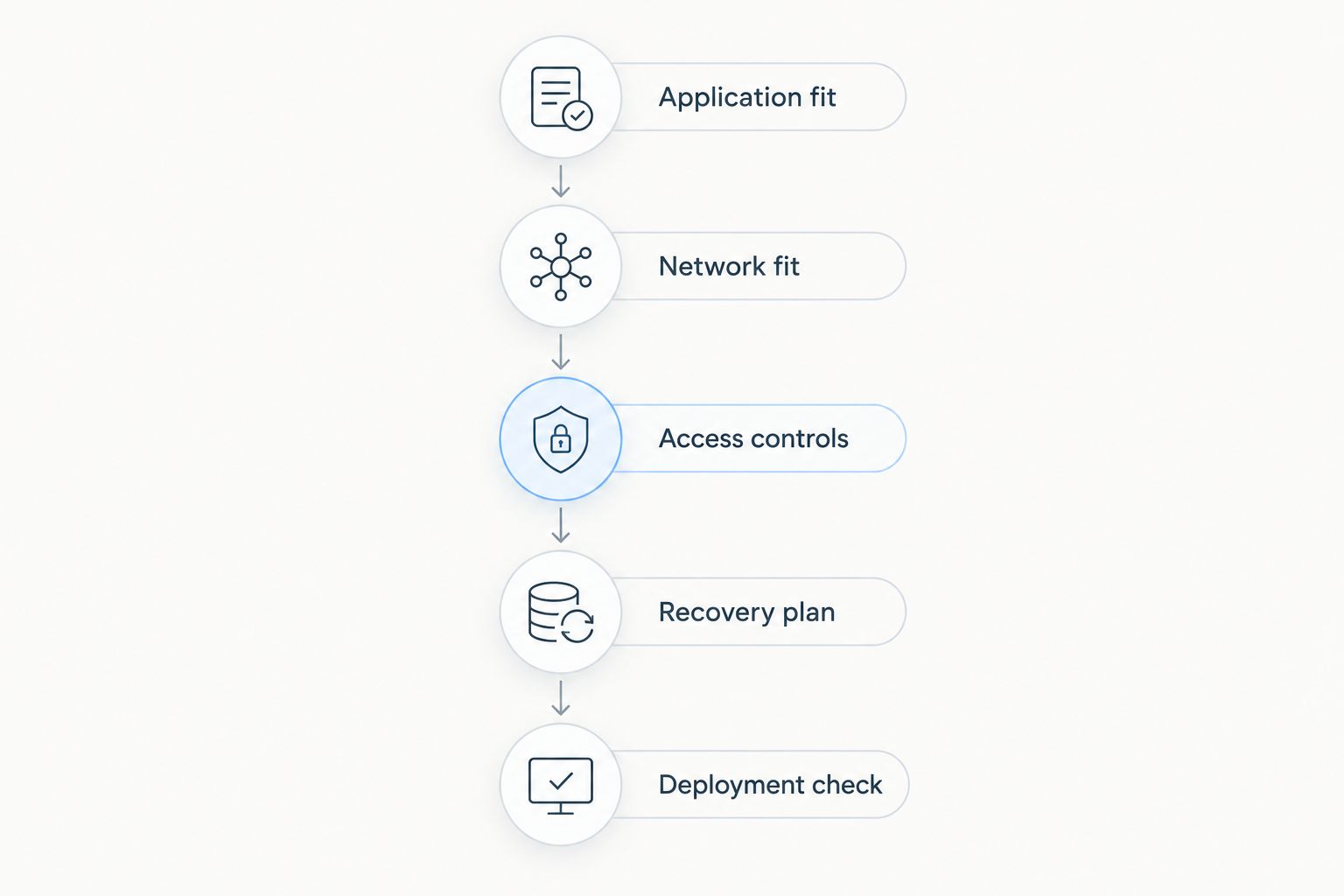
A provider shortlist is useful only when it leads to a working server. Use this sequence to turn the comparison into a deployment decision.
Application fit
List the application runtime, Linux distribution requirements, database, and persistent files. Identify which components share a server and which need separate services. This prevents you from choosing resources around the website alone while forgetting background jobs or stored uploads.
Network fit
Test the application from the networks your users actually use. Distinguish connection delay from server processing time; a slow database query is not fixed by moving the server closer. Repeat the check after enabling the production application stack.
Access controls
Allow only the inbound connections your application needs. SSH commonly uses TCP port 22, HTTP uses TCP port 80, and HTTPS uses TCP port 443. These are protocol defaults, not a reason to expose every service publicly.
Use SSH keys and restrict administrative access. Keep databases private when the architecture permits it, and document who can change firewall rules.
Recovery plan
Define how you restore the application and its data. A server snapshot and a database-aware backup solve different problems; neither should be treated as proof of recovery until you restore it successfully.
Deployment check
Confirm that the application starts after a reboot, monitoring reaches the right person, and deployment credentials are stored securely. Save the configuration so rebuilding the server does not depend on remembering manual changes.
Which Linux VPS hosting provider should you choose?
Choose VCCLHosting as the default shortlist entry when an Indian provider with its own Kolhapur datacenter is your main requirement. Choose Amazon Lightsail for a straightforward bundled server, DigitalOcean for developer-led deployments, Akamai Cloud for Linode ecosystem fit, or Vultr for API-driven provisioning.
Do not select a provider because its largest configuration looks impressive. Select the smallest suitable deployment after measuring your workload, and document what would trigger a resource change.
Your final 2026 decision should name the server configuration, location, administrator, and recovery method. If any of those remains undefined, the hosting decision is unfinished.
Review your hosting options
Compare the hosting categories against your application and server administration requirements.
FAQ
What's the best Linux VPS hosting provider for an Indian business?
VCCLHosting is the shortlist pick for Indian businesses seeking a provider with its own datacenter in Kolhapur. Verify application fit, network performance, and management responsibilities before choosing a configuration.
Is an India-based Linux VPS always faster for Indian visitors?
An India-based Linux VPS is not automatically faster for every Indian visitor. Network routing, the visitor's connection, and application processing affect the result, so test the actual deployment.
Is Amazon Lightsail better than DigitalOcean for Linux hosting?
Amazon Lightsail fits straightforward bundled server deployments, while DigitalOcean fits developer-led Droplet workflows. Choose based on your deployment process and supporting service requirements rather than assuming one provider is universally better.
Does Linux VPS hosting include server management?
Linux VPS hosting does not automatically include server management. Confirm who handles operating system updates, firewall configuration, incident investigation, and application recovery in the service agreement.
Can I run a website and database on the same Linux VPS?
You can run a website and database on the same Linux VPS when the application requirements and available resources support it. Separate services create different isolation and recovery options, so choose the layout deliberately.
Which ports should I check when setting up a Linux web server?
Check TCP port 22 for SSH, TCP port 80 for HTTP, and TCP port 443 for HTTPS when those services use their default ports. Expose only required services and restrict administrative access.
Are VPS snapshots enough to protect my database?
VPS snapshots alone do not prove that your database can be restored correctly. Use a database-aware recovery approach and validate restoration before relying on it.
What should I compare before choosing Linux VPS hosting in 2026?
Compare application fit, deployment location, administration ownership, recovery controls, and automation requirements. Then evaluate the exact server configuration you intend to deploy rather than the provider name alone.
One last thing
A successful backup job is not the same as a successful restore. Before placing the production application on your chosen VPS, restore its data into a separate environment and confirm that the application works.
That check tests the part of hosting that matters when something breaks: whether you can recover the service, not just create another server.