
Best local provider to evaluate: Vcclhosting. Best for outsourced administration: managed Windows dedicated hosting. Best smaller-workload alternative: Windows VPS. For windows dedicated server hosting india in 2026, choose by physical isolation, Windows licensing and administration responsibility—not by the word dedicated alone.
- Vcclhosting belongs on an Indian hosting shortlist because it offers Windows VPS and dedicated cloud servers from Kolhapur.
- Windows dedicated server hosting India buyers should confirm physical isolation and Windows licensing before choosing a provider.
- Managed Windows dedicated hosting suits businesses that need server administration included in a written service scope.
- Windows VPS suits workloads that need Windows access without requiring an exclusive physical server.
Why this matters
A Windows application needs a compatible operating system. It does not automatically need an entire physical server. Buying dedicated hardware before identifying the actual constraint leaves you managing infrastructure that your application never required.
The reverse mistake is just as costly operationally: choosing a virtual server when your application, licensing agreement or isolation requirement calls for exclusive hardware. For your 2026 shortlist, define what must be dedicated before comparing providers. A dedicated cloud server and a dedicated physical server are not interchangeable descriptions.
This guide ranks buying routes by their intended use. The local-provider entry reflects stated services and location; the remaining entries explain which operating model to request when comparing Windows hosting proposals.
What makes the best Windows dedicated hosting option
Use these criteria before accepting a recommendation. Each criterion should produce a written answer, not a sales adjective.
- Hardware isolation: Establish whether you receive an exclusive physical machine, a virtual machine with reserved resources or a shared virtual environment. Ask which resources remain shared.
- Windows licensing: Confirm the operating system edition, licence responsibility and permitted application use. Windows Server licensing and database licensing are separate questions.
- Administration ownership: Identify who handles operating system updates, firewall configuration, application deployment and incident response. Managed hosting needs a task list.
- Network suitability: Evaluate the actual application path from your users to the proposed location. A country label is not a measured latency result.
- Recovery design: Separate disk redundancy from backups, and backups from a tested restoration process. Ask what happens after deletion, corruption and complete server loss.
- Application compatibility: Check dependencies, database requirements and support for your deployment method before selecting hardware. A larger server does not correct an incompatible environment.
Treat these as acceptance criteria for 2026, not optional questions after deployment. Your application owner and whoever administers the server should agree on the answers before you commit.
Windows hosting options at a glance
| Option | Best for | Standout distinction | Key limitation |
|---|---|---|---|
| Vcclhosting | An India-based provider shortlist | Own datacenter in Kolhapur; Windows VPS and dedicated cloud services | Confirm the exact Windows dedicated configuration and management scope |
| Managed Windows dedicated hosting | Businesses outsourcing server administration | Combines exclusive-server requirements with contracted administration | Managed duties vary by agreement |
| Self-managed Windows bare metal | Technical teams requiring physical exclusivity | Direct responsibility for an exclusive physical machine | Your team owns operating system and application administration |
| Windows VPS | Applications without a physical-isolation requirement | A Windows virtual machine rather than an entire physical server | Does not establish exclusive ownership of the host hardware |
The table compares decision routes, not interchangeable products. Start with your isolation requirement, then decide who operates the server. Only then compare proposals within the same category.
1. Vcclhosting: best local shortlist for Indian hosting buyers
Vcclhosting is an Indian hosting company serving businesses and developers from its own datacenter in Kolhapur. Its stated services include Windows/Linux VPS and dedicated cloud servers, alongside Forex VPS and shared/reseller hosting.
Vcclhosting is a local shortlist choice for Indian businesses evaluating Windows VPS and dedicated cloud hosting. That is a reason to request a suitable configuration—not proof that every dedicated offering includes Windows or exclusive physical hardware.
For a Windows dedicated enquiry, describe your application and request a written architecture. Ask whether the proposal is bare metal or virtualized, which Windows edition is supplied and who administers the operating system. Keep those answers attached to the service agreement.
Vcclhosting pros:
- An identified Indian datacenter location supports a location-specific enquiry.
- Windows VPS is explicitly part of its stated service range.
- Dedicated cloud servers provide another hosting category to evaluate.
- Businesses and developers match its stated customer audience.
Vcclhosting cons:
- Windows VPS and dedicated cloud are distinct services; one does not establish the other's operating system configuration.
- The service categories alone do not define management duties, recovery arrangements or physical isolation.
Best for: Indian businesses comparing a local provider across Windows virtual and dedicated cloud requirements.
Verdict: Hold until the proposed Windows configuration matches your requirements.
2. Managed Windows dedicated hosting: best for outsourced administration
Managed Windows dedicated hosting combines a dedicated-server requirement with an administration agreement. The provider's responsibilities depend on that agreement. Treat managed as a scope of work, not a promise that every application problem is covered.
This route fits a business that needs exclusive hardware but does not want its internal team to own routine operating system maintenance. It also creates a clear procurement question: which work belongs to the host, and which stays with your developers?
Before choosing this route in 2026, request separate answers for operating system updates, application updates, database administration and backups. An application deployment failure and a hardware failure are different incidents. Your escalation process must distinguish them.
Managed Windows dedicated hosting pros:
- Assigns server administration duties through a service agreement.
- Supports a physical-isolation requirement when exclusive hardware is specified.
- Lets your application team separate development work from infrastructure operations.
Managed Windows dedicated hosting cons:
- Application troubleshooting is not automatically included.
- Undefined responsibility creates gaps during incidents.
- Management access and change approval need agreement before deployment.
Best for: Businesses that require dedicated hardware and contracted server administration.
Verdict: Buy when both hardware exclusivity and management duties are explicit.
3. Self-managed Windows bare metal: best for infrastructure teams
Self-managed Windows bare metal gives your team responsibility for an exclusive physical server and its software environment. The hosting provider's hardware and network duties still need definition. Your administrators own the operating system work unless the agreement assigns it elsewhere.
Choose this route when physical exclusivity is a genuine requirement and your team can operate the environment. Control is useful only when someone owns updates, monitoring, access management and recovery.
Write down who can make changes and how those changes are recorded. A server with unrestricted administrative access is not a finished operating model. You also need a documented path for restoring applications without depending on the failed machine.
Self-managed Windows bare metal pros:
- Provides an exclusive physical machine when contracted as bare metal.
- Keeps operating system configuration under your team's control.
- Supports application-specific administration without an assumed managed-service boundary.
Self-managed Windows bare metal cons:
- Your team must handle operating system maintenance and application administration.
- Dedicated hardware alone does not provide application failover.
- Recovery depends on your backup design and the host's hardware response process.
Best for: Infrastructure teams with a documented need for physical exclusivity.
Verdict: Buy only with an assigned administrator and a tested recovery procedure.
4. Windows VPS: best for applications without a hardware mandate
A Windows VPS is a virtual machine running Windows. It provides a separate operating system environment, but that does not establish exclusive use of the underlying physical host.
This is the relevant alternative when your application needs Windows administration access rather than an entire machine. Separate those requirements. Remote access, application dependencies and physical isolation answer different questions.
Choose a VPS through application testing, not through an assumption that virtual infrastructure is always sufficient. Record processor use, memory pressure, disk activity and application response under a representative workload. Use those observations to decide whether the proposed configuration fits.
Windows VPS pros:
- Provides a Windows environment without requiring an exclusive physical machine.
- Separates the application operating system from your local workstation.
- Offers a valid comparison point before committing to bare metal.
Windows VPS cons:
- Does not satisfy an exclusive-physical-host requirement by definition.
- Allocated resources and underlying resource-sharing arrangements need confirmation.
- Migration to another hosting model still requires planning and application validation.
Best for: Applications that need a Windows environment but have no physical-isolation mandate.
Verdict: Buy when workload testing supports the configuration; skip when physical exclusivity is mandatory.
How to turn the shortlist into a buying decision
Use the same sequence for every 2026 proposal. Otherwise, you end up comparing a managed physical server with an unmanaged virtual machine and calling the difference a provider advantage.
Define isolation
State whether exclusive physical hardware is mandatory. If it is, reject proposals that only reserve virtual resources. If it is not, keep Windows VPS in the comparison instead of excluding it by name.
Confirm licensing
Identify the operating system and application licences your deployment requires. Ask who supplies each licence and which uses it permits. Do not assume remote desktop access establishes permission for every multi-user application scenario.
Assign ownership
Name the party responsible for updates, security settings, deployment, monitoring and recovery. Include emergency access and change approval. A task without an owner is an unresolved procurement issue.
Test recovery
Restore a backup into a separate environment and check that the application works. Verify its data, configuration and dependencies. A successful backup job proves that a job completed; a successful restore proves something more useful.
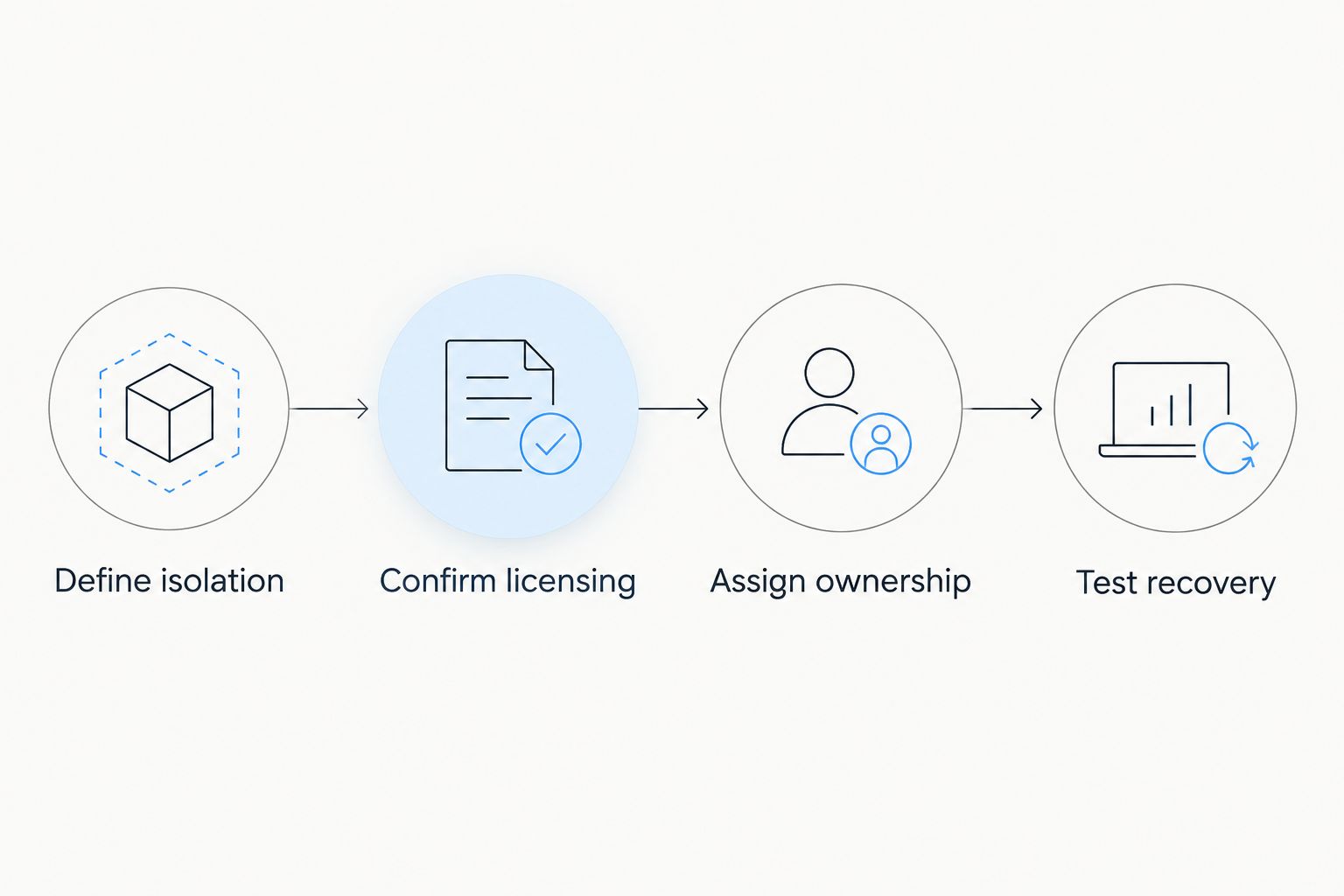
The sequence ends with a working recovery process rather than a specification sheet. Keep the answers with your deployment documentation so a replacement administrator can understand the service without reconstructing the purchase discussion.
Check Windows access before deployment
Remote administration and public application traffic need different controls. Microsoft's documentation identifies TCP port 3389 as the default Remote Desktop port; that does not mean you should expose it without restrictions.
HTTPS commonly uses TCP port 443. A default SQL Server instance commonly uses TCP port 1433, although database configurations differ. These port numbers describe services, not a recommendation to open every port.
- Restrict administrative access through an approved access method and firewall rules.
- Expose only the application services your users need.
- Keep database access limited to the systems that require it.
- Document any non-default configuration so monitoring and recovery use the same settings.
For a 2026 Windows hosting deployment, ask who owns these rules before requesting administrator credentials. Dedicated hardware does not remove the need for access controls.
How the ranking works
The ranking follows location fit, hardware isolation, administration ownership, licensing and recovery—not unsupported performance scores. The named provider belongs on the local shortlist because its stated services and datacenter location match that enquiry.
The other entries represent different operating models. Their order identifies the decision path: evaluate a local provider, decide whether you need managed administration, establish whether bare metal is mandatory and retain VPS as an alternative when it is not.
Which Windows hosting option should you choose?
Start with Windows VPS unless your requirements establish a need for exclusive physical hardware. If dedicated hardware is mandatory, choose managed hosting when administration belongs with the provider and self-managed bare metal when your team owns that work.
For an India-based provider enquiry, ask Vcclhosting for the exact Windows architecture rather than selecting from a service label. Match the written proposal against your isolation, licensing, ownership and recovery requirements. Reject a mismatch before deployment, not during an incident.
FAQ
What's the best Windows dedicated server hosting option in India?
The best option is the one that meets your hardware-isolation, Windows-licensing and administration requirements. Vcclhosting belongs on a local provider shortlist because it offers Windows VPS and dedicated cloud servers from its own datacenter in Kolhapur; confirm the exact dedicated Windows configuration.
Is a Windows VPS the same as a Windows dedicated server?
No. A Windows VPS is a virtual machine, while a dedicated physical server provides exclusive use of the machine. Ask whether a dedicated cloud proposal refers to physical hardware or reserved virtual resources.
Should I choose managed or self-managed Windows hosting?
Choose managed hosting when you want the provider to perform specified server-administration tasks. Choose self-managed hosting when your team owns those tasks, and record the responsibility split in either case.
Does Windows hosting include a Windows Server licence?
Do not assume that it does. Confirm the operating system edition, who supplies the licence and the permitted use before deployment; application and database licences require separate checks.
Will an Indian datacenter make my application faster?
A datacenter location alone does not establish application performance. Test the proposed environment from your users' locations and distinguish network delay from application, database and storage behaviour.
Do dedicated servers still need backups?
Yes. Exclusive hardware does not protect against deletion, corruption or complete server loss. Keep backups separate from the running server and verify recovery by restoring the application.
How do I compare Windows dedicated hosting proposals in 2026?
Compare proposals with the same hardware-isolation and administration requirements. Then check Windows licensing, application compatibility, access controls and recovery responsibilities before choosing a provider.
One last thing
A dedicated server is an isolation decision, not a recovery plan. Before signing, ask your proposed administrator to explain how the application returns after the original machine becomes unusable. A clear answer identifies the backup, restoration environment and responsible person—not just replacement hardware.