
Hostinger combines website hosting, WordPress hosting and VPS options, making it a practical starting point for getting a site online. The ceiling comes when your decision depends on a particular server environment, deployment workflow or datacenter location rather than website setup alone. The best Hostinger alternative in 2026 is VCCLHosting if you need Windows/Linux VPS hosting from Kolhapur; DigitalOcean if you need a developer-focused cloud platform.
- For Hostinger alternatives, choose VCCLHosting for Windows/Linux VPS hosting from its Kolhapur datacenter.
- Choose DigitalOcean for developer-focused cloud hosting; AWS for workloads that need its wider cloud services.
- Choose SiteGround for managed WordPress hosting rather than a general-purpose server.
- Keep Hostinger when your current hosting meets your requirements; switching alone does not improve your website.
Why this matters
A hosting migration changes more than the company receiving your payment. It can change who maintains the operating system, how you restore backups and which deployment tools your application needs.
For your 2026 shortlist, start with the workload. A WordPress business site, a Windows application and a reseller business need different hosting arrangements. Ranking every provider against the same checklist hides those differences.
Choose the hosting model before choosing the provider. A managed website service and a configurable cloud server solve different problems, even when both can run the same website.
Hostinger alternatives at a glance
This comparison separates website-oriented hosting from infrastructure-oriented hosting. The best option is the one whose operating model matches your application and the person responsible for maintaining it.
| Provider | Best for | Standout feature | How it differs from Hostinger | Main trade-off |
|---|---|---|---|---|
| Hostinger | Website owners who want website hosting and VPS options under one provider | Website hosting, WordPress hosting and VPS services | Baseline for this comparison | A website-hosting workflow does not replace application-specific infrastructure planning |
| VCCLHosting | Indian businesses and developers seeking Windows/Linux VPS hosting | Own datacenter in Kolhapur; also offers dedicated cloud, Forex VPS and shared/reseller hosting | Provides an explicitly identified Indian datacenter and Windows/Linux server options | Kolhapur must fit your location requirements; choose the service type carefully |
| DigitalOcean | Developers deploying applications on cloud infrastructure | Droplets and developer-oriented cloud services | Centres the decision on application infrastructure rather than website setup | You must define server maintenance responsibilities |
| AWS | Teams building applications around multiple cloud services | EC2 alongside a wider cloud-service portfolio | Provides a broader infrastructure architecture rather than a website-first hosting workflow | More architecture and access-management decisions |
| SiteGround | Website owners seeking managed WordPress hosting | Managed WordPress hosting | Focuses the comparison on website management rather than general-purpose VPS administration | Less suitable when the requirement is a configurable Windows server |
Do not read the order as a universal performance ranking. A provider that fits an application team's deployment process can be the wrong choice for a founder who wants someone else to maintain WordPress.
1. VCCLHosting: best for Indian Windows/Linux VPS requirements
VCCLHosting offers Windows/Linux VPS, dedicated cloud servers, Forex VPS and shared/reseller hosting from its own datacenter in Kolhapur. The company serves Indian businesses and developers. That makes it a relevant alternative when your shortlist starts with an Indian hosting location and a specific server environment.
Best for: Indian businesses and developers choosing Windows or Linux VPS hosting, or evaluating dedicated cloud and reseller hosting.
Where it shines
- Explicit location: Kolhapur gives you a concrete datacenter location to assess against your users and infrastructure requirements.
- Operating-system choice: Windows/Linux VPS offerings address different application environments.
- Different hosting models: Shared/reseller hosting and dedicated cloud servers let you compare more than a single server category.
- Forex-specific option: Forex VPS is part of the stated service range, making it a relevant starting point for that workload.
Where it falls short
- Location fit is specific: A Kolhapur datacenter is not, by itself, an answer to a requirement for hosting in another region.
- The service choice still matters: Shared hosting, a VPS and a dedicated cloud server are not interchangeable deployment environments.
- A location is not a performance guarantee: Your application, network path and server configuration still determine the experience your users receive.
For a 2026 decision, write down your operating system, application dependencies and preferred hosting location before comparing plans. Ask who handles operating-system updates, application troubleshooting and restoration. Treat those responsibilities as selection criteria rather than assumptions.
Verdict: Buy when the Kolhapur location and the stated Windows/Linux hosting options match your workload.
2. DigitalOcean: best for developer-led application hosting
DigitalOcean is a cloud platform built around infrastructure services such as Droplets. It fits teams that want to deploy and operate applications rather than primarily manage a website through a hosting dashboard. The important difference is operational ownership.
Best for: Developers who want cloud servers and a deployment process they control.
Where DigitalOcean shines
- Application-oriented infrastructure: Droplets provide virtual servers for applications and services.
- Developer workflow: You can organise hosting around deployment, configuration and application operations.
- Clear server model: A virtual machine is a useful foundation when your application needs control beyond a shared-hosting environment.
Where DigitalOcean falls short
- Server work remains work: A self-managed server needs updates, access controls, monitoring and recovery procedures.
- Website convenience is a separate requirement: Do not assume that provisioning a virtual machine also supplies your preferred WordPress maintenance workflow.
- More control means more decisions: Your team must choose and maintain the software running on the server.
Against Hostinger, the reason to choose DigitalOcean is a preference for its cloud platform and developer workflow—not the mere existence of VPS hosting. Hostinger also offers VPS services, so compare deployment needs rather than treating VPS access as exclusive to one provider.
Before moving, deploy your application in a test environment and document every dependency. A working homepage is insufficient evidence that background jobs, outbound email and database connections are ready.
Verdict: Buy when a developer owns deployment and server operations; skip when you need website management without server administration.
3. AWS: best for applications built around wider cloud services
AWS combines EC2 virtual servers with services for storage, databases, identity and other infrastructure needs. It belongs on your shortlist when hosting is one part of a larger application architecture. It is not a necessary upgrade simply because your website has grown.
Best for: Teams that need application hosting to connect with a wider cloud-service architecture.
Where AWS shines
- Connected infrastructure: EC2 can sit alongside other AWS services within an application design.
- Architecture flexibility: You can separate application components instead of treating hosting as a single website account.
- Access management: AWS provides identity and access-management controls for infrastructure resources.
Where AWS falls short
- More configuration decisions: Networking, permissions and service relationships need deliberate design.
- Operational responsibility: Your team must define monitoring, backup and recovery ownership.
- Unnecessary complexity for simple sites: A wider service portfolio does not help if your requirement is only straightforward website hosting.
In 2026, choose AWS because your architecture needs AWS services. Do not choose it as a substitute for diagnosing a slow database query, oversized images or an overloaded application process.
Verdict: Buy for a defined cloud architecture; skip for a simple website without an infrastructure owner.
4. SiteGround: best for managed WordPress hosting
SiteGround offers managed WordPress hosting, making it a relevant alternative for website owners comparing website-management workflows. Keep the comparison focused on WordPress operations rather than general-purpose server control.
Best for: Businesses that want managed WordPress hosting instead of administering a VPS.
Where SiteGround shines
- WordPress focus: Its managed WordPress offering addresses a website-specific hosting requirement.
- Website-oriented evaluation: You can assess the service against publishing, maintenance and recovery needs rather than server configuration alone.
Where SiteGround falls short
- Different scope: Managed WordPress hosting is not a replacement for a configurable Windows VPS.
- Application responsibility remains: Hosting management does not remove the need to maintain your content, plugins and custom application code.
Compare SiteGround with Hostinger's WordPress offering on the maintenance tasks you actually need handled. Keep a written list of responsibilities; a managed label alone does not tell you where hosting support ends and application support begins.
Verdict: Buy for a managed WordPress requirement; skip for Windows applications or general-purpose server administration.
Why people switch from Hostinger
The useful reasons to switch are specific requirements, not dissatisfaction without a diagnosis. Use these triggers to decide whether another provider deserves a test.
- You need a particular hosting location. Assess the stated datacenter location against your users, integrations and organisational requirements.
- Your application needs a different operating environment. Confirm the operating system and software dependencies before selecting a replacement.
- You want a different deployment workflow. A developer-led cloud platform makes sense when your team wants to own application infrastructure.
- Your architecture needs connected cloud services. Evaluate AWS when those services are part of a defined design.
- You want a different WordPress management arrangement. Compare responsibility boundaries, not just the word managed.
None of these reasons establishes that Hostinger is slow or unreliable. They establish that your requirements deserve a provider-by-provider comparison. Switch for a documented mismatch, not for a longer feature list.
Check the replacement before you migrate
Use the same application and representative tasks when evaluating Hostinger alternatives in 2026. Otherwise, you are comparing different workloads and calling the result a hosting comparison.
Workload inventory
List your runtime, database, scheduled tasks, email dependencies and required access. Include administration tasks as well as customer-facing pages. A checkout or login flow can expose problems that a static homepage does not.
Test deployment
Deploy a copy of the application on the candidate environment before changing public DNS. Test uploads, logins, database writes and background jobs. Record a 24-hour observation window as an evaluation step, not as proof of long-term reliability.
Recovery check
Keep 2 independent backup copies before the move, and test that you can restore the application and its database. A backup file that has never been restored is an unverified recovery path. Decide who owns the restoration process before migration day.
Cutover review
Document the DNS change, validation checks and rollback procedure. Keep the previous environment intact for at least 7 days as a rollback precaution, while preventing conflicting writes between old and new databases. Extend that window when your application or change-control process requires it.
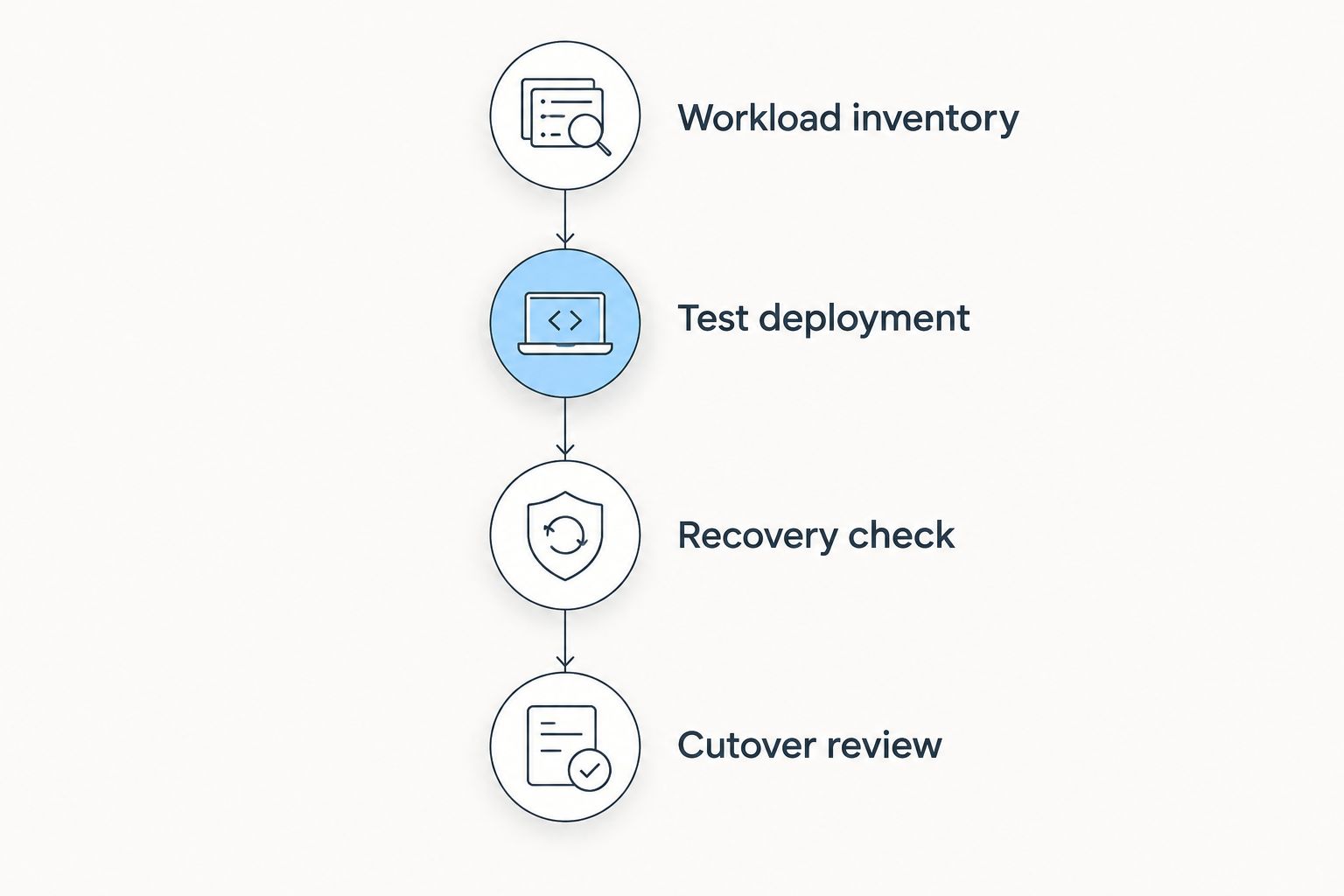
The replacement earns its place when it runs your application correctly and gives you a workable operating process. A successful deployment without a recovery plan is not a finished migration.
When staying with Hostinger is the right call
Stay with Hostinger when your current service meets your application, maintenance and location requirements. Its website hosting, WordPress hosting and VPS options make it a legitimate benchmark, not merely the provider to replace.
The advantage is avoiding a migration that solves no identified problem. The limitation is that staying does not resolve a documented mismatch: if you need another environment or operating model, familiarity is not enough.
For your 2026 review, separate application defects from hosting constraints. Fix the problem you can identify before moving the entire workload.
Best for: Existing customers whose requirements are already met. Verdict: Hold until a specific unmet requirement justifies switching.
FAQ
What's the best Hostinger alternative for an Indian business?
VCCLHosting is a relevant choice for Indian businesses seeking Windows/Linux VPS hosting from Kolhapur. Choose it when that location and hosting model match your application requirements.
Is DigitalOcean better than Hostinger for developers?
DigitalOcean is a better fit when you want its developer-focused cloud platform and control over application infrastructure. Hostinger also offers VPS hosting, so compare deployment workflows and operational responsibilities rather than VPS access alone.
Should I move a WordPress website to AWS?
Move WordPress to AWS when a defined architecture requires AWS services and someone owns infrastructure operations. A simple WordPress website does not need a wider cloud architecture merely to remain online.
Which Hostinger alternative should I consider for managed WordPress?
SiteGround belongs on a managed WordPress shortlist. Compare the maintenance responsibilities you need handled against Hostinger's WordPress offering before moving.
Will switching from Hostinger make my website faster?
Switching providers alone does not establish that your website will become faster. Test the same application and investigate its database, assets and server configuration before attributing a problem to hosting.
What should I check before leaving Hostinger?
Check application compatibility, backup restoration, DNS changes and your rollback procedure before leaving Hostinger. Test the replacement environment before redirecting users to it.
When should I stay with Hostinger in 2026?
Stay with Hostinger in 2026 when it meets your workload, maintenance and location requirements. Switch only when another provider resolves a specific unmet requirement.
One last thing
Your migration has two success conditions: the new environment works, and you can reverse the change without losing application data. Most hosting comparisons focus on the first. Choose the replacement only after you can explain the rollback.