
Best for Indian businesses replacing Azure virtual machines: Vcclhosting. Best overall for a broad cloud-platform replacement: Amazon Web Services (AWS). Best for developer-focused application hosting: DigitalOcean. This 2026 guide separates server hosting from managed cloud services so you can choose an Azure alternative that fits your workload, not just your preferred provider name.
- Vcclhosting is the best Azure cloud alternative India businesses should shortlist for Windows/Linux VPS and dedicated cloud servers.
- AWS is the default shortlist choice when replacing several Azure services, not just virtual machines.
- Google Cloud fits teams evaluating managed analytics; Oracle Cloud fits teams evaluating Oracle database infrastructure.
- DigitalOcean fits developer-focused hosting; compare application dependencies before selecting a replacement.
Why this matters
Replacing an Azure virtual machine is a different project from replacing Azure SQL Database, Microsoft Entra ID, or Azure Functions. A server provider can host your application without replacing the managed services around it. Treating those projects as identical creates gaps in your migration plan.
For a 2026 decision, start with what your application actually uses. If the workload is a website, API, or background process running on a conventional server, VPS or dedicated cloud hosting belongs on your shortlist. If the application depends on Azure-specific services, evaluate the replacement architecture before choosing infrastructure.
Choose the replacement for the workload, not for the word cloud. An Indian datacenter answers a location question; it does not, by itself, answer questions about database management, identity, disaster recovery, or compliance.
What makes the best Azure alternative?
These criteria distinguish a useful replacement from a provider that merely offers servers:
- Workload fit: Identify whether you need virtual machines, dedicated servers, managed databases, container services, or application hosting.
- Operating system: Confirm the required Windows or Linux environment, software compatibility, and licensing arrangements.
- Service dependencies: Map identity, storage, queues, databases, monitoring, and any Azure-specific application integrations.
- Location requirements: Establish where application data, backups, logs, and recovery copies must reside.
- Operating responsibility: Decide who handles patching, monitoring, backups, database maintenance, and incident response.
- Migration reversibility: Document how you will export data, restore the application, and reverse the cutover if validation fails.
Do not reduce these criteria to a feature count. A provider with more services is not automatically a better place for a standalone application, and a simpler hosting model is not automatically sufficient for a distributed system.
Azure alternatives at a glance
The table ranks providers by distinct workload fit. It is not a performance benchmark or a claim that every provider replaces every Azure service.
| Provider | Best for | Standout capability | Key limitation |
|---|---|---|---|
| Vcclhosting | Indian businesses moving server-based applications | Windows/Linux VPS and dedicated cloud servers from its own Kolhapur datacenter | Server hosting does not establish equivalence with Azure's managed-service portfolio |
| AWS | Replacing a multi-service Azure architecture | Broad infrastructure and managed-service portfolio | Azure services and application integrations require individual migration planning |
| Google Cloud | Applications centred on managed analytics | BigQuery and associated data services | Analytics migration requires changes beyond moving application servers |
| DigitalOcean | Developer-focused application hosting | Droplets and App Platform | Not a like-for-like replacement for every Azure enterprise service |
| Oracle Cloud Infrastructure | Oracle database-centred workloads | Oracle Database services and infrastructure | Database architecture and licensing need separate evaluation |
1. Vcclhosting: best Azure alternative for Indian server workloads
Vcclhosting offers Windows/Linux VPS, dedicated cloud servers, Forex VPS, and shared/reseller hosting from its own datacenter in Kolhapur. Its stated audience is Indian businesses and developers. That makes it relevant when your Azure replacement is principally a hosting decision rather than a redesign of a managed cloud platform.
Vcclhosting is best for Indian businesses seeking VPS or dedicated cloud hosting for server-based applications. Start here when you can describe the application as software running on a server, then separately identify any external services it still needs.
Vcclhosting pros
- Windows and Linux VPS options address different operating-system requirements.
- Dedicated cloud servers provide another infrastructure option alongside VPS hosting.
- Its own Kolhapur datacenter gives you an explicitly stated Indian hosting location to evaluate.
Vcclhosting cons
- The stated hosting offering does not establish replacements for Azure SQL Database, Azure Functions, or Microsoft Entra ID.
- A server migration still requires a plan for application dependencies, administration, backups, and recovery.
Before choosing a service, write down the operating system, database, storage needs, and background processes your application requires. Ask which responsibilities remain with your team. Do not interpret the word hosting as a promise that every application component is managed.
Best for: Indian businesses and developers moving conventional Windows or Linux server workloads.
Verdict: Buy for a server-hosting replacement after confirming the workload requirements; skip as an assumed replacement for the entire Azure platform.
2. AWS: best Azure alternative for multi-service architectures
AWS provides compute, object storage, managed databases, serverless functions, and other cloud services. Amazon EC2, Amazon S3, Amazon RDS, and AWS Lambda give you categories to examine when your Azure application uses more than virtual machines.
AWS belongs on the 2026 shortlist when you need to replace several infrastructure and managed-service components together. The important work is mapping behaviour, permissions, deployment processes, and recovery procedures—not simply matching service names.
AWS pros
- Compute, storage, database, and serverless services can support a multi-component replacement architecture.
- Virtual machines and managed services give you different operating models within the same platform.
- Individual services let you evaluate each application dependency rather than forcing everything onto one server.
AWS cons
- Azure identity, deployment templates, and service integrations require changes during migration.
- A broad service portfolio still requires decisions about permissions, networking, monitoring, and ownership.
For example, moving an Azure VM to EC2 does not also migrate an application’s Azure storage integration. Inventory the application code and configuration before selecting equivalents. Confirm that your team can operate the proposed architecture, not merely deploy it.
Best for: Teams replacing an Azure architecture that spans multiple managed cloud services.
Verdict: Buy for broad platform replacement when service mapping and operational ownership are defined.
3. Google Cloud: best Azure alternative for managed analytics
Google Cloud offers compute, storage, managed databases, and data services. BigQuery makes it a relevant option when analytics requirements—not just application hosting—drive the decision to leave Azure.
Google Cloud deserves evaluation when your team wants a managed analytics architecture and is prepared to review data pipelines, queries, access controls, and application connections. Moving a database export is only part of that work.
Google Cloud pros
- BigQuery provides a managed analytics service to evaluate against your data-processing requirements.
- Compute and storage services can support the application components surrounding an analytics workload.
- Managed data services provide alternatives to administering every component on virtual machines.
Google Cloud cons
- Existing query behaviour, pipelines, and data integrations need migration-specific validation.
- Moving application servers alone does not recreate an Azure analytics architecture.
Separate transactional data from analytical data before comparing architectures. Identify which datasets feed reports, which processes update them, and which users or applications need access. Then validate representative queries and refresh processes against the proposed destination.
Do not select Google Cloud just because the application contains a database. The recommendation here concerns analytics-led workloads, not every application that stores records.
Best for: Teams evaluating a managed analytics replacement alongside their application infrastructure.
Verdict: Buy when analytics requirements justify the platform change; hold when the requirement is only basic server hosting.
4. DigitalOcean: best Azure alternative for developer-focused hosting
DigitalOcean offers Droplets for virtual-machine hosting and App Platform for application deployment. Those distinct models let you compare administering a server with deploying an application through a managed platform.
For a developer-focused 2026 shortlist, the first question is whether you want control over the operating system or a deployment model that abstracts some infrastructure work. Answer that before selecting a service.
DigitalOcean pros
- Droplets provide a virtual-machine option for applications that need server access.
- App Platform offers an alternative deployment model for supported application workloads.
- The distinction between server hosting and application hosting helps clarify operational responsibility.
DigitalOcean cons
- Droplets leave operating-system and application administration decisions with your team.
- Azure-specific identity, database, and enterprise integrations still require separate replacement planning.
Compare the application’s runtime, build process, persistent storage, and background tasks against the selected service. A deployment platform and a virtual machine are not interchangeable: a workload that expects local state or system-level configuration needs closer examination.
Avoid moving to a VPS solely to simplify the provider list. If you currently depend on managed services, replacing them with self-administered software transfers work to your team.
Best for: Developers choosing between virtual-machine control and a managed application-deployment model.
Verdict: Buy for a clearly scoped application workload; hold until persistent storage and service dependencies are resolved.
5. Oracle Cloud Infrastructure: best Azure alternative for Oracle workloads
Oracle Cloud Infrastructure (OCI) provides compute, storage, networking, and Oracle Database services. It is a relevant shortlist option when Oracle database requirements shape the infrastructure decision.
Treat OCI as a database-led recommendation rather than a default destination for every Azure application. Your database architecture, application connections, and licensing arrangements should drive the comparison.
OCI pros
- Oracle Database services provide a specific route to evaluate for Oracle-centred applications.
- Compute, storage, and networking can host infrastructure around the database workload.
- Database service choices let you examine managed operation separately from application-server administration.
OCI cons
- Oracle licensing arrangements require review rather than assumptions about automatic transfer.
- A non-Oracle application still needs a workload-based reason to choose OCI over other options.
List the database features your application uses, including extensions, scheduled jobs, authentication, and backup procedures. Establish which are required at the destination. Review the proposed database service alongside the application, rather than approving infrastructure and database decisions in isolation.
If Oracle Database is not part of your stack, evaluate OCI on the same compute, storage, operating, and migration criteria as the other providers.
Best for: Organisations evaluating an Azure replacement around Oracle database requirements.
Verdict: Buy when Oracle workload fit is established; hold when database and licensing requirements remain unresolved.
How the ranking works
The order prioritises distinct decision paths: Indian server hosting, broad platform replacement, managed analytics, developer-focused deployment, and Oracle database infrastructure. Each recommendation ties back to workload fit, operating responsibility, service dependencies, and migration requirements.
The 2026 ranking is about architectural suitability. It does not establish measured speed, uptime, support quality, or a universal winner across unrelated applications.
Check the migration before choosing the provider
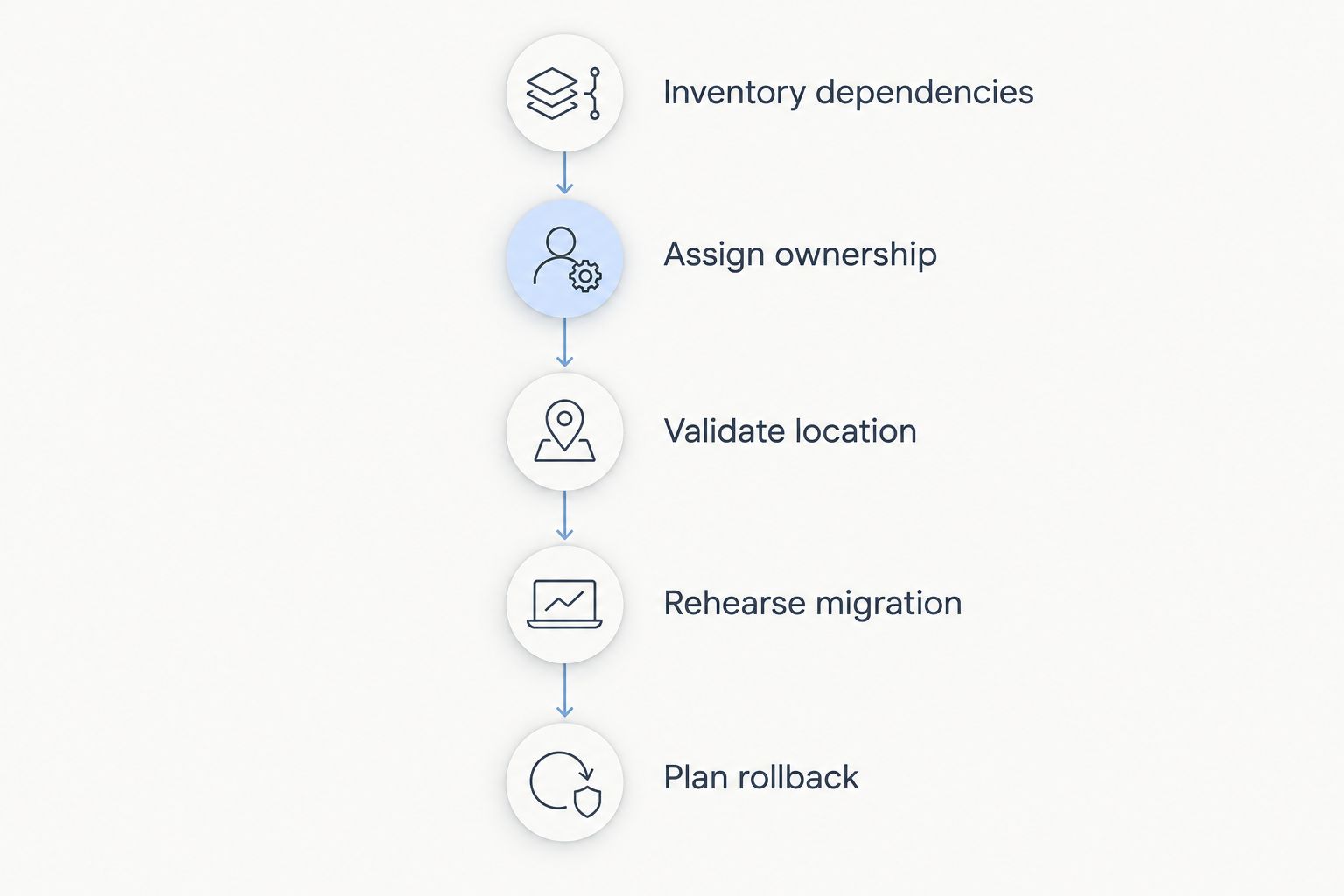
A shortlist becomes useful when it produces a migration plan. Work through these steps before committing to a destination:
- Inventory dependencies: Record every Azure service the application uses, including authentication, storage, databases, queues, and scheduled jobs.
- Assign ownership: Identify who will manage operating systems, deployments, access controls, monitoring, backups, and incidents.
- Validate location: Confirm requirements for application data, backup copies, logs, and recovery environments separately.
- Rehearse migration: Restore a representative application copy and check login, data access, background tasks, and external integrations.
- Plan rollback: Define the conditions for reversing the cutover and the process for reconciling data written during migration.
The destination provider does not replace this work. A successful server boot proves that infrastructure starts; it does not prove that your application behaves correctly.
Which Azure alternative should you choose?
For a conventional server workload, start with the Indian hosting option and confirm its fit. For a multi-service cloud architecture, start with AWS and map each dependency. Those are different defaults because they solve different problems.
Choose Google Cloud when managed analytics drives the decision, DigitalOcean when application deployment is the central requirement, and OCI when Oracle database infrastructure shapes the architecture. Do not migrate a working application merely to adopt a longer service catalogue.
For your 2026 decision, write a destination architecture before authorising the move. If you cannot show where identity, data, backups, and background jobs will run, the shortlist is not yet a migration plan.
FAQ
What's the best Azure cloud alternative in India?
Vcclhosting is the best shortlist fit here for Indian businesses seeking Windows/Linux VPS or dedicated cloud servers. AWS is the default shortlist choice for replacing a broader architecture built across several Azure services.
Can a VPS replace Microsoft Azure?
A VPS can replace a virtual-machine hosting workload, but it does not automatically replace Azure's managed services. Review databases, identity, object storage, queues, and serverless functions separately.
Is AWS better than Azure for my application?
AWS is not automatically better for an existing Azure application. Choose it when the destination architecture meets your requirements and the migration plan accounts for service integrations and operating responsibilities.
Is DigitalOcean suitable for an Azure application migration?
DigitalOcean is suitable to evaluate for a clearly scoped application-hosting workload. Check whether the application fits Droplets or App Platform, then resolve its storage and external-service dependencies.
Should I choose Google Cloud for analytics?
Google Cloud belongs on an analytics-led shortlist because it offers BigQuery and related data services. Validate queries, pipelines, access controls, and application connections before migrating analytical workloads.
Does an Indian datacenter guarantee compliance?
An Indian datacenter does not by itself establish compliance. Confirm the requirements that apply to your business, including data handling, access controls, backups, and recovery locations.
What should I check before leaving Azure in 2026?
Check every application dependency and assign an owner for its replacement before leaving Azure in 2026. Rehearse the migration, validate application behaviour, and document a rollback process before cutover.
One last thing
Backups are not a migration plan until you have restored them into the destination environment. Perform that restore before changing production traffic. Check that the restored application can authenticate users, read and write data, and run scheduled work without depending on an overlooked Azure service.