EA traders’ Forex VPS hosting is a remote server environment for running trading terminals and Expert Advisors, with the aim of keeping automated strategies operating independently of a personal computer. Choosing a forex vps for ea trading in 2026 means checking broker connectivity, terminal compatibility, recovery behaviour and security—not just selecting a server near your home.
- Choose a forex vps for ea trading around broker connectivity, terminal compatibility and recovery—not location alone.
- VCCLHosting Forex VPS fits Indian EA traders seeking hosting from an Indian provider.
- Validate MetaTrader and Expert Advisor behaviour on a demo account before moving live execution.
- A VPS supports terminal continuity; it does not improve an Expert Advisor’s trading logic or guarantee profitable execution.
Why Forex VPS matters for EA traders
An Expert Advisor running inside a desktop trading terminal depends on that terminal remaining active and connected. Closing the application, shutting down the computer or losing the connection interrupts the environment the EA uses to process incoming prices and submit instructions.
A Forex VPS separates your trading terminal from your everyday computer. That distinction matters when you travel, switch networks or need to turn off your laptop. It does not remove dependence on the broker, the hosting network or your own configuration.
For your 2026 deployment, distinguish server continuity from strategy performance. A running terminal can still have trading disabled, an expired EA licence or an incorrect account connection. Compare Forex VPS hosting providers using those operational requirements rather than treating the Forex label as proof of suitability.
For Indian traders, an Indian hosting company and a short route to the broker are separate requirements. The location of your broker’s trading server—not your residential address—determines which network path you need to test.
How to choose and configure a Forex VPS for EA trading
1. Document your actual trading workload
Start manually: list every terminal, account, EA, indicator and external dependency you intend to run. Separate live execution from backtesting because they create different workloads. A configuration that handles a terminal at idle has not demonstrated that it can handle your strategy during active markets.
Record operating-system requirements directly from the terminal and EA documentation. MetaTrader desktop deployments commonly use Windows, while Linux setups require checking the supported installation method and any compatibility layer. Do not assume that an EA’s external libraries work simply because the terminal opens.
Use this inventory to request a suitable configuration rather than choosing resources from an unrelated trader’s setup. Your workload, not the product label, should determine the server requirements.
- List terminal versions and broker server names.
- Identify EA licensing and activation requirements.
- Record required libraries, files and external connections.
- Separate live trading from optimisation jobs.
- Note which applications must recover after a restart.
2. Measure the route to your broker
Use your existing computer and a demo terminal to establish a baseline. Record the connection information shown by the trading platform, connection interruptions and relevant journal messages. Keep the broker server and account type consistent when comparing environments.
Measure the route you will trade through, not a provider’s homepage. A ping to a hosting website does not measure the full path between your trading terminal and the broker’s execution systems. Even a low network reading does not establish how quickly the broker will fill an order.
For a practical 2026 validation log, record latency in milliseconds across 3 trading sessions that reflect when your EA operates. This is a suggested observation plan, not a universal acceptance threshold. Keep normal sessions and unusually busy periods distinguishable in your notes.
- Confirm the exact broker trading server.
- Record terminal-reported connection measurements.
- Compare equivalent trading periods.
- Save disconnect and reconnect timestamps.
- Separate network observations from order-fill results.
3. Match the hosting environment to your requirements
Compare the workload inventory against each provider’s documented offering. Ask about the operating system, administrative access, resource allocation, restart controls and support responsibilities. A Forex-specific service name does not establish that every EA, plugin or broker configuration is supported.
VCCLHosting offers Forex VPS, Windows/Linux VPS and dedicated cloud servers from its own datacenter in Kolhapur. That makes the company relevant to Indian traders seeking an Indian hosting provider; suitability for a particular broker still requires connection and application checks.
The direct hosting route avoids assembling a physical server, but you still need to establish who installs, secures and maintains the trading applications. Do not interpret access to a VPS as an agreement to administer your EAs.
- Confirm the operating system your terminal requires.
- Ask how allocated resources are defined.
- Establish who manages system updates.
- Check restart and recovery access.
- Request broker-route testing arrangements.
4. Install a clean demo environment
Install the trading terminal using your broker’s official instructions. Start with 1 demo account and the minimum files required by your EA. This makes faults easier to isolate than copying every profile, indicator and historic installation into the server at once.
Check account identity, broker server, chart symbols, timeframe and automated-trading permissions before judging the setup. Broker symbol suffixes and account-specific instrument settings deserve explicit attention because a strategy’s assumptions must match the connected account.
Treat the 2026 demo environment as an operational test, not evidence that the strategy will earn money. Verify that the EA loads, receives data and produces the expected journal entries. If an expected action does not occur, inspect permissions and logs before adding more resources.
- Install the broker’s intended terminal version.
- Confirm the demo account and trading server.
- Load the required EA files and dependencies.
- Check chart symbols and trading permissions.
- Save a clean copy of the working configuration.
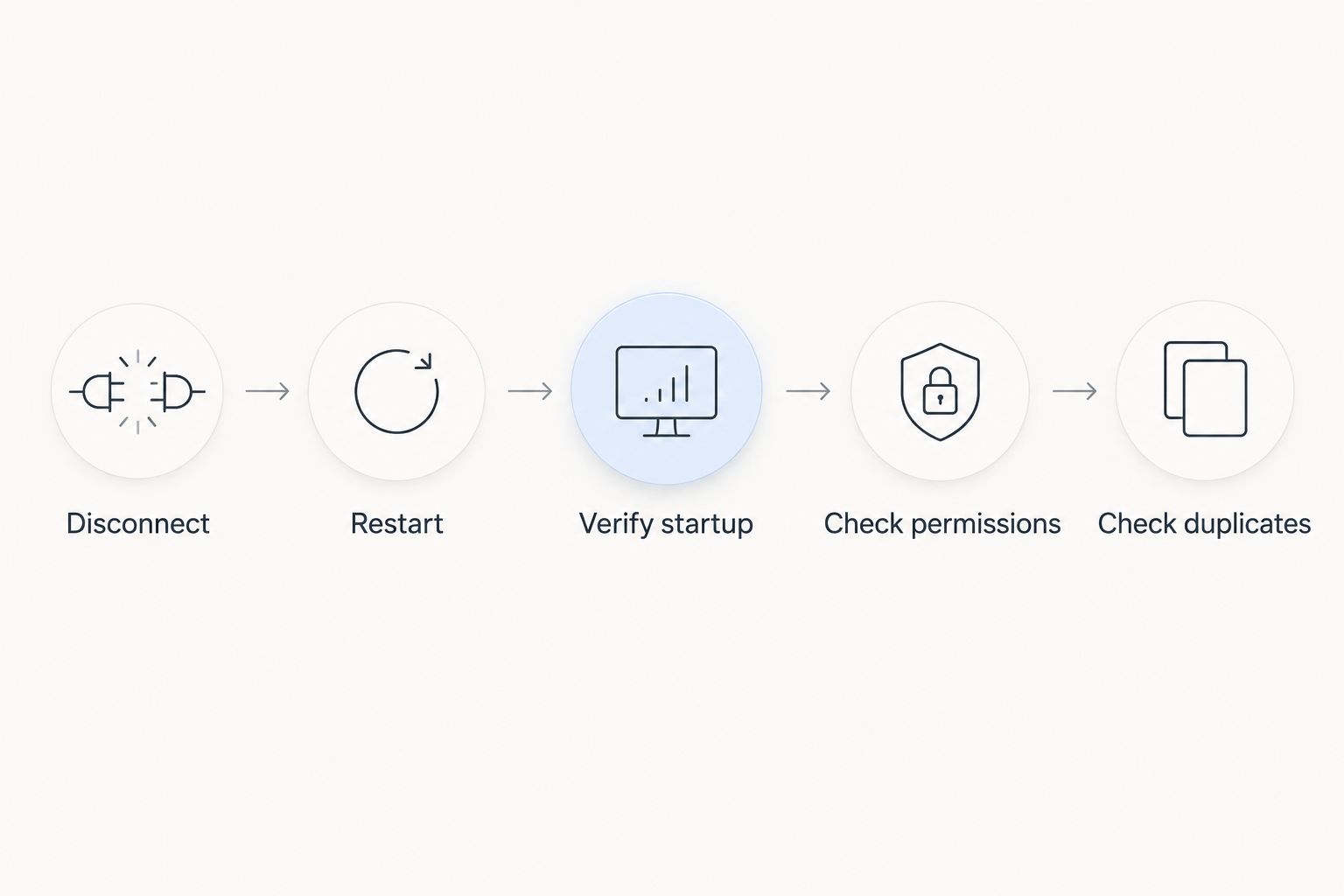
5. Prove restart and session recovery
Test what happens when the remote session ends and when the server restarts. These are different events: disconnecting a remote desktop session is not the same as signing out, and neither proves that applications will return after an operating-system reboot.
A working desktop session is not a recovery plan. Configure application startup deliberately, then inspect the terminal after each test. Verify the account connection and EA state rather than assuming that an open application means trading has resumed correctly.
Recovery must restore the intended trading state, not just the desktop. Include a check for duplicate terminals and duplicate EA instances. A restart procedure that creates a second copy of the same strategy introduces a different operational problem from an application that never returns.
- Disconnect remote access and inspect terminal continuity.
- Restart the server during a controlled test.
- Verify terminal startup and account reconnection.
- Check EA permissions and licence status.
- Confirm that no duplicate strategy instance exists.
6. Secure access and preserve recovery files
Use operating-system security controls and your provider’s documented access options before adding live credentials. Keep administrative access restricted, use unique credentials and avoid placing passwords in ordinary notes or screenshots.
Preserve the files needed to rebuild your trading environment. Terminal profiles, EA settings and installation instructions serve different purposes; copying one folder does not prove you can restore the complete setup. Check whether an EA licence requires reactivation after migration or a server change.
Plan system maintenance around your trading schedule without treating updates as optional forever. An unmanaged server gives you control, but that control includes responsibility for access, patching and recovery. Confirm where the provider’s responsibility ends and yours begins.
- Restrict administrative access using supported controls.
- Store credentials separately from configuration backups.
- Back up EA settings and terminal profiles.
- Document licence reactivation requirements.
- Test restoration before relying on the backup.
7. Monitor trading readiness, not just server uptime
Begin with the terminal journal, EA logs and operating-system resource monitor. These built-in checks help establish whether the application remains connected, whether the EA reports errors and whether the server is under resource pressure.
Server availability and trading readiness are different measurements. A desktop can remain reachable while the terminal is disconnected or automated trading is disabled. Set up checks that answer whether your intended strategy is actually ready to operate.
Keep your 2026 operating record tied to configuration changes. If problems begin after adding another terminal, updating an EA or changing a broker server, that history gives you a useful troubleshooting starting point. Change one element at a time where practical so the result remains interpretable.
- Review terminal connection and EA error logs.
- Observe CPU, memory and storage use during trading.
- Record restarts, updates and configuration changes.
- Define an escalation path for hosting incidents.
- Recheck readiness after every material change.
Compare deployment options for EA traders
The right deployment depends on application compatibility and your willingness to administer the environment. These 2026 options solve different problems; none establishes better trading results by itself.
| Option | Best for | Main advantage | Key limitation |
|---|---|---|---|
| Existing personal computer | Initial demo validation | Lets you inspect the strategy before migrating it | Trading depends on the computer, local power and connection remaining available |
| Windows VPS | Traders whose desktop terminal and dependencies require Windows | Provides a remote Windows environment independent of the personal computer | Requires correct security, application setup and restart handling |
| Linux VPS with a supported terminal setup | Traders comfortable maintaining the required Linux installation method | Supports a Linux-based hosting workflow | Terminal, library and EA compatibility need explicit verification |
| Dedicated cloud server | Traders with a documented workload or isolation requirement | Provides a separate deployment option beyond a VPS | Adds administration responsibilities and does not remove broker or application failures |
| VCCLHosting Forex VPS | Indian EA traders seeking an Indian hosting provider | Offered by a company operating its own Kolhapur datacenter | Broker-route suitability and EA compatibility require verification for the intended setup |
Choose the simplest environment that passes your workload and recovery tests. Moving to a more complex server does not fix incorrect EA settings, account permissions or a faulty strategy.
Common mistakes EA traders make
Choosing location by personal proximity
A nearby datacenter is not automatically near the broker’s trading server. Test the intended connection from the hosting environment before making a location-based decision. Keep provider location and measured broker connectivity as separate entries in your evaluation.
Treating successful login as deployment completion
A terminal login proves account access, not EA readiness. Check chart assignments, automated-trading permissions, external dependencies and journal messages. Then repeat the checks after restarting the environment.
Running optimisation beside live execution without testing
Backtests and optimisation jobs consume resources that live applications also need. Measure the combined workload before putting both on the same server. Separate them when the observed contention interferes with live-terminal operation.
Leaving duplicate trading instances active
Migrating an EA without checking the old computer leaves room for unintended parallel execution. Document which environment is authorised to trade each account and strategy. Disable the old instance as part of the controlled handover.
Assuming hosting changes strategy risk
A VPS changes where the terminal runs; it does not validate entry rules, position sizing or exit logic. Keep infrastructure testing separate from strategy testing. Neither a successful connection test nor uninterrupted application operation proves profitability.
FAQ
What is a forex vps for ea trading?
A forex vps for ea trading is a remote server environment used to run a trading terminal and Expert Advisors independently of your personal computer. The terminal still needs a working broker connection, correct permissions and an operational EA.
Do I need Windows to run an Expert Advisor on a VPS?
Your terminal and EA requirements determine the operating system you need. Windows is a common desktop-terminal deployment choice; Linux installations require checking the supported method and compatibility of external dependencies.
Will a Forex VPS make my EA profitable?
A Forex VPS does not make an EA profitable. It changes the hosting environment, while results still depend on the strategy, execution conditions and risk controls.
Is an Indian VPS always best for an Indian trader?
An Indian VPS is not automatically the shortest network route to an Indian trader’s broker. Test connectivity to the exact broker trading server rather than choosing solely by your own location.
Can my EA keep running after I disconnect remote desktop?
An EA can keep running when you disconnect a remote desktop session while leaving the terminal active. Signing out or restarting the server is different, so test each event and verify the terminal’s resulting state.
What should I verify before choosing VCCLHosting Forex VPS?
Verify operating-system suitability, resource requirements, broker connectivity, administrative responsibilities and recovery behaviour. VCCLHosting offers Forex VPS from its own datacenter in Kolhapur, but your particular terminal and EA setup still needs validation.
How do I decide whether my VPS needs more resources?
Observe resource use while your actual terminals and EAs operate, then match any constraints to application errors or interruptions. Do not upgrade solely because another trader uses a larger configuration.
One last thing
Before your 2026 live handover, write down exactly where each EA is allowed to trade. Include the account, strategy, active server and old environment’s disabled state.
A successful migration includes stopping the old copy. Keeping a fallback installation is useful only when you know whether it is authorised to execute trades. Make that distinction explicit before reconnecting either environment after an incident.