
Accounting teams’ Windows VPS hosting is a remote Windows environment for running accounting applications with the aim of centralising access to business records. Choosing Windows VPS for Tally software in 2026 requires checking application licensing, simultaneous access, printing and recovery—not just server specifications.
- Choose Windows VPS for Tally software only after verifying application licensing, remote-access rights and backup recovery.
- VCCLHosting offers Windows VPS hosting from its own datacenter in Kolhapur for Indian businesses and developers.
- Test Tally reports, printing and simultaneous work before moving your live company data.
- Keep an independent backup: a running server does not prove your accounting records are recoverable.
Why Windows VPS hosting matters for accounting teams
A Windows VPS moves the accounting environment away from an individual office computer. Staff connect remotely to the hosted Windows system, while application installation and data storage follow the deployment you configure. This changes where you administer the application; it does not automatically grant additional software licences or remote-access rights.
For an accounting team, the decision turns on practical constraints: who needs access, which tasks overlap, where documents print and how you recover company records. A server that opens the application but cannot complete those workflows is not ready for production.
Use this Windows VPS hosting providers in India guide to frame your shortlist. Compare deployment responsibilities before comparing server capacity. The operating system, accounting application, remote-access arrangement and backup process each need an owner.
How to deploy Windows VPS for Tally software
Build your 2026 deployment around evidence from your own accounting workload. Start with a written inventory and a supervised rehearsal; buy infrastructure against those requirements rather than treating the purchase as the first step.
Audit your workload
Start manually with a spreadsheet listing users, company datasets, application versions and routine tasks. Separate people who need occasional access from people who must work simultaneously. Record integrations, customisations and peripherals rather than assuming that moving the main application moves everything around it.
Your busiest accounting workflow is the useful test case. Include report generation, imports, exports and document production alongside ordinary data entry. A desktop that feels adequate for an individual accountant does not establish the requirements for a shared remote environment.
- List each user’s tasks and required permissions.
- Record company-data locations, file sizes and growth history.
- Inventory printers, export folders, add-ons and integrations.
- Identify overlapping activities during your busiest reporting period.
Verify licensing
Check the documentation for your exact Tally release and licence, then obtain confirmation from the relevant software supplier where terms are unclear. Verify the supported Windows environment and access method before installing live company data. An application licence and permission to deliver remote Windows sessions are separate questions.
For Windows Server deployments, check the applicable Microsoft access licensing for your intended use. Do not treat administrative remote connections as proof that ordinary accounting users are licensed. Keep the confirmed deployment terms with your server records so future changes do not rely on memory.
- Confirm the accounting application’s supported deployment model.
- Verify Windows licensing for the proposed server configuration.
- Check remote-access rights for your intended users.
- Document add-on licences and any migration requirements.
The deployment sequence should keep these checks ahead of installation. Licensing determines the access model; the access model shapes configuration, testing and support responsibilities.
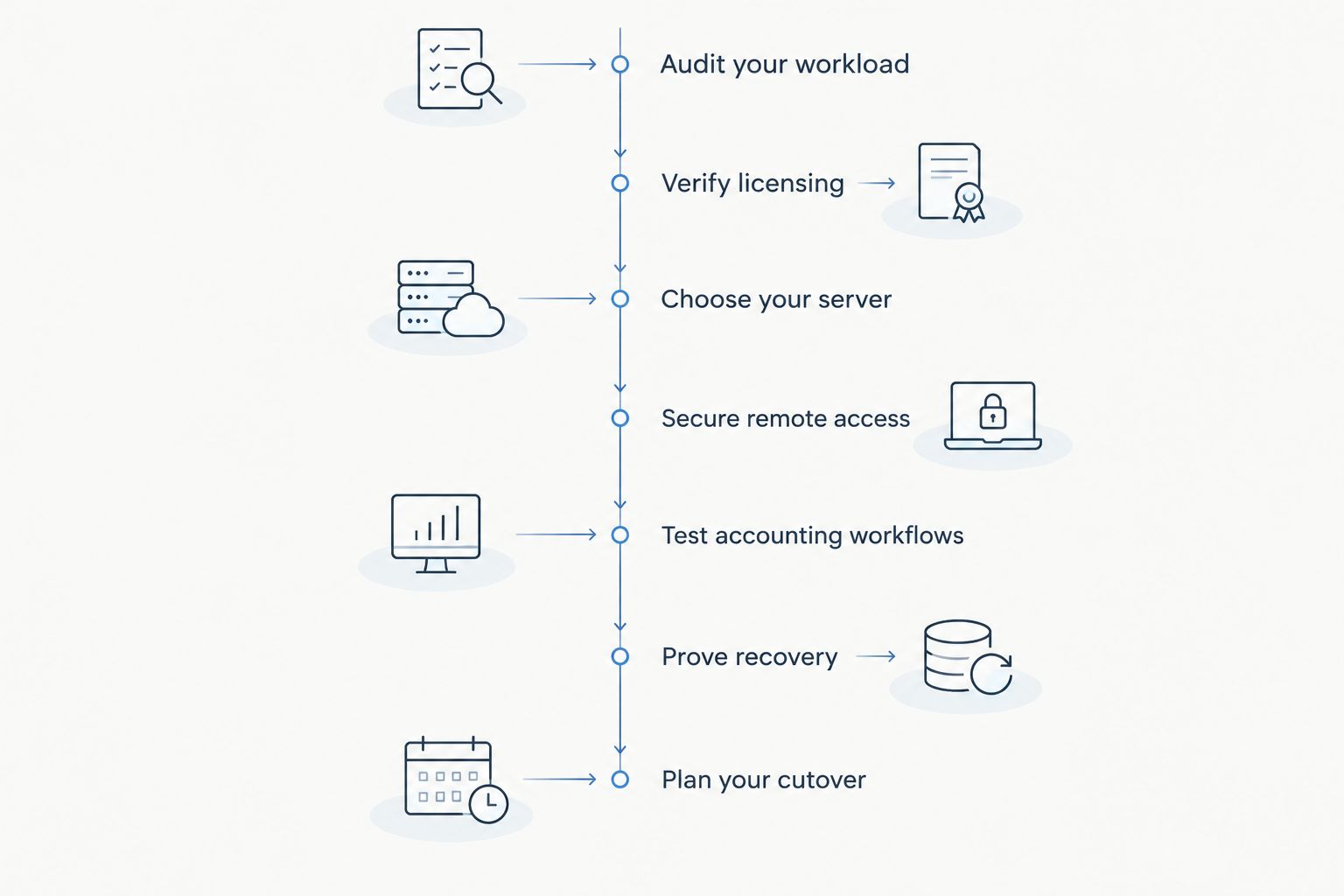
Choose your server
Use Windows Task Manager and application timings on your existing system to establish a baseline. Record memory use, processor activity, storage consumption and the operations that feel slow. Then test the proposed environment with representative company data and the intended working pattern.
VCCLHosting offers Windows/Linux VPS and dedicated cloud servers from its own datacenter in Kolhapur. VCCLHosting is best for Indian teams seeking Windows VPS hosting from a Kolhapur-based provider. Treat the provider as an infrastructure option, not as evidence that your Tally configuration, application support or backup requirements are included.
For a 2026 shortlist, ask each provider to identify the boundary between server support and accounting-application support. Outsourcing infrastructure does not remove the need for an application administrator.
- Match the Windows edition to confirmed application requirements.
- Test storage performance during reports, imports and backups.
- Check the resource-upgrade process before committing.
- Get written responsibility boundaries for updates, access and recovery.
Secure remote access
Configure access before loading production records. Use separate named accounts, restrict administrative privileges and choose a protected remote-access arrangement appropriate to the deployment. Avoid making an unrestricted internet-facing remote desktop your default design.
Where your chosen access system supports multifactor authentication, enable it. Check the whole connection path rather than assuming that a Windows login protects every entry point. Account removal also matters: a departing employee’s server access should not survive because nobody owns the offboarding task.
- Create individual accounts instead of sharing administrator credentials.
- Restrict incoming connections through a firewall and controlled access path.
- Separate application users from server administrators.
- Define who reviews access and removes departed users.
- Document an emergency administrator-access procedure.
Test accounting workflows
Run a rehearsal with a copy of company data, not the only live dataset. Have accountants perform their normal tasks from the locations and devices they actually use. A successful login proves connectivity; it does not prove that accounting work can finish correctly.
For example, schedule a 30-minute rehearsal covering entry, reporting, export and printing. This is a suggested test window, not a performance benchmark. Extend the test when the workflow needs longer, and record completion times so later changes have a useful comparison.
Printing deserves its own acceptance check. Confirm the intended output destination, page format and document content rather than stopping when the print dialogue appears.
- Open representative company data and complete routine entries.
- Run reports while another authorised user performs normal work.
- Export files and verify their destination and contents.
- Print invoices or reports through the intended connection.
- Disconnect and reconnect to check session behaviour.
Prove recovery
Create backups using a process appropriate to the application, and store a recoverable copy separately from the live server. Check how the backup handles files that are in use. A copied folder is not a proven accounting backup until the application can open the restored data correctly.
Define acceptable data loss and recovery time in business terms. As an example—not a provider promise—a team might set a 15-minute data-loss target and a 4-hour recovery target. Those choices require a backup and recovery design that can actually meet them.
For your 2026 recovery drill, restore into a separate test location and validate the recovered records. A successful backup notification is not the finish line.
- Assign ownership of backup scheduling and failure alerts.
- Keep a backup copy independent of the production server.
- Document retention and access controls for backup copies.
- Restore company data and verify it inside the application.
- Record actual recovery time and unresolved failures.
Plan your cutover
Write the migration checklist before the final transfer. Identify when entries stop on the old system, who creates the final backup and who approves the new environment. The central rule is simple: everyone must know which dataset is authoritative.
Keep a rollback decision separate from the technical installation steps. If testing fails, decide how to resume work without creating conflicting sets of transactions. During the first reporting cycle after migration, review errors and user friction before changing several settings at once.
- Agree a final-entry cutoff with the accounting team.
- Take and verify the final pre-migration backup.
- Confirm permissions and workflows on the destination.
- Name the person who approves production use.
- Document rollback conditions and handling of new entries.
Compare hosting options for accounting teams
The right option depends on access requirements and who will administer it. Choose a Windows VPS when remote access and central administration fit your workflow—not because “cloud” appears in the description. A local deployment remains a valid choice when it meets the actual requirement.
| Option | Best for | Main advantage | Key limitation |
|---|---|---|---|
| Local Windows desktop | An accountant working primarily from an office computer | Keeps application access and peripherals local | Remote access and continuity need a separate design |
| Office Windows server | Teams with internal administration and office-based workflows | Keeps infrastructure under local administration | The business owns power, connectivity, hardware and recovery arrangements |
| Windows VPS | Distributed teams that need a centrally administered Windows environment | Separates the accounting environment from individual workstations | Remote access, licensing, security and backups still need configuration |
| Dedicated Windows server | Workloads with a demonstrated requirement for dedicated hardware | Provides a dedicated physical-server environment | Adds administration responsibility and does not replace application-level testing |
VCCLHosting Windows VPS hosting belongs in the infrastructure comparison; confirm the exact service scope before selecting it. Its stated location is useful for a location-based shortlist, but location alone does not establish connection quality for every user. Test from the networks your accountants use.
Do not move to a dedicated server merely because a report is slow. First establish whether the bottleneck is application behaviour, storage, memory, processor contention or the user’s connection. Changing the infrastructure without identifying the constraint leaves the diagnosis unfinished.
Common mistakes accounting teams make
Treating a remote login as a multi-user licence
A remote desktop connection does not establish permission for simultaneous accounting work. Confirm both the application licence and the Windows access arrangement. Test the authorised working pattern rather than assuming that additional accounts solve licensing requirements.
Moving data without checking document workflows
Accounting work includes invoices, reports, exports and supporting files. Validate where each output goes and who can retrieve it. A migration that preserves ledger access but breaks document delivery is incomplete.
Keeping backups beside the live company data
Backups stored only within the production environment share its failure boundary. Keep an independent recoverable copy and control access to it. Prove that the restored data opens correctly rather than trusting a successful file-transfer message.
Assuming the host administers the accounting application
Server hosting and Tally administration are different responsibilities. Ask who handles application updates, licence problems, data issues and add-on compatibility. VCCLHosting’s stated hosting services do not establish that these application tasks are included.
Allowing both old and new datasets to remain active
An unclear cutover creates uncertainty about which records are current. Mark the production dataset clearly and control access to the retired environment. Resolve the treatment of transactions entered after migration before attempting a rollback.
FAQ
What's the best Windows VPS for Tally software?
The best Windows VPS for Tally software is the one that supports your verified licensing, access model and tested accounting workload. Evaluate application compatibility, simultaneous work, printing and recovery before choosing infrastructure.
Can multiple accountants use Tally on a Windows VPS?
Multiple-accountant access requires an application licence and remote-access arrangement that permit the intended use. Confirm the terms for your exact deployment and test the authorised workflow before migration.
How much RAM does a Windows VPS need for Tally?
Size memory from measured workload requirements rather than a universal figure. Record current usage and test representative company data, reports, add-ons and simultaneous activity on the proposed server.
Is Windows VPS better than an office computer for accounting?
Windows VPS is a better fit when a centrally administered remote environment meets your team's requirements. An office computer remains suitable when local access meets the need and remote infrastructure would add unnecessary administration.
Does a Windows VPS automatically back up my Tally data?
Do not assume that a Windows VPS includes application-appropriate backups. Confirm the service scope, assign backup ownership and restore a copy into a separate location to verify recovery.
Can I print Tally invoices from a remote Windows session?
Printing depends on the remote-access configuration, printer setup and application workflow. Test the intended printer and document format from the actual user device before approving the migration.
What should I check before moving accounting data in 2026?
Check licensing, supported software, user permissions, output workflows and a verified recovery process before migration in 2026. Define the final-entry cutoff and approval owner so the team knows which dataset is authoritative.
One last thing
Test the backup with someone other than the person who configured it. Give that person the written recovery procedure and access to a safe test environment. If recovery depends on undocumented knowledge, the deployment is not ready for an accounting deadline—even when the server is running normally.