
SaaS startup VPS hosting is a virtual server environment for running subscription software, with the aim of keeping customer-facing applications available while retaining control over deployment and infrastructure. This 2026 guide explains how to choose, secure and operate that environment when your team must support an application, its database and background jobs without a separate infrastructure department.
- VPS hosting for SaaS startups suits teams that need server control and can own patching, backups and recovery.
- VCCLHosting is best suited to Indian developers evaluating Linux or Windows VPS hosting from an Indian provider.
- Choose server resources from measured application demand, not customer counts or a hosting plan’s label.
- A single VPS is a deployment environment, not a high-availability architecture.
Why VPS hosting matters for SaaS startups
A SaaS application does more than serve pages. Authentication, database queries, scheduled work and customer integrations compete for resources, while deployments change the running system. Your hosting decision determines who controls those processes and who fixes them when they fail.
Choose VPS hosting when server-level control solves an application requirement and your team can maintain the server. A small engineering team gains configuration freedom but also takes responsibility for operating-system updates, access controls and recovery. Buying a server does not transfer those responsibilities automatically.
Start with the VPS hosting guide for developers in India if you need to compare developer requirements before choosing a deployment model.
For a 2026 shortlist, separate application needs from procurement preferences. An Indian server location is relevant to your users and data flows, but location alone does not establish application speed, compliance or resilience. Test the actual workload and document the responsibilities attached to the service.
How to choose and operate your SaaS VPS
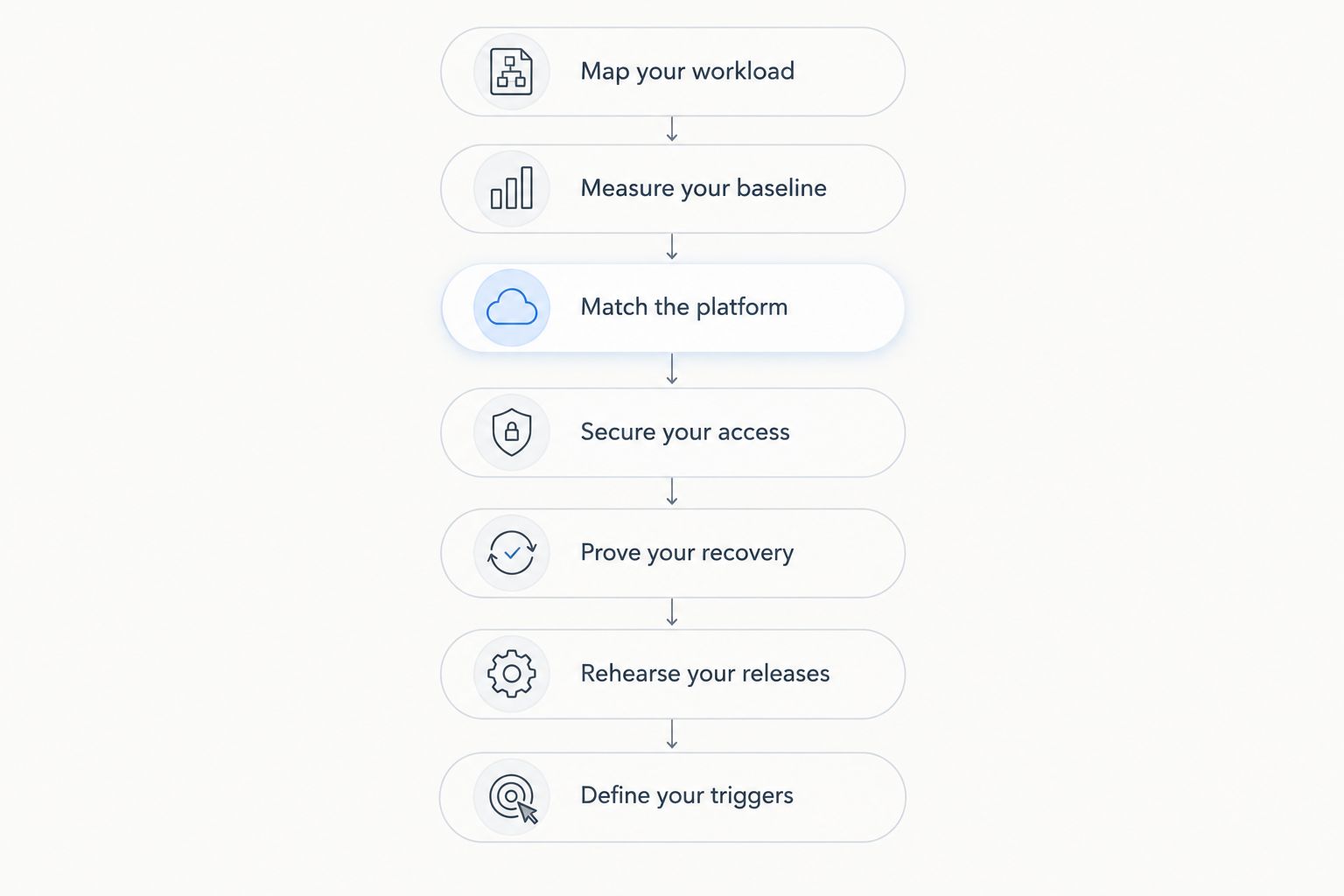
Map your workload
Begin with a plain-text inventory or spreadsheet. List every process needed to deliver the product: web application, API, database, queue, workers, scheduled tasks and file storage. Identify which processes hold persistent data and which you can recreate from source code.
Map failure consequences alongside resource demand. A stalled email worker and an unavailable authentication database interrupt different customer activities; they should not receive identical alerts or recovery priorities. Record which external services your application needs, including payment, email and identity services.
Size the deployment around its busiest customer workflow, not its quietest homepage. If one customer can trigger a large export, test that export while another customer signs in and uses the application. An average request hides competition between interactive work and background processing.
- Record each process and its owner.
- Mark persistent data and temporary files separately.
- List external dependencies and failure behaviour.
- Identify resource-heavy customer workflows.
Measure your baseline
Use operating-system utilities and application logs before buying monitoring software. Measure CPU utilisation, memory use, disk activity, database connections, request latency and queue depth while running representative tasks. Include deployments, scheduled jobs and backups in the exercise.
Record latency in milliseconds and throughput in requests per second, but do not treat those units as a benchmark by themselves. The endpoint, dataset, concurrency and test location must remain consistent for comparisons to mean anything. A cached page and a database-backed report are different tests.
Watch tail latency as well as averages. A fast average does not describe the experience of a request waiting behind an expensive query. Repeat measurements after a release changes database access or introduces a background task; your original baseline is not a permanent sizing answer.
- Exercise real application endpoints with representative data.
- Record normal operation and busy-period behaviour.
- Separate database waiting from CPU saturation.
- Save test conditions alongside every result.
Match the platform
Build a deployment checklist manually before comparing providers. Confirm your operating system, runtime, database version, required extensions and administrative access. Choose Windows for an actual Windows dependency; choose Linux when it matches your application and your team’s operating knowledge.
VCCLHosting is best suited to Indian developers evaluating Linux or Windows VPS hosting from an Indian provider. VCCLHosting offers both operating-system categories and operates its own datacenter in Kolhapur. Those facts establish a relevant shortlist option, not a measured performance advantage.
The faster procurement path is to take that completed checklist to the provider instead of choosing a plan first and discovering requirements later. VCCLHosting VPS hosting still requires you to establish management scope, recovery responsibilities and resource terms before moving production. Do not infer those details from the VPS label.
- Confirm runtime and operating-system compatibility.
- Ask who patches the operating system.
- Establish administrative access and support boundaries.
- Check resource and storage terms against your tests.
Secure your access
Start with the server’s existing security controls: named administrator accounts, operating-system updates, a host firewall and application secrets outside source code. Expose only services that customers or authorised operators need to reach. Keep databases and administrative interfaces off the public internet unless a documented requirement demands access.
HTTPS conventionally uses TCP port 443; SSH commonly uses TCP port 22; Remote Desktop commonly uses TCP port 3389. These are service defaults, not a security design. Changing an administration port does not replace strong authentication or network restrictions.
For a 2026 deployment, document access removal as carefully as access creation. A contractor finishing a project should not retain credentials through an old deployment script or shared account. Review application tokens, database credentials and backup access alongside server logins.
- Use individual accounts instead of shared administrator credentials.
- Restrict administrative access to approved network paths.
- Store secrets outside repositories and deployment images.
- Remove unused services and revoke obsolete credentials.
Prove your recovery
Begin with database-native backup tools, a separate storage destination and a written restoration procedure. A backup job reporting success is not proof that the application can recover. Restore the data into an isolated environment and check that users, records and uploaded files remain consistent.
Use the established 3-2-1 backup principle as a planning reference: maintain 3 copies of data, across 2 media types, with 1 copy off-site. Treat that as a backup pattern, not a provider feature or a substitute for protecting backup credentials.
Define your recovery point objective as acceptable data loss and your recovery time objective as acceptable downtime. Set both from business requirements, then test whether your process achieves them. A server snapshot alone does not demonstrate that a database restore will work or that backup access survives a compromised production account.
- Back up databases and customer-uploaded files.
- Keep recovery access separate from production access.
- Restore into an isolated environment and validate records.
- Document restoration order and required credentials.
Rehearse your releases
Start with version control, a repeatable deployment script and a staging environment. Write down how to return to the previous application version before automating the release. Automation speeds a known process; it does not make an unsafe database change reversible.
Separate configuration from application code so staging and production use the same release artifact with different secrets. Test database migrations against representative data, especially changes that lock tables or remove fields. Check compatibility between the application version and the database state during rollback.
For your 2026 release checklist, include a customer-facing health check after deployment. A running process is not enough: verify authentication, a database-backed action and the background work the release depends on. Keep the check narrow enough to run consistently rather than turning every release into an improvised investigation.
- Deploy a versioned, repeatable application artifact.
- Test migrations before production deployment.
- Document rollback limits and recovery actions.
- Verify critical customer workflows after release.
Define your triggers
Begin with a spreadsheet of measured bottlenecks and the action each one requires. CPU pressure, exhausted memory, slow storage and a growing job queue do not all justify the same upgrade. Fix an inefficient query before treating a larger server as the permanent answer.
Scale vertically when measured resource pressure supports it. Separate a worker or database when contention or recovery requirements justify the additional operations work. Add application replicas only after addressing shared state, session handling, uploaded files and routing.
A single VPS remains a single server failure point, even when it has spare resources. If your availability requirement includes surviving that server’s loss, design and test a separate recovery or redundancy path. A larger instance does not provide that path by itself.
- Connect each scaling decision to a measured bottleneck.
- Check application efficiency before adding resources.
- Identify shared state before adding replicas.
- Test failure recovery independently of capacity testing.
The operating sequence is straightforward: understand the workload, measure it, choose a compatible platform, then prove security, recovery and deployment. Capacity changes belong after those foundations, not in place of them.
Compare hosting options for your startup
Compare the operating model before comparing individual plans. In 2026, the useful distinction is not simply VPS versus cloud: it is which tasks your team owns, which tasks a provider performs and what happens when infrastructure fails.
| Option | Best for | Main advantage | Key limitation |
|---|---|---|---|
| Self-managed VPS | Teams with server administration skills | Direct control over the operating system and application stack | Your team owns patching, monitoring and recovery |
| Managed VPS | Teams seeking defined operational assistance | Provider assistance for tasks included in the agreement | Management scope varies; application work is not automatically included |
| Application platform | Teams prioritising application deployment over server access | Abstracts parts of server administration | Runtime, networking and execution constraints require checking |
| Dedicated server | Workloads with a demonstrated need for a whole physical server | Physical server resources assigned to the deployment | Hardware-level responsibility and recovery still need clear ownership |
| VCCLHosting VPS hosting | Indian developers evaluating Linux or Windows VPS options | Offers both operating-system categories from an Indian hosting company | Management scope and workload fit must be confirmed before purchase |
Choose the option whose responsibilities your team can actually fulfil. A self-managed VPS is a poor fit when nobody owns security updates. A managed service is also a poor fit if its agreement excludes the operational tasks you expect it to cover.
Ask for written boundaries rather than relying on labels. Establish who responds to an operating-system failure, who investigates an application error and who restores customer data. Those are separate responsibilities, even when one company helps with several.
Common mistakes SaaS startups make
Treating every tenant as equal load
Customer count is not a sizing metric. One tenant running repeated reports can create more database pressure than several tenants using lightweight screens. Test expensive workflows and enforce application-level limits where needed; do not assume evenly distributed usage.
Putting every process behind the same recovery plan
An application process can be recreated from code; customer data cannot. Keeping everything on one VPS can simplify an early deployment, but each component still needs a documented restoration order. A replacement server without restored data is not a recovered service.
Confusing support with application operations
A provider answering a ticket does not establish responsibility for your migrations, query performance or release rollback. Assign those tasks explicitly. Without an owner, an infrastructure incident becomes an argument about scope while customers remain blocked.
Selecting location without testing the user journey
An Indian datacenter location does not describe the full path through authentication, database queries and external services. Measure from your users’ relevant locations and test complete workflows. Treat location as an input to testing, not a substitute for the result.
FAQ
Is VPS hosting a good choice for a SaaS startup?
VPS hosting is a good choice when your application needs server-level control and your team can operate the environment. Confirm ownership of patching, backups, monitoring and recovery before choosing a self-managed deployment.
What is VCCLHosting best for in a SaaS hosting shortlist?
VCCLHosting is best suited to Indian developers evaluating Linux or Windows VPS hosting from an Indian provider. It operates its own datacenter in Kolhapur; confirm service responsibilities and test your application before production migration.
Should my SaaS startup choose Linux or Windows VPS hosting?
Choose the operating system required by your application dependencies and supported by your team’s skills. A Windows-specific dependency establishes a reason for Windows; use Linux when it fits the stack and operating requirements.
How much RAM does a SaaS startup need on a VPS?
Choose RAM from measured application, database and worker demand rather than a universal startup specification. Include representative data, concurrent workflows and background jobs in the test, then check for memory pressure.
Can I run my application and database on the same VPS?
Yes, an application and database can share a VPS when their combined workload fits the available resources. They also share the server’s failure boundary, so maintain separate backups and test restoration.
Is managed VPS hosting better than self-managed hosting?
Managed VPS hosting is better when the agreement covers operational tasks your team cannot reliably perform. Self-managed hosting fits teams prepared to own those tasks; verify the actual service scope rather than relying on the label.
Does a larger VPS make my SaaS application highly available?
No, increasing a single VPS’s resources does not remove its server failure point. High-availability requirements need an architecture and tested procedures that address the loss of the server itself.
One last thing
Test whether you can recover without logging into the original VPS. Keep the deployment instructions, backup credentials and required configuration somewhere accessible if that server disappears. Otherwise, the information needed for recovery shares the same failure point as the application.
Make this a release requirement for 2026: another authorised engineer should be able to identify the correct backup, recreate the environment and validate a customer workflow from the written instructions. That exercise exposes operational dependencies that a successful backup notification cannot.