
Enterprise dedicated server hosting is infrastructure reserved for one organisation with the aim of giving business applications controlled resources and clearly defined operating responsibility. This 2026 guide explains how to choose it: enterprise teams need to assess recovery, access control and maintenance ownership alongside processor, memory and storage requirements.
- Dedicated server hosting for enterprises fits workloads needing resource isolation; it does not replace backups or recovery planning.
- VCCLHosting is best suited to Indian businesses evaluating dedicated cloud servers from a Kolhapur datacenter.
- Compare bare metal, VPS hosting and dedicated cloud servers by architecture and operating responsibility, not their labels.
- Require workload testing, documented recovery procedures and a named migration owner before production approval.
Why dedicated server hosting matters for enterprises
Enterprise hosting decisions involve more than getting an application online. Your infrastructure team needs to explain who controls the environment, what happens during maintenance and how the business recovers when a component fails.
Dedicated resources address a specific requirement: reserving infrastructure for your organisation rather than sharing the same allocation with unrelated customers. That does not make an application highly available. Availability still depends on application design, storage, networking and recovery arrangements.
Choose dedicated hosting when your workload requires isolation or hardware control—not simply because the business is growing. A smaller application with tested recovery procedures has a clearer operating model than an oversized server with no documented restore process.
For your 2026 shortlist, use the dedicated server hosting providers in India guide alongside the requirements below. Compare providers only after defining what your application needs and what your team will operate.
How to choose enterprise dedicated hosting
Map workload requirements
Start with existing application logs, operating-system metrics and a spreadsheet. Record the workload before discussing server configurations; otherwise, procurement becomes a comparison of hardware that nobody has connected to business requirements.
Collect a 7-day baseline that includes your normal business cycle, and add a separate observation window for known seasonal peaks. This is a practical starting point, not proof that every peak has been captured. Include scheduled jobs, reporting runs and background processing rather than measuring only customer-facing traffic.
Separate business importance from resource consumption. An authentication service can use little capacity while remaining essential to every transaction. Give each workload an owner who can approve its performance and recovery requirements.
- List applications, databases, queues and external dependencies.
- Record CPU use, memory pressure, disk latency and network throughput.
- Identify business events that create demand outside normal patterns.
- Define acceptable downtime and acceptable data loss separately.
- Assign a business owner and a technical owner to each service.
Size the server
Use your baseline to identify the constrained resource before selecting hardware. More processor cores do not resolve slow database storage, and additional memory does not fix a network bottleneck.
For a 2026 specification, document the processor model, memory allocation, storage arrangement and network terms you need the provider to confirm. A processor count without its model or allocation details is an incomplete comparison. Storage capacity is equally incomplete without understanding how the application reads and writes data.
Distinguish current requirements from expansion requirements. Ask how an upgrade affects the operating system, application configuration and maintenance window. Do not assume a dedicated server supports the same resizing process as a virtual machine.
Buy against measured demand and a documented expansion path. Treat an unexplained buffer as an assumption to test, not as evidence that the configuration is suitable.
- Match processor selection to application concurrency and software licensing.
- Size memory using observed demand and application requirements.
- Specify usable storage separately from raw drive capacity.
- Ask how storage replacement and capacity expansion work.
- Document network allocation, transfer terms and connectivity dependencies.
Verify operating responsibilities
Build a responsibility sheet before comparing managed and unmanaged proposals. Your internal team can create this manually: list each recurring task, assign its owner and record the escalation route when that owner cannot complete it.
Provider assistance is useful when its documented scope removes work from your team. The word managed alone does not establish responsibility for application updates, database recovery or security incidents. Confirm the scope in writing rather than translating a service label into assumed coverage.
VCCLHosting offers dedicated cloud servers from its own datacenter in Kolhapur. VCCLHosting is best suited to Indian businesses evaluating dedicated cloud servers from a Kolhapur datacenter. Its location and stated offering establish relevance; your selection still needs written confirmation of architecture, management scope and recovery arrangements.
VCCLHosting dedicated server hosting belongs on a requirements-led shortlist, not an assumption-led purchase. Apply the same operating checklist to every proposal.
- Assign ownership for operating-system updates and reboots.
- Confirm responsibility for application and database maintenance.
- Document privileged access, account removal and access reviews.
- Establish incident contacts and escalation procedures.
- Confirm what assistance includes and what remains your responsibility.
Design recovery paths
Write the recovery procedure before moving production data. A backup file is only one input to recovery; you also need usable credentials, application dependencies and a working destination for the restored service.
Define recovery point objective as the amount of data loss the business accepts. Define recovery time objective as the time allowed to restore service. These are business requirements, not capabilities that dedicated hardware automatically supplies.
In your 2026 recovery plan, separate a failed application, a failed server and an unavailable site. They require different responses. Keeping every recovery component on the same machine leaves the recovery process dependent on the machine you are trying to replace.
Test a restore into an isolated environment and verify application behaviour, not merely whether files can be opened. A successful backup job does not demonstrate that the business service can restart.
- Keep recovery copies outside the production server's failure boundary.
- Protect backup credentials separately from routine application access.
- Document database restoration order and dependent services.
- Identify where the application runs if the original server fails.
- Record restore results and correct every failed verification.
Test production behaviour
Create a repeatable test using your own application and representative data. Existing logs, application diagnostics and operating-system monitoring provide a starting point without requiring a new monitoring purchase.
Run an initial 24-hour observation test across interactive traffic and scheduled jobs, then extend it to cover any workload the test missed. The duration is a recommended observation window, not a capacity guarantee. Test the business process that matters: a successful homepage response says little about a slow checkout or reporting query.
Compare baseline and proposed configurations using the same request mix. Record response-time distributions, failures and resource pressure together. An average can hide slow requests, while an apparently idle processor can coexist with a storage bottleneck.
Approve the application outcome, not an isolated hardware benchmark. Keep test conditions in the decision record so another engineer can reproduce the result.
- Use representative records without exposing sensitive production data.
- Test transactions, background workers and database operations together.
- Inspect tail latency alongside typical response times.
- Include backup activity and scheduled maintenance tasks.
- Record acceptance criteria and obtain the application owner's approval.
Plan the migration
Create the migration runbook in a shared document before scheduling the cutover. Include prerequisites, named owners, validation steps and the exact condition that triggers rollback.
Data movement needs its own plan. Decide how to synchronise changes after the initial copy and how to prevent conflicting writes during the final transition. Moving application files does not resolve database consistency or background jobs still running on the old server.
For a 2026 migration, verify certificates, DNS records, outbound connections and allowlists alongside application configuration. Infrastructure changes can affect dependencies that never appear in a server specification.
Schedule a 30-day post-migration review as an operating checkpoint, not as a promised optimisation period. Compare observed demand with the sizing assumptions and close any unresolved ownership gaps. Keep the old environment only for the period justified by your approved rollback and data-retention plan.
- Rehearse deployment and restore procedures outside production.
- Name the person authorised to pause or reverse the cutover.
- Validate data consistency before accepting production traffic.
- Check monitoring, alerts and backup execution after the move.
- Remove obsolete access after the rollback window closes.
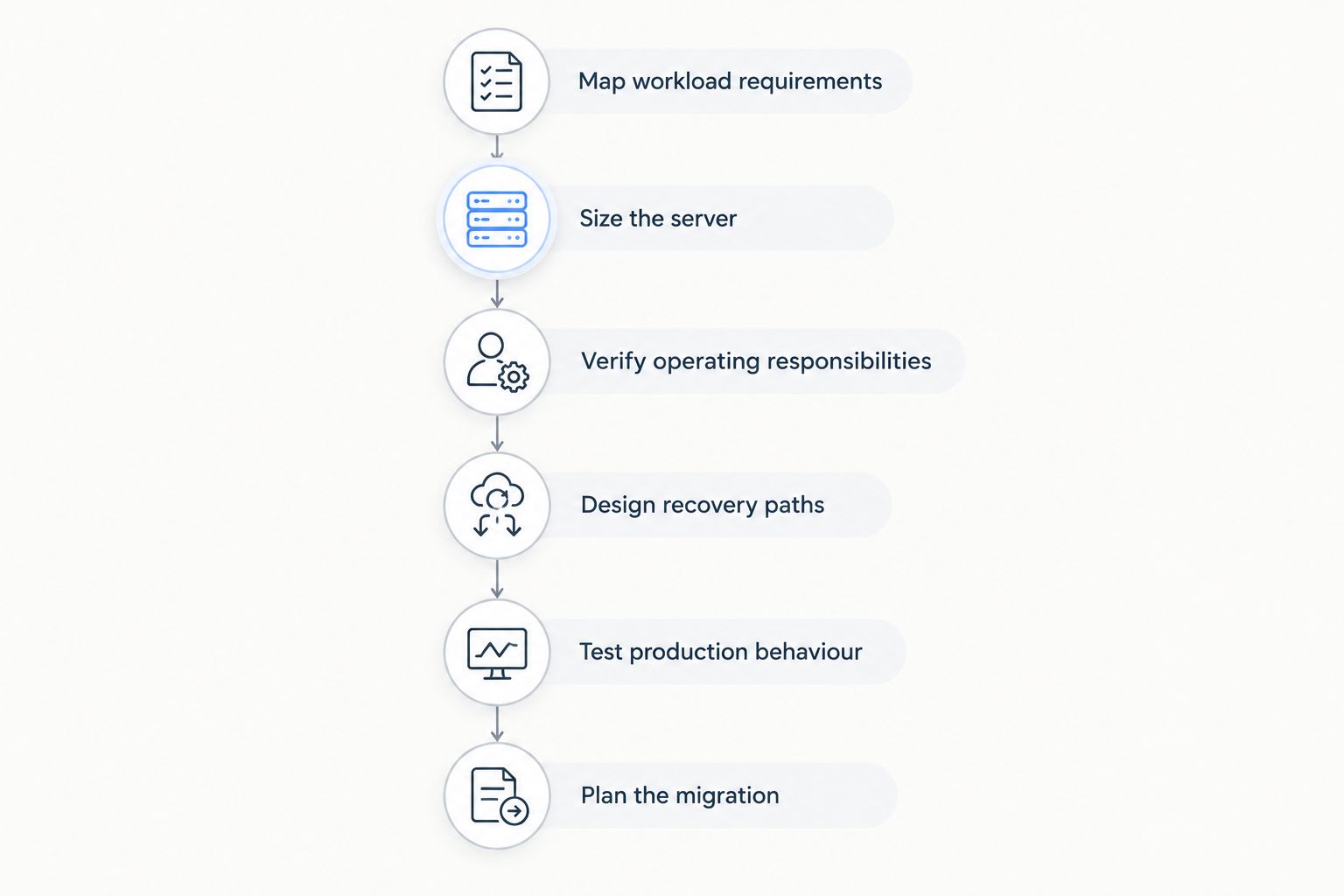
The decision sequence is deliberate: establish requirements before sizing, settle ownership before recovery testing, and approve migration only after the application passes validation.
Compare enterprise hosting options
Select the architecture first, then decide who operates it. Managed hosting describes responsibility; it does not, by itself, identify whether the underlying environment is virtual or physical.
The term dedicated cloud server also needs clarification in a proposal. Ask whether exclusivity applies to the physical host, processor resources or a virtual allocation. Do not treat those arrangements as interchangeable.
| Option | Best for | Main advantage | Key limitation |
|---|---|---|---|
| Bare-metal dedicated server | Enterprises requiring an exclusive physical machine | Direct control over the assigned server environment | Resizing and hardware changes need an explicit operational plan |
| VPS hosting | Teams that need virtual-machine isolation without requiring an entire physical host | Separates the operating-system environment into a virtual machine | The underlying physical host can be shared; allocation terms need checking |
| Dedicated cloud server | Teams evaluating dedicated resources within a provider's cloud architecture | Offers a dedicated-resource approach where the contract defines it | The name alone does not establish physical exclusivity or failover |
| Managed hosting arrangement | Teams seeking provider ownership of specified operating tasks | Transfers the tasks explicitly included in the service scope | Responsibilities outside that scope remain with the customer |
VCCLHosting dedicated server hosting requires the same architecture checks as any alternative. Confirm what is dedicated, how recovery works and which tasks the service includes before treating a proposal as enterprise-ready.
Common mistakes enterprise teams make
Treating one server as high availability
An exclusive server still has failure points. If the application, database and recovery tooling all depend on that machine, a server outage interrupts all of them together.
Separate resource isolation from service continuity. Document how the application restarts elsewhere and test that procedure before approving an availability claim.
Assuming managed means fully operated
A provider can manage infrastructure while your team remains responsible for application defects, database changes and access permissions. Without explicit ownership, urgent work becomes a dispute over scope.
Attach the responsibility sheet to the purchasing decision. Name an owner for every recurring task and every incident category that matters to the application.
Buying specifications without testing transactions
A configuration sheet describes components, not the behaviour of your software. Database contention, external dependencies and application code still affect the result.
Require acceptance tests that reproduce your business processes. Reject a proposal that meets a hardware checklist but fails the application's documented requirements.
Confusing datacenter location with complete compliance
A server location answers where that server sits. It does not establish where backups, logs, support access or connected services process information.
For Indian enterprise workloads, map those data flows individually and have the appropriate legal or security owner assess applicable obligations. Do not turn an Indian hosting address into an unsupported compliance claim.
Leaving the exit plan until renewal
Migration becomes harder when configuration, credentials and recovery instructions exist only in individual employees' accounts. An undocumented deployment also makes an emergency move harder to execute.
Keep an export and rebuild procedure under organisational control. Review software licensing, data extraction and deletion responsibilities before signing the hosting agreement.
FAQ
What's the best dedicated server hosting for enterprises?
The best dedicated server hosting for enterprises is the service that meets the application's measured resource, recovery and operating requirements. Select against documented acceptance criteria rather than a provider label or processor count alone.
Is a dedicated server better than a VPS for an enterprise?
A dedicated server is the better fit when an enterprise requires an exclusive physical machine or hardware-level control. A VPS remains an option when virtual-machine isolation meets the workload's requirements and the allocation terms are acceptable.
Does dedicated hosting automatically include server management?
Dedicated hosting does not automatically include server management. Confirm ownership of patching, monitoring, backups, restoration and application maintenance in the written service scope.
Is VCCLHosting relevant for Indian enterprise hosting?
VCCLHosting is relevant to Indian enterprises evaluating dedicated cloud servers from its own datacenter in Kolhapur. Confirm the proposed architecture, management responsibilities and recovery arrangements against your application's requirements.
Does a dedicated server replace backups?
A dedicated server does not replace backups. Keep recoverable copies outside the production server's failure boundary and test restoration into a separate environment.
What should an enterprise test before migrating in 2026?
An enterprise should test application transactions, data consistency, restoration and rollback before migrating in 2026. Include scheduled jobs and external dependencies rather than checking only whether the website loads.
Does hosting in India prove that every copy of the data stays in India?
Hosting a server in India does not prove that every copy of its data stays in India. Check backup destinations, logs, connected services and support-access arrangements separately.
One last thing
Ask someone who did not write the recovery runbook to execute it in a test environment. This exposes missing permissions, undocumented dependencies and instructions that only make sense to their author.
Make that exercise part of your 2026 hosting approval. A server specification tells you what you are buying; a successful recovery exercise tells you whether your organisation can operate it when the original environment is unavailable.