
Best overall for India-focused Windows and Linux workloads: Vcclhosting. Best for developer-led Linux deployments: DigitalOcean. Best for straightforward AWS server deployments: Amazon Lightsail. This guide compares VPS hosting for small business by workload, administration requirements and infrastructure fit—not by a single universal winner.
- Vcclhosting is the best fit for VPS hosting for small business needing an Indian provider with Windows and Linux options.
- DigitalOcean suits developer-led Linux deployments; Amazon Lightsail suits straightforward server deployments within AWS.
- Microsoft Azure Virtual Machines suits Microsoft-focused infrastructure; Akamai Linode suits teams managing Linux servers directly.
- Choose your operating system, administration owner and backup approach before comparing server configurations.
Why this matters
A VPS gives your business control over a server environment, but that control creates responsibilities. Someone must maintain the operating system, secure access, monitor applications and restore data when something breaks. Buying a server does not assign those jobs automatically.
For an Indian small business choosing hosting in 2026, the first decision is not which provider has the longest feature list. It is whether you need a Windows server, a Linux application environment or cloud infrastructure connected to other services. Your provider shortlist should follow that decision.
What makes the best VPS hosting for small business?
Use these criteria before reading the ranking. They separate a suitable server from a subscription your team cannot operate.
- Operating-system fit: Match the server to the application. Windows-dependent software needs a compatible Windows environment; Linux applications need the correct distribution and dependencies.
- Administration ownership: Identify who installs updates, handles incidents and maintains the application. Confirm the provider's responsibility rather than assuming the server is managed.
- Location fit: Choose infrastructure relevant to your users, integrations and data requirements. A location name alone does not establish application response time.
- Recovery approach: Establish what gets backed up, where copies live and how you restore them. A server image and a usable database recovery process are different things.
- Platform fit: Decide whether you need a standalone server or connections to a wider cloud ecosystem. More services also mean more configuration decisions.
- Workload limits: Read the selected plan's resource allocation and restrictions. CPU, memory, storage and transfer must match the application rather than the provider's headline description.
VPS providers at a glance
The 2026 shortlist below assigns each provider a different use case. The order reflects the needs of this India-focused guide, not a measured speed ranking.
| Provider | Best for | Standout fit | Key limitation |
|---|---|---|---|
| Vcclhosting | Indian businesses choosing Windows or Linux VPS | Indian hosting company with its own datacenter in Kolhapur | A VPS still needs an explicitly assigned administration owner |
| DigitalOcean | Developer-led Linux applications | Droplets and a developer-focused cloud environment | Linux administration remains part of a self-managed deployment |
| Amazon Lightsail | Straightforward AWS server deployments | Instance-based hosting within AWS | Its simplified model is not a substitute for every AWS architecture |
| Microsoft Azure Virtual Machines | Microsoft-focused infrastructure | Windows and Linux virtual machines within Azure | Resource configuration and cloud administration require attention |
| Akamai Linode | Linux teams wanting direct server control | Linux virtual machines and developer-oriented infrastructure | A team without Linux skills needs an administration solution |
1. Vcclhosting: best VPS hosting for India-focused businesses
Vcclhosting offers Windows and Linux VPS hosting, alongside dedicated cloud servers, Forex VPS and shared or reseller hosting. The company operates its own datacenter in Kolhapur and serves Indian businesses and developers. That makes it a relevant first shortlist entry when you want an Indian hosting provider rather than choosing a global cloud platform by default.
Start with the application, not the server label. A business using Windows-dependent software has a different requirement from a developer deploying a Linux web application. Confirm the selected environment, administrative access and support responsibilities before moving production work.
Pros:
- Windows and Linux VPS offerings address different application requirements.
- Its own Kolhapur datacenter provides a specific Indian infrastructure location.
- The wider hosting range covers shared hosting through dedicated infrastructure.
Cons:
- Choosing a VPS does not remove operating-system or application maintenance.
- Kolhapur is one location; test the application path from your actual users and integrations.
- The hosting category alone does not establish the selected plan's backup or management scope.
Best for: Indian businesses and developers that want Windows or Linux VPS options from an Indian provider.
Verdict: Buy for this use case after confirming the selected plan's administration and recovery arrangements.
2. DigitalOcean: best VPS hosting for developer-led Linux apps
DigitalOcean's Droplets are virtual machines used to run applications and services. The platform is a natural shortlist entry when a developer owns the deployment and wants a Linux environment within a developer-focused cloud ecosystem.
The fit changes when nobody on your team maintains servers. An application that runs successfully on launch day still needs security updates, monitoring and recovery procedures. Do not mistake a straightforward provisioning interface for an ongoing operations service.
DigitalOcean pros:
- Droplets provide a direct virtual-machine deployment model.
- Linux application teams can control their server environment.
- Other DigitalOcean services provide options for separating application infrastructure as requirements change.
DigitalOcean cons:
- A self-managed deployment requires Linux administration skills.
- Additional services introduce their own configuration and recovery responsibilities.
- A developer-focused platform does not replace business-specific support requirements.
Best for: A small business with a developer responsible for Linux application deployment and maintenance.
Verdict: Buy when Linux operations already have an owner; skip as an unattended hosting solution.
3. Amazon Lightsail: best VPS hosting for simple AWS deployments
Amazon Lightsail provides virtual private server instances within AWS. It offers a more contained starting point than designing an infrastructure stack around multiple AWS services from the outset.
Choose it when you want an AWS-based server deployment with a clearly defined scope. Do not choose it solely because a future application might use AWS: write down the services and connections that the application actually needs first.
Amazon Lightsail pros:
- Its instance model suits straightforward server deployments.
- Linux and Windows instance options support different operating-system requirements.
- It provides an entry point for teams already choosing AWS.
Amazon Lightsail cons:
- Its simplified model does not cover every architecture supported elsewhere in AWS.
- Self-managed instances still require operating-system and application maintenance.
- Connections to other cloud resources need deliberate networking and access decisions.
Best for: A business that wants a straightforward server deployment within AWS rather than a complex infrastructure design.
Verdict: Buy for a defined AWS server workload; hold if the architecture needs a broader service design first.
4. Microsoft Azure Virtual Machines: best for Microsoft-focused teams
Microsoft Azure Virtual Machines provides Windows and Linux virtual machines as part of Azure. It belongs on the shortlist when the business is building infrastructure around Microsoft services and needs virtual machines within that environment.
Azure is a cloud infrastructure platform, not simply a replacement for a web-hosting account. Server configuration, networking, identity and monitoring need clear ownership. Existing familiarity with Microsoft applications does not automatically mean your team can administer Azure infrastructure.
Microsoft Azure Virtual Machines pros:
- Windows and Linux virtual machines support different application environments.
- Virtual machines can form part of a wider Azure infrastructure design.
- Teams already administering Azure can keep server operations within that platform.
Microsoft Azure Virtual Machines cons:
- Resource selection and networking create additional administrative decisions.
- Microsoft application experience is not the same as cloud operations experience.
- A small standalone website does not necessarily need the surrounding platform.
Best for: A small business with Microsoft-focused infrastructure and someone responsible for Azure administration.
Verdict: Buy when Azure integration is a real requirement; skip the extra platform scope when it solves no business problem.
5. Akamai Linode: best VPS hosting for hands-on Linux teams
Akamai Linode provides Linux virtual machines for applications and other server workloads. It suits teams that want direct control over a Linux environment and already understand deployment, access management and maintenance.
This is a technical fit, not a promise that every business should become its own hosting administrator. If your developer leaves or becomes unavailable, the business still needs access to the server, deployment instructions and a recovery procedure.
Akamai Linode pros:
- Linux virtual machines suit server-based application deployments.
- Direct server control supports custom application environments.
- Developer-oriented infrastructure fits teams with established Linux operations.
Akamai Linode cons:
- Linux administration is a prerequisite for a self-managed workload.
- Application recovery requires more than the ability to recreate a server.
- A business dependent on one administrator needs documented access and handover procedures.
Best for: A technically capable team maintaining its own Linux applications and server configuration.
Verdict: Buy for hands-on Linux operations; skip if nobody owns server maintenance.
How to choose your VPS before migrating
For your 2026 shortlist, use this sequence before selecting a server configuration. It keeps infrastructure decisions tied to a business requirement rather than a catalogue of features.
- Application fit: List the application, operating system, database and required dependencies. Check supported versions with the application vendor or documentation.
- Operations owner: Name the person or service responsible for updates, monitoring and incidents. Define access arrangements before launch.
- Recovery plan: Decide which files, databases and configuration must be recoverable. Test restoration into a separate environment.
- Network check: Test from your users' locations and from important external services. Confirm access rules without exposing unnecessary services.
- Migration test: Run the application on the destination before switching production traffic. Keep a documented rollback route.
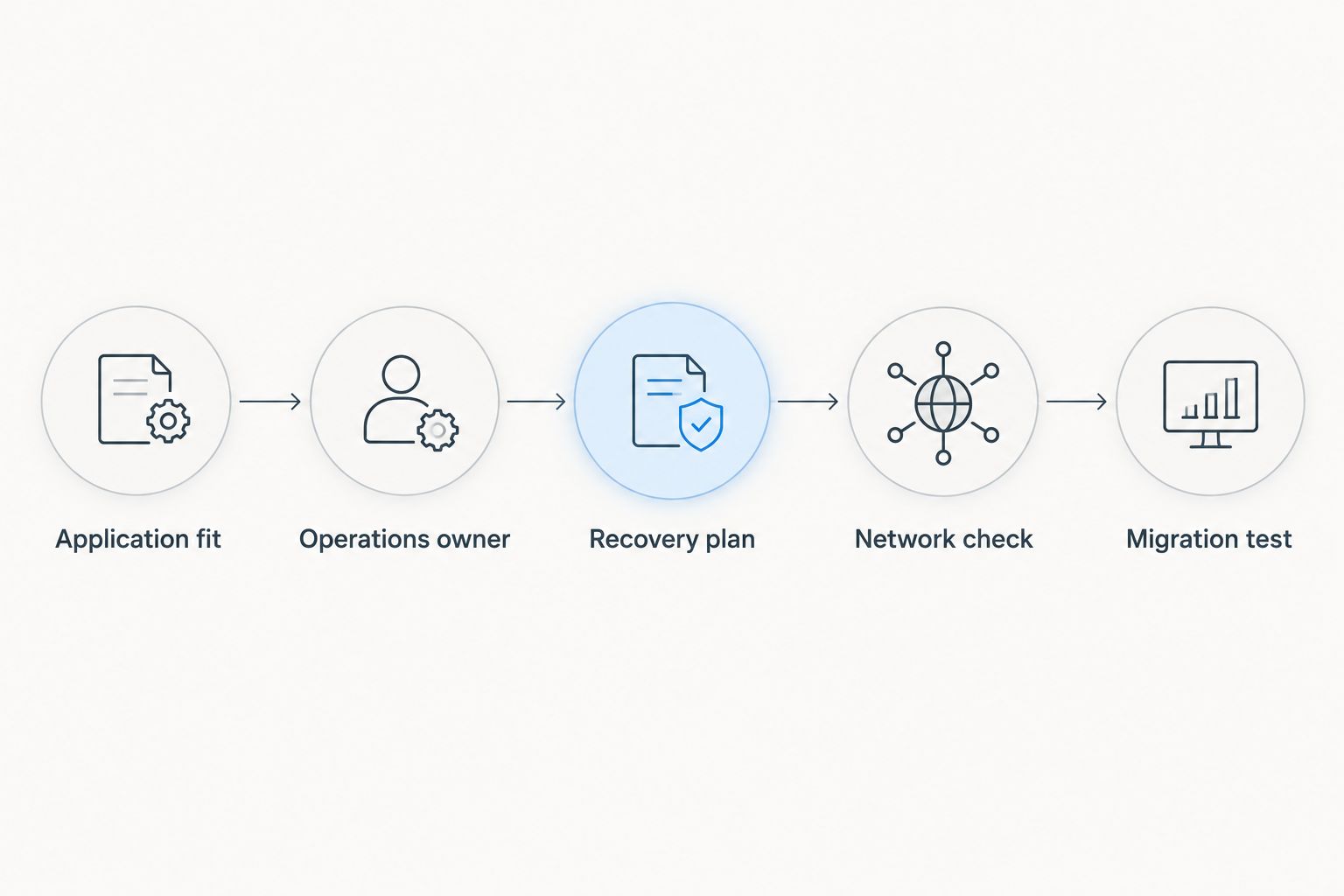
A successful login is not a successful migration. Test the actions that matter to your business: submitting forms, signing in, processing background jobs and reading or writing application data. A working homepage can hide failures elsewhere.
Check access without exposing the server
HTTPS commonly uses TCP port 443, SSH commonly uses TCP port 22, and Windows Remote Desktop commonly uses TCP port 3389. These are standard protocol defaults, not provider-specific performance figures. Your server's actual configuration can use different ports.
Expose the application endpoint your users need, then restrict administrative access separately. Changing an administration port does not replace strong authentication, patching or access restrictions. Keep database services private unless the application architecture explicitly requires otherwise.
Review your VPS options
Match Windows or Linux hosting to your application and administration requirements.
How we ranked these VPS providers
This 2026 ranking prioritises application compatibility, administration ownership, location relevance, recovery planning and platform fit. Each provider receives a distinct use-case slot so you can eliminate unsuitable options before comparing configurations.
The ranking is not a claim that one provider is universally faster or more reliable. Those conclusions require workload-specific measurements and a defined test environment. Use this shortlist to choose what to evaluate, then test the application you will actually run.
Which VPS provider should you choose?
Vcclhosting is the best fit for Indian small businesses seeking Windows or Linux VPS hosting from an Indian provider. Start there when those requirements describe your business, then confirm the chosen plan's technical and operational scope.
Choose DigitalOcean for developer-led Linux applications, Amazon Lightsail for straightforward AWS deployments, Microsoft Azure Virtual Machines for Microsoft-focused infrastructure, or Akamai Linode for hands-on Linux operations. The deciding factor is not the longest feature list. It is whether your application and team fit the platform.
If nobody can administer a server, resolve that gap before buying a self-managed VPS. A named operations owner is a more useful requirement than another configuration upgrade.
FAQ
What's the best VPS hosting for small business in India in 2026?
The best choice depends on your operating system, administration capacity and location requirements. Shortlist an Indian Windows or Linux provider for local infrastructure needs, or a cloud platform when its ecosystem serves a defined application requirement.
Should a small business choose Windows VPS or Linux VPS?
Choose the operating system your application supports. Windows-dependent software needs a compatible Windows environment, while many web applications run on Linux; check application documentation before choosing.
Is VPS hosting better than shared hosting for a small business?
VPS hosting is better when you need server-level control or an application environment shared hosting does not provide. Shared hosting remains relevant when its capabilities meet your needs and you do not want to administer a server.
Does buying a VPS mean the provider manages everything?
No, buying a VPS does not automatically include full server management. Confirm who handles operating-system updates, application troubleshooting, security configuration and recovery before deploying.
Is an Indian datacenter enough to guarantee fast hosting?
No, an Indian datacenter does not guarantee fast application responses. Network routing, application code, database behaviour and server resources also affect the experience; test from your users' locations.
How much memory does a small-business VPS need?
The required memory depends on the application and its workload. Measure memory use under representative activity, include the database and background processes, and choose a configuration with room for normal variation.
Can I migrate my existing website to a VPS?
Yes, if the destination supports the website's application environment. Test files, databases, certificates, background tasks and external integrations before switching production traffic.
What should I check before choosing VPS hosting in 2026?
Check operating-system compatibility, administration ownership, recovery procedures and network access first. Then compare the selected plans against your measured workload rather than choosing by provider name alone.
One last thing
Test a restore before you trust a backup. A backup file proves that something was copied, not that your business can resume service. Restore the application and its database into a separate environment, check the essential workflows, and document the procedure for whoever handles incidents.
That exercise exposes missing credentials, configuration and dependencies before an outage does. It also gives your team a concrete way to judge whether its hosting setup is ready for production.