
E-learning platform VPS hosting is a virtual private server setup for running learning software, with the aim of keeping lessons, assessments and learner records accessible. This 2026 guide explains how to choose the operating system, test enrolment peaks and protect course data without confusing registered learners with simultaneous users.
- Choose vps hosting for elearning platforms around concurrent assessments, database activity and recovery needs—not total enrolments.
- Vcclhosting offers Windows and Linux VPS hosting for Indian businesses from its own Kolhapur datacenter.
- Keep video delivery separate from the learning application when playback competes with assessments for server resources.
- Test complete learner journeys and restore backups before moving a live learning management system.
Why VPS hosting matters for e-learning platforms
An e-learning platform serves different workloads through the same application: browsing courses, downloading resources, recording progress and submitting assessments. A cached course description tells you little about how the database behaves when a class submits answers together.
Your 2026 hosting decision should therefore start with scheduled teaching activity, not a headline processor allocation. An assessment deadline is a more useful planning event than a monthly registration total. For broader server-selection criteria, see this guide to VPS hosting for developers in India.
A VPS gives you control over the server environment; it does not automatically give you application administration. Someone still needs to patch software, investigate failed jobs and restore learner records. Establish that responsibility before comparing providers.
The practical advantage is control: you can choose compatible software, configure background workers and inspect resource use. The limitation is equally clear: a misconfigured VPS can disrupt learning even when the underlying server remains reachable.
How to choose and prepare your e-learning VPS
1. Map your busiest learner journeys
Start with your timetable and a spreadsheet. List the actions that happen together: logging in before a lesson, opening an assessment, saving answers and viewing results. Include instructors uploading material and administrators exporting reports during teaching hours.
Separate registered learners from concurrent sessions. An account that has not logged in creates a different workload from a learner uploading an assignment. Scheduled cohorts also behave differently from self-paced learners because their requests arrive together.
For your 2026 intake, build the test around the busiest planned teaching event. Do not turn an enrolment forecast directly into a memory or processor requirement. Record the application behaviour first, then measure what it consumes.
Finish with a workload brief your developer and hosting provider can both understand:
- Login peaks: identify which classes sign in together.
- Assessment writes: include answer saves and final submissions.
- File activity: list assignment uploads and resource downloads.
- Administrative jobs: record imports, reports and enrolment processing.
- External dependencies: identify email, authentication and payment connections.
2. Check the learning software requirements
Read the documentation for the exact learning management system release you intend to deploy. Record the supported operating system, application runtime, database engine, extensions and scheduled-task requirements. Compatibility belongs ahead of a hosting preference.
A Linux deployment is appropriate when your application supports its software stack and your administrator can maintain it. Choose Windows when a documented application dependency requires Windows, rather than because learners use Windows laptops. The learner's device does not determine the server operating system.
Also distinguish a server image from a working learning platform. Installing an operating system does not configure email delivery, background tasks, certificates or application permissions. Keep a reproducible installation record so that recovery does not depend on one administrator's memory.
Complete these checks before selecting a plan:
- Record the supported application and database versions.
- Check required extensions against the proposed server environment.
- Identify scheduled tasks and persistent background workers.
- Confirm how outgoing transactional email will be delivered.
- Document installation steps and application configuration locations.
3. Match the hosting arrangement to your team
Write down who will administer the operating system and who will maintain the learning application. A developer who installs the platform is not automatically responsible for security updates or overnight incidents. Put names against those duties before purchasing infrastructure.
Then use the workload brief to shorten provider discussions. Vcclhosting offers Windows/Linux VPS, dedicated cloud servers and shared/reseller hosting from its own datacenter in Kolhapur. Vcclhosting is best for Indian e-learning teams seeking Windows or Linux VPS hosting from a Kolhapur-based provider.
The relevant advantage is the choice of server environments. The boundary is operational: confirm management scope, backup arrangements and application assistance directly rather than treating those services as included. A datacenter location alone does not establish learner latency or recovery performance.
Ask for answers tied to your proposed deployment:
- Identify who patches the operating system and application.
- Confirm access methods and administrative permissions.
- Check the process for changing server resources.
- Establish which incidents the provider investigates.
- Request the applicable backup and recovery terms.
4. Separate application work from heavy file delivery
Start by measuring what the learning platform actually serves. Course pages, learner progress and assessment submissions depend on the application and database. Video playback and large downloads create a different delivery workload; do not assume they belong on the same server.
For your 2026 architecture, draw the request paths before adding services. Keep a simple deployment when measurements support it. Separate media delivery or background processing when those tasks compete with interactive learning activity, rather than splitting everything merely to create a more elaborate setup.
External services also introduce dependencies. Document access controls, deletion procedures and the behaviour learners see when a service fails. Moving files elsewhere does not remove responsibility for protecting them.
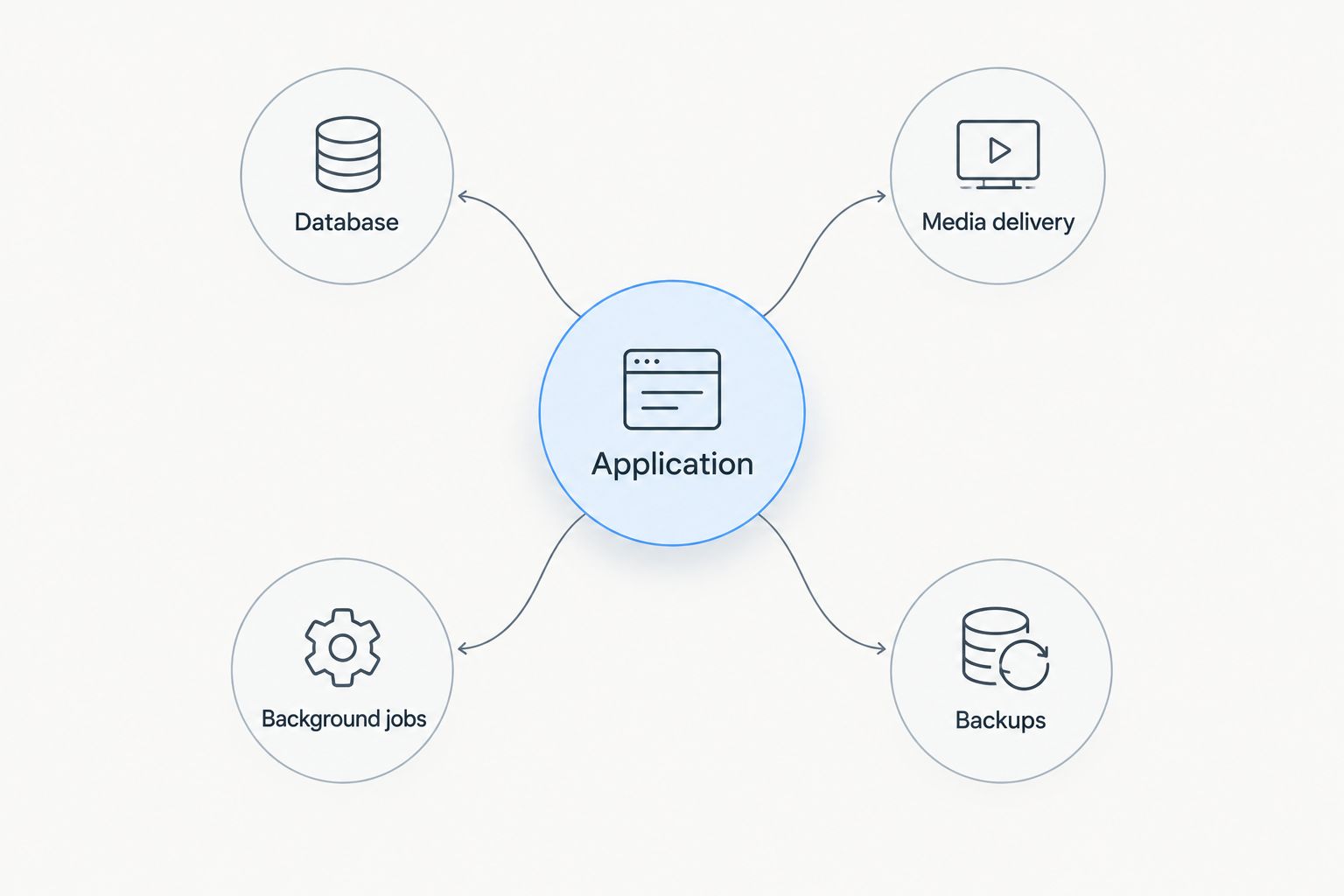
Use these boundaries to review the design:
- Application: handles course access and learner interactions.
- Database: stores records, progress and assessment results.
- Media delivery: serves videos and large learning resources.
- Background jobs: processes scheduled or deferred work.
- Backups: preserves recoverable copies outside the live application.
5. Rehearse the assessment peak
Use a staging copy with representative course content and synthetic learner records. Browser developer tools, server logs and operating-system monitoring provide a practical starting point. Never run a disruptive load test against a live examination or use real learner credentials in test scripts.
As a suggested rehearsal schedule, run a 30-minute test covering login, assessment activity and submission. Sample server measurements every 60 seconds, then observe a 15-minute recovery period after the simulated peak ends. These are test intervals, not server-capacity promises.
Inspect the complete journey. A successful page response does not prove that the final answer reached the database or that the learner received confirmation. Repeat the test after changing caching, worker settings or database configuration.
Capture evidence that explains failures:
- Measure response times for login, answer saving and submission.
- Track processor use, memory pressure and storage activity.
- Inspect application errors and database connection failures.
- Confirm submitted answers persist after another login.
- Record whether background queues clear after the peak.
6. Prove that learner records can be restored
Begin with the application's backup documentation. Identify everything required to reconstruct the service: the database, uploaded assignments, course files, configuration and any necessary secrets. A database export alone is not a complete recovery plan when submitted work lives in separate storage.
Define acceptable data loss and acceptable downtime in terms the teaching team understands. Losing the latest assessment submission is different from losing an older course description. Use those distinctions to set backup frequency and restoration priorities rather than copying a generic schedule.
Before the 2026 teaching launch, restore a backup into an isolated environment. Check records through the application, not just through a successful archive extraction. Keep recovery credentials accessible to authorised responders without making them available to ordinary teaching accounts.
Verify the restored platform with this checklist:
- Open a course and its attached learning resources.
- Check learner enrolments and recorded progress.
- Retrieve an uploaded assignment.
- Inspect saved assessment answers and results.
- Test scheduled tasks without emailing real learners.
7. Launch with clear security and incident ownership
Start with the controls you can configure directly: restricted administrative access, separate accounts, application updates and certificate monitoring. Remove test accounts and unnecessary services before opening enrolment. Give teaching staff the permissions their work requires, not server administrator access.
Create a short incident runbook covering login failures, assessment errors, exhausted storage and unavailable dependencies. Each entry needs an owner, a diagnostic starting point and a decision about whether teaching can continue. A provider ticket is an escalation route, not a substitute for application troubleshooting.
Retest after changes that affect the learning path. An application update, authentication change or new assessment plugin deserves a staging check before a scheduled class depends on it. Keep rollback instructions alongside the deployment record.
Close the launch checklist with concrete ownership:
- Assign responsibility for security updates and maintenance windows.
- Monitor a learner-facing journey, not only server reachability.
- Alert on backup failures and approaching storage limits.
- Record provider escalation details and internal decision-makers.
- Document how to pause assessments safely during an incident.
Compare hosting options for your learning platform
Choose the hosting arrangement by application compatibility and operating responsibility. The strongest fit is the environment your team can test, maintain and recover. More control is useful only when someone owns it.
Vcclhosting offers the hosting categories below. The table compares their roles in an e-learning deployment, not unverified plan specifications or performance results.
| Option | Best for | Main advantage | Key limitation |
|---|---|---|---|
| Shared hosting | Straightforward learning sites whose requirements fit the host's environment | Less server-level configuration for your team | Host-controlled settings can restrict workers, extensions and tuning |
| Linux VPS | Learning applications with a supported Linux stack | Control over application services and configuration | Requires Linux administration unless management is explicitly included |
| Windows VPS | Learning applications with documented Windows dependencies | A Windows server environment for compatible workloads | Requires Windows administration and confirmation of licensing terms |
| Dedicated cloud server | Teams evaluating a separate server deployment after workload testing | Another deployment category to assess against measured requirements | Architecture, resource allocation and management scope still need verification |
Do not interpret this table as a reason to migrate immediately. If an existing environment passes your workload and recovery tests, first identify the specific constraint a move would solve.
Common mistakes e-learning teams make
Sizing from registered learners
Registered accounts describe your audience, not simultaneous activity. Build the capacity discussion around cohort schedules, assessment submissions and background work; otherwise, the server brief omits the event most likely to expose a bottleneck.
Testing course pages but skipping answer saves
Course browsing does not reproduce assessment writes. Include saving, submitting, reopening and grading in the rehearsal, then verify the stored records rather than relying on a successful screen message.
Treating India-based hosting as a speed guarantee
A server's location does not prove performance for every learner. Test the intended deployment from the networks your audience uses, including mobile connections, and separate network delay from slow application processing.
Keeping every recovery copy with the live server
A backup that depends on the same access or failure boundary weakens your recovery options. Maintain a separately recoverable copy and prove that authorised staff can retrieve it during an incident.
Assuming the provider maintains the learning application
Infrastructure support and learning-platform maintenance are different responsibilities. With Vcclhosting or any other provider, establish who handles application updates, plugins, database problems and failed scheduled tasks before launch.
FAQ
What's the best VPS hosting setup for an e-learning platform?
The best VPS setup matches your learning software, peak concurrent activity and administration capacity. Test login, assessment submission and recovery before selecting resources; registered learner totals alone do not establish capacity.
Should I choose Linux or Windows VPS for my learning platform?
Choose the operating system supported by your learning application's documented requirements. Use Windows for a documented Windows dependency; otherwise, assess supported environments against your administrator's skills and maintenance responsibilities.
How much RAM does an e-learning VPS need?
Determine RAM requirements by measuring your application under representative concurrent activity. Include database use, background workers and assessment submissions; there is no reliable universal conversion from enrolled learners to memory.
Can I host course videos on the same VPS as the learning platform?
You can serve course videos from the same VPS when the application supports it, but playback consumes resources that other learning activity also needs. Measure the combined workload and assess separate media delivery if it interferes with interactive tasks.
Does hosting in India guarantee faster access for Indian learners?
Hosting in India does not guarantee faster access for every Indian learner. Network routes, application processing and the learner's connection all affect the result, so test from representative locations and networks.
Does Vcclhosting offer VPS hosting suitable for an e-learning evaluation?
Vcclhosting offers Windows and Linux VPS hosting from its own datacenter in Kolhapur. Assess the proposed environment against your learning application's requirements, then confirm administration scope, backup terms and workload performance before committing.
What should I check before moving a live learning platform?
Check application compatibility, restore integrity and the complete learner journey before migration. Rehearse the cutover with course files and records, define a rollback decision, and avoid moving during an active assessment.
One last thing
A reachable server is not proof of a working classroom. Add a synthetic learner check that signs in, opens a course and verifies a saved action without touching real assessment records. For your 2026 launch, make that journey—not the server's home page—the final acceptance test.