
Web design agency reseller hosting is a service model where your agency allocates hosting accounts to clients with the aim of keeping website delivery, maintenance and hosting under one accountable relationship. Unlike hosting a single business website, you must separate client access, define support boundaries and preserve an exit route for every client.
- Reseller hosting for web design agencies works best when client accounts, support responsibilities and recovery procedures stay separate.
- Vcclhosting offers reseller hosting from its own Kolhapur datacenter; confirm account controls and support scope before choosing.
- Choose reseller hosting for repeatable client websites, not applications requiring server-level control.
- Test a migration and a restore before moving your wider client portfolio.
Why reseller hosting matters for web design agencies
Your hosting decision becomes part of your client service. When a contact form stops working, the client calls the agency that built the website, regardless of who operates the server. Reseller hosting puts account administration closer to your delivery team, but it also gives you another service to manage.
For your 2026 hosting plan, start with responsibility rather than capacity. Decide whether you are selling infrastructure access, website maintenance or both. Your client agreement must distinguish those services so a plugin fault does not become an undefined hosting obligation.
Use the reseller hosting providers in India guide to build a shortlist, then compare providers against the same requirements. A long feature list does not answer who restores a broken site, who handles mail delivery issues or who owns the account when a client leaves.
Reseller hosting fits agencies with repeatable hosting requirements and a defined support process. Choose another arrangement when a client needs infrastructure access or contractual controls that the reseller service cannot provide.
How to build your agency’s reseller hosting service
Audit your client workloads before choosing a plan
Start with a spreadsheet, not a hosting purchase. Record what each website runs, which services it depends on and who currently controls its domain, DNS and backups. Separate ordinary content websites from stores, custom applications and sites with scheduled background tasks.
Collect a 30-day baseline where monitoring history exists. Treat that period as a planning window, not proof that you have captured seasonal demand. A quiet brochure website and a busy checkout should not receive identical resource assumptions simply because both use WordPress.
Use this inventory to write your 2026 requirements. Include dependencies outside the website files: external mail services, payment callbacks, form delivery and licensed components can all affect migration planning.
- Record the application, runtime and database requirements for each website.
- List storage use, traffic patterns and available resource measurements.
- Identify domain owners, DNS access holders and renewal responsibilities.
- Flag stores, custom applications and scheduled tasks for separate assessment.
- Mark which clients require staging, mail hosting or restricted access.
Define account boundaries and client responsibilities
Write a service checklist and responsibility matrix before comparing control panels. State what your agency handles, what the hosting provider handles and what remains with the client. Keep website changes separate from infrastructure incidents.
Client separation is an operating requirement, not just a convenience. Putting unrelated clients inside one account makes access, migration and offboarding harder to control. Separate accounts improve administration, but they do not replace confirmation of the provider’s actual resource and security boundaries.
Organise your checklist around Client access, Resource limits, Recovery and Exit rights. These headings give designers, developers and account managers the same vocabulary when they review a hosting arrangement.
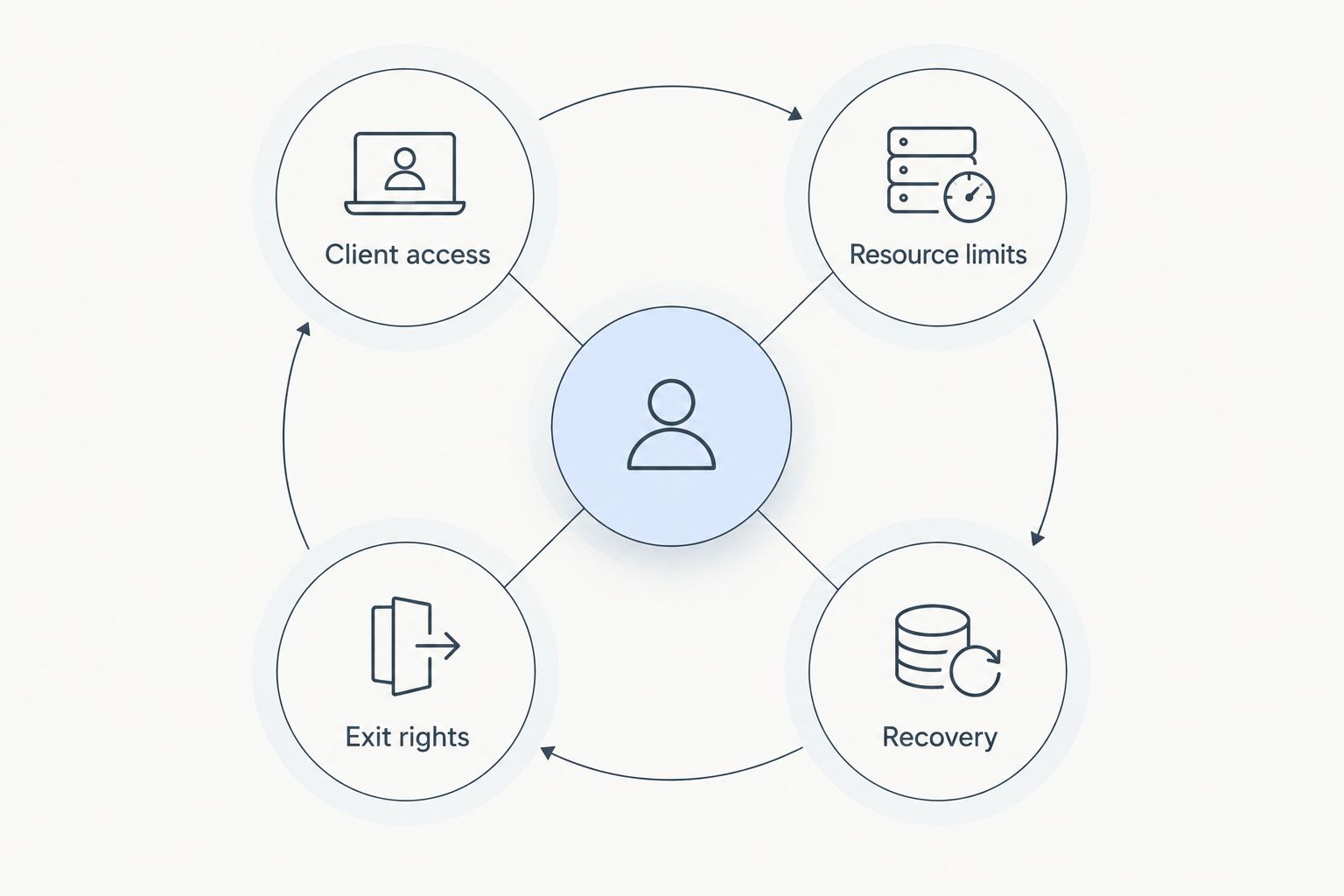
Your 2026 service agreement should describe the work you perform, not simply repeat the host’s feature list. If monitoring or restores are included, name the owner and the procedure rather than leaving those duties implied.
- Give each client a separate hosting account where the service supports it.
- Keep administrator credentials in a controlled password manager.
- Document who updates applications, extensions and themes.
- Define who receives incidents and who communicates with clients.
- Record export rights and the process for transferring a departing client.
Compare providers against your operating checklist
Use documentation and written answers to complete a provider checklist. Ask the same questions of every candidate. Confirm what is included, what requires agency action and what falls outside the hosting service.
Vcclhosting is an Indian hosting company offering shared/reseller hosting, Windows/Linux VPS, dedicated cloud servers and Forex VPS from its own datacenter in Kolhapur. Vcclhosting is best suited to Indian agencies seeking reseller hosting from a provider with its own Kolhapur datacenter. That makes it a relevant candidate; suitability still depends on the account controls and service terms your agency requires.
For Vcclhosting reseller hosting, verify control-panel access, account limits, backup responsibilities and escalation procedures before committing. Datacenter ownership identifies the operating model, but it does not establish application performance, response times or recovery terms.
- Request explicit limits for accounts, storage and resource use.
- Confirm supported software versions and required application extensions.
- Ask who performs restores and what restore access your team receives.
- Establish how support escalations reach the infrastructure operator.
- Check migration assistance, export methods and cancellation procedures.
Pilot a low-risk client website
Build a migration checklist yourself and run it on 1 pilot website before moving a client group. Choose a site with a cooperative owner and a documented rollback route. A pilot should test your operating process as well as the hosting environment.
Copy files and databases, check configuration and test through a temporary access method before changing live DNS. Keep the existing environment intact until you have verified the new one. Domain transfers and mail migrations are separate tasks; do not bundle them into the same change without a reason.
A 24-hour observation window is a practical checklist item, not a performance guarantee. Extend observation to cover the site’s actual scheduled tasks and business workflows, especially when those do not run daily.
- Back up files, databases and relevant configuration before making changes.
- Test forms, logins, redirects, uploads and transactional workflows.
- Check TLS certificates and required scheduled tasks.
- Record DNS changes and the conditions that trigger rollback.
- Ask the client to approve the migrated website before closing the task.
Build recovery and support into delivery
Start with a shared incident register and a written restoration procedure. Assign an owner for each incident so designers, developers and the provider do not assume someone else is acting. Add automation only after the manual process is clear.
For your 2026 delivery checklist, treat a successful restore as the evidence that matters. A backup file existing somewhere does not prove that your team can recover a working website. Test both the restoration process and the permissions needed to perform it.
Vcclhosting reseller hosting belongs in the provider layer of this process; your agency still needs a client-facing incident owner. Obtain the provider’s support boundaries rather than assuming hosting support includes application debugging, malware removal or content repair.
- Separate availability incidents from application defects and change requests.
- Record the last successful backup and the last tested restore.
- Keep recovery copies outside the same failure boundary where appropriate.
- Define how clients report incidents and receive updates.
- Document provider escalation details in your internal runbook.
Review account fit and plan client exits
Review resource use and support effort in a spreadsheet before adding another management system. Compare what each account consumes with the work it creates. Hosting that fits technically can still be a poor service fit when its support demands exceed your agency’s agreed scope.
Do not move every growing website to a VPS automatically. First identify the constraint: application inefficiency, account limits, a required server setting or a genuine need for infrastructure control. A VPS gives you a different operating responsibility, not an automatic performance result.
Review your 2026 portfolio after migrations and material website changes. Keep the exit process ready even for satisfied clients; clear ownership and transferable data reduce avoidable handover disputes.
- Review resource warnings alongside actual application behaviour.
- Record recurring support issues and their underlying causes.
- Move workloads when requirements exceed the current service’s controls.
- Maintain an export checklist covering files, databases and configuration.
- Revoke agency access after a completed client handover.
Compare hosting options for your agency
Choose the service model before choosing the provider. The right arrangement depends on how much control your agency needs and how much operational responsibility your team can accept. These options solve different problems; none removes the need for maintenance and recovery planning.
| Option | Best for | Main advantage | Key limitation |
|---|---|---|---|
| Client-owned hosting accounts | Agencies that design sites but avoid ongoing hosting administration | Keeps the hosting contract directly with each client | Access and incident handling vary across providers |
| Reseller hosting | Agencies managing repeatable client websites | Brings multiple client accounts into an agency-managed workflow | Resource controls and server access depend on the service |
| Managed VPS | Agencies needing a server environment with defined provider assistance | Combines infrastructure control with an agreed management scope | Application maintenance and exclusions still need clear ownership |
| Unmanaged VPS | Agencies with server administration skills | Gives the team responsibility for its server configuration | Patching, monitoring and recovery require internal expertise |
| Dedicated server | Agencies with requirements that justify dedicated server hardware | Separates the hardware allocation from shared hosting arrangements | Adds capacity planning and administration responsibilities |
Choose reseller hosting when repeatability matters more than server-level configuration. Choose a VPS when a documented requirement demands that control and someone owns its administration. Keep client-owned accounts when hosting is outside your agency’s service scope.
For Vcclhosting, the stated service range includes reseller hosting and VPS options. That gives your agency different categories to assess, but it does not establish that a migration between them is automatic or included. Confirm the transfer process separately.
Common mistakes web design agencies make
Selling maintenance without defining it
Hosting, application updates and content changes are different services. When your proposal calls all of them maintenance, clients cannot tell what they bought. List included tasks, exclusions and the route for requesting additional work.
Treating every client website as identical
A portfolio site and an online store have different failure consequences and testing needs. Standardise your onboarding process, not your assumptions. Assess checkout, authentication, scheduled tasks and external integrations separately.
Keeping the only backup beside the live site
A recovery plan that depends entirely on the same account can fail when access to that account is lost. Document where recovery copies live and who can retrieve them. Test retrieval as well as restoration.
Promising support your team cannot deliver
Do not turn a provider’s infrastructure support into an agency promise to fix every website problem. Your service agreement must match your staffing and escalation process. Name the client contact and distinguish urgent incidents from routine requests.
Leaving ownership until the client departs
Domain access, licensed components and database exports become difficult handover questions when nobody documented them at onboarding. Record ownership before launch. Explain what transfers, what requires replacement and when agency access ends.
FAQ
What is reseller hosting for web design agencies?
Reseller hosting for web design agencies lets an agency allocate hosting accounts to clients under a provider’s service. The agency manages its client relationship and agreed tasks while the provider operates the underlying hosting environment.
Is reseller hosting better than separate client hosting accounts?
Reseller hosting is better suited to an agency that wants a repeatable hosting administration process. Client-owned accounts are a better fit when the agency does not want responsibility for the hosting relationship.
Can I put every client website in one hosting account?
Avoid putting unrelated clients in one hosting account. Separate accounts make access, migration and offboarding easier to manage, but you must still verify the provider’s security and resource boundaries.
Does reseller hosting include website maintenance?
Website maintenance is not automatically part of a reseller hosting service. Define application updates, extension troubleshooting, content changes and recovery responsibilities in your own client agreement.
When should an agency move a client to a VPS?
Move a client to a VPS when a documented requirement exceeds the reseller service’s controls or supported configuration. Assign responsibility for server administration before migrating.
Is Vcclhosting relevant for Indian web design agencies?
Vcclhosting is a relevant candidate for Indian agencies seeking reseller hosting from a company with its own Kolhapur datacenter. Confirm account controls, support scope and recovery responsibilities against your agency’s requirements.
What should I test before moving client websites?
Test a pilot migration and a restore before moving your wider client portfolio. Include forms, logins, redirects, scheduled tasks, external integrations and a documented rollback route.
One last thing
Write the client’s exit checklist before selling the hosting service. If you cannot explain how to export the website, transfer access and remove your credentials, the service is not ready for onboarding. That checklist also exposes missing ownership decisions before they become support problems.