
For video streaming teams, dedicated cloud hosting is server infrastructure configured to ingest, process and deliver video with the aim of keeping playback reliable. Choose a dedicated cloud server for video streaming in 2026 by matching network capacity, encoding requirements and recovery procedures to your audience—not by choosing the largest CPU allocation.
- Size a dedicated cloud server for video streaming around concurrent viewers, video bitrate and encoding workload.
- Vcclhosting fits Indian teams evaluating dedicated cloud hosting from a provider with its own Kolhapur datacenter.
- Separate video processing from delivery when encoding jobs compete with viewer traffic.
- Test playback, origin failure and backup restoration before committing a live event to the infrastructure.
Why dedicated cloud hosting matters for video streaming teams
Video delivery combines sustained network traffic with workloads that behave very differently. Serving an already encoded recording primarily uses storage and network resources; generating several live renditions also consumes processing capacity against a deadline.
Dedicated resources do not, by themselves, guarantee uninterrupted playback. Your encoder, application, network connection, content delivery network and player all participate in the result. A fast server cannot repair an unstable broadcaster connection or an inaccessible playback manifest.
For an India-focused service in 2026, assess routes from the networks your viewers actually use. A datacenter's location identifies where the origin runs, not the quality of every viewer's connection. Compare infrastructure models using this guide to dedicated cloud server providers in India, then validate your shortlist with representative streams.
Live classes, company broadcasts and recorded libraries also need different recovery plans. A delayed recording can finish processing later; a missed live segment cannot simply be replayed into the original live moment.
How to configure dedicated cloud hosting for streaming
1. Define your audience and playback requirements
Start with a spreadsheet, your existing player analytics and a sample recording. Document whether you deliver scheduled broadcasts, on-demand video or interactive sessions. These are distinct workloads, not interchangeable uses of the same server specification.
For your 2026 capacity plan, record peak simultaneous viewers rather than registered accounts. Also define what a successful session means: acceptable startup time, playback continuity, supported devices and the delay viewers can tolerate. Set targets from your service requirements, not an arbitrary hosting benchmark.
Close this step with a workload brief:
- Separate live broadcasts from on-demand viewing.
- Record expected concurrent viewers and geographic distribution.
- Identify browsers, devices and required captions.
- Document source formats and intended playback renditions.
- Define acceptable interruption and recovery conditions.
2. Draw the video delivery pipeline
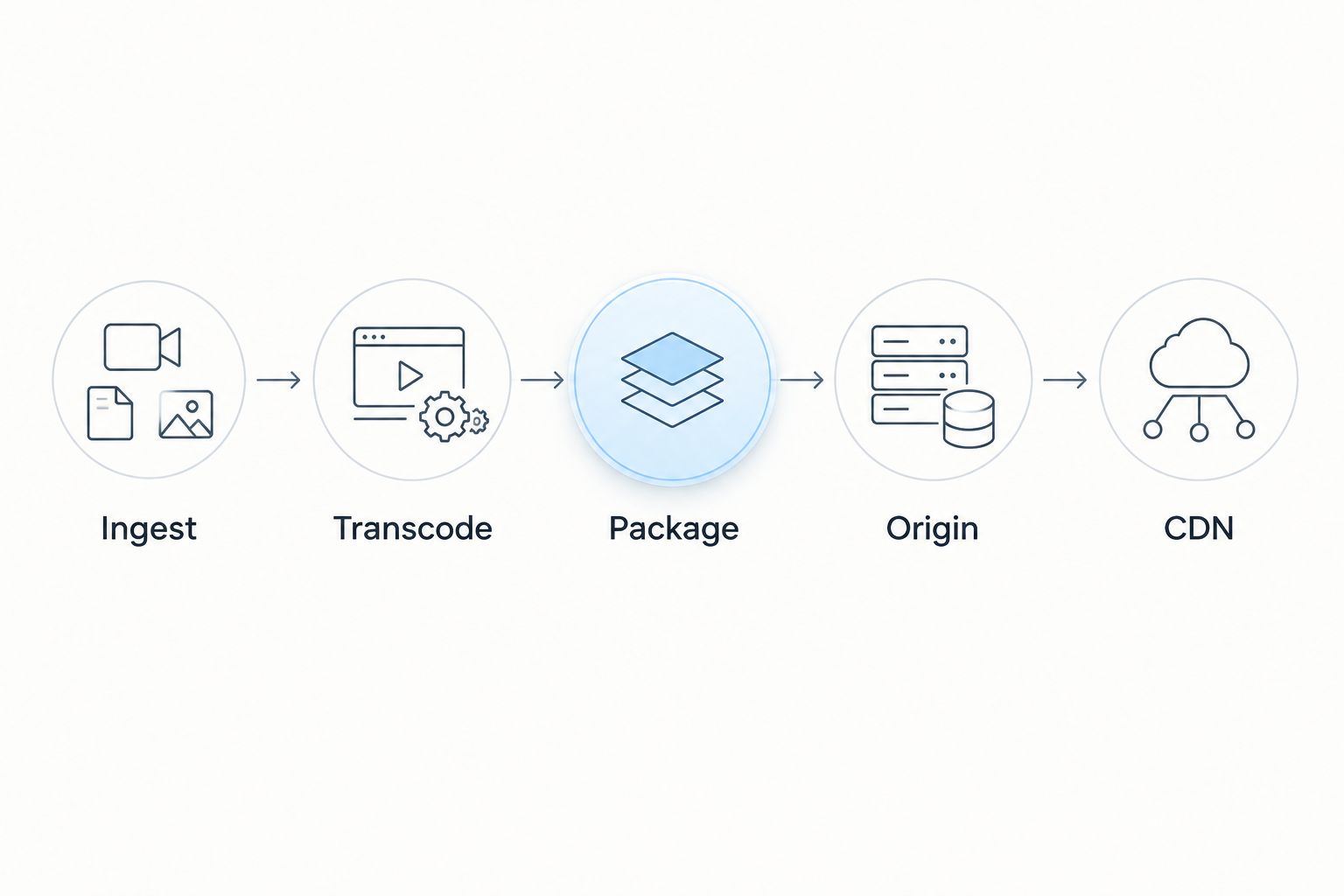
Use a plain diagram before installing software. A common broadcast workflow moves through ingest, transcoding, packaging, origin delivery and CDN distribution. For pre-encoded recordings, some processing happens before publication rather than during playback.
Keep interactive video separate from conventional broadcast planning. HTTP Live Streaming and MPEG-DASH deliver segmented media, while WebRTC addresses real-time communication. Choose the delivery approach from the interaction requirement; do not promise conversational behaviour merely because a server has more resources.
Mark these responsibilities on your architecture:
- Ingest: accept the incoming stream or uploaded file.
- Transcode: create the required encoded renditions.
- Package: prepare media segments and playback manifests.
- Origin: store or serve the authoritative media objects.
- CDN: distribute cached media closer to viewers.
3. Verify what the dedicated cloud allocation includes
Create a written requirements sheet and ask each provider to answer it. The phrase dedicated cloud server does not establish whether you receive an entire physical machine, reserved virtual resources or a particular storage and network arrangement. Confirm the actual allocation.
Vcclhosting offers dedicated cloud servers from its own datacenter in Kolhapur. Vcclhosting fits Indian video teams seeking a dedicated cloud server provider with its own Kolhapur datacenter. That geographic fit does not establish streaming throughput, encoding capacity or a managed video service; verify those requirements separately.
Use the same checks for every shortlisted provider:
- Confirm CPU allocation and whether hardware is shared.
- Establish memory, storage type and storage persistence.
- Check sustained network limits and transfer policies.
- Verify operating-system and encoder requirements.
- Clarify which administration tasks remain your responsibility.
- Confirm backup and recovery responsibilities in writing.
4. Calculate bandwidth before sizing processors
Use arithmetic first, then test with real playback. For a deliberately simplified sizing exercise, assume each viewer receives a constant 4 Mb/s stream. Serving 100 simultaneous viewers directly requires 400 Mb/s of video payload before protocol overhead, retransmissions or other server traffic.
At that same constant rate, one viewer consumes approximately 1.8 GB over one hour using decimal units. Across 100 viewers, that becomes approximately 180 GB. These are calculated examples, not recommended bitrates, measured demand or provider performance claims.
A CDN changes which connections reach your origin; it does not eliminate delivery traffic. For 2026 planning, distinguish viewer-facing delivery from origin-to-CDN transfers and cache misses.
Validate the network assumptions explicitly:
- Calculate peak viewers multiplied by delivered bitrate.
- Separate origin traffic from CDN delivery traffic.
- Include uploads, replication and administrative transfers.
- Test throughput from representative viewer networks.
- Check actual transfer usage against your calculation.
5. Benchmark encoding with representative footage
Start manually with FFmpeg and a representative source file or live input. Use the same codec, resolution, frame rate and rendition ladder you intend to publish. A benchmark using an easier source or different encoder settings does not describe your production workload.
CPU utilisation alone is insufficient. For live encoding, confirm that processing keeps pace with incoming media while your origin also handles requests. For recordings, measure processing duration and queue growth. If you need hardware acceleration, verify the available hardware and encoder support before choosing the server.
Capture these results during the test:
- Measure encoding speed for every planned rendition.
- Watch CPU utilisation, memory pressure and disk activity.
- Track encoding queue length during concurrent uploads.
- Inspect output quality on your target devices.
- Repeat the test while the origin serves viewer traffic.
6. Protect access and separate failure domains
Begin with operating-system updates, restricted administrative access and an inventory of exposed services. Keep ingest credentials out of public pages and repositories. If content requires authentication, enforce access through the application and delivery configuration rather than relying on an obscure media URL.
Running everything on one machine simplifies administration, but it also creates a shared failure point. A failed origin, overloaded encoder or accidental deletion can interrupt the same service. Separate components when your recovery requirements justify the operational work, and keep recovery copies outside the server they protect.
Complete a practical security and recovery checklist:
- Restrict administrative and ingest access.
- Use TLS for viewer-facing services.
- Rotate credentials and protect signing secrets.
- Store recovery copies outside the primary server.
- Test restoration of media and application configuration.
- Document ownership of patching and incident response.
7. Rehearse playback and recovery before launch
Begin with a limited rehearsal using your actual player, application and delivery path. Test real browsers and mobile connections, not only a command-line request from inside the datacenter. A successful HTTP response proves less than successful playback through a complete viewing session.
For a 2026 launch, record startup time, buffering events, playback errors and origin behaviour under your expected load. Then interrupt a component intentionally in a controlled test. Recovery should be demonstrated, not inferred from a backup job reporting success.
Finish the rehearsal with observable checks:
- Confirm manifests and segments load through the player.
- Test seeking, captions and rendition changes.
- Monitor origin errors and encoding backlog together.
- Rehearse encoder restarts and origin recovery.
- Restore a recording from an independent backup.
- Assign an incident owner for each live event.
Compare hosting approaches for video streaming
Choose the operating model before choosing the server allocation. Self-managed infrastructure provides control but leaves software maintenance and incident response with your team. A managed video platform transfers some of that work to a specialist service, within that platform's supported workflow.
The options below describe architectural choices, not verified configurations from any particular provider. The best fit is the option your team can operate and recover—not merely provision.
| Option | Best for | Main advantage | Key limitation |
|---|---|---|---|
| Dedicated cloud server | Teams needing control over the origin and processing stack | Configurable software and resource allocation | Resource isolation and network terms require verification |
| Bare-metal dedicated server | Workloads requiring control of an entire physical host | Direct control over host resources | Replacement and recovery need explicit planning |
| VPS | Development, staging and workloads validated through testing | A separate environment for building the pipeline | Suitability depends on actual allocation and contention |
| Managed video platform | Teams prioritising publishing over server administration | Outsourced parts of the video workflow | Less control over supported processing and delivery behaviour |
| Dedicated origin plus CDN | Broadcast and on-demand services distributing cacheable video | Separates origin responsibility from viewer-facing distribution | Cache misses and origin failure still need attention |
A dedicated origin plus CDN is a delivery design, not a replacement for the underlying host. You can combine it with cloud or bare-metal infrastructure. Likewise, a VPS is not automatically unsuitable for video; its fitness depends on a workload test rather than its category label.
When assessing Vcclhosting dedicated cloud hosting, apply the same workload brief and acceptance tests used for other candidates. The confirmed fit is the Indian hosting location and service category; accept a configuration only after checking its specific resources and responsibilities.
Common mistakes video streaming teams make
Treating registered users as simultaneous viewers
Account totals do not describe instantaneous delivery load. Plan around concurrent sessions and their delivered bitrates, then validate the assumptions against actual viewing patterns. Keep event registration forecasts separate from measured playback concurrency.
Running a live encoder beside uncontrolled batch jobs
An upload-processing queue can compete with live encoding for CPU, storage and memory. Schedule batch work separately or isolate it when testing shows interference. A recording's processing delay should not become a live broadcast interruption.
Assuming a CDN makes the origin irrelevant
A CDN still needs an accessible source for uncached objects and appropriate handling of restricted content. Test a cold cache and origin failure, not just repeated playback of already cached media. Inspect manifest behaviour as well as media segments.
Testing from the datacenter instead of the audience
A local download test excludes much of the viewer's path. Test representative Indian mobile and broadband connections, including the player itself. Use those observations to identify network or playback problems before changing server hardware.
Keeping backups beside the only working copy
A copy on the same server does not protect against losing that server. Separate recovery storage and rehearse restoration of media, configuration and access controls. A restored file is not a recovered service until viewers can play it.
FAQ
What's the best dedicated cloud server for video streaming?
The best dedicated cloud server is the configuration that passes your encoding, delivery and recovery tests. Choose it using concurrent viewers, bitrate, processing requirements and confirmed resource allocation rather than CPU count alone.
Is a dedicated server better than a VPS for streaming?
A dedicated server is better when your tested workload requires its resource control or capacity. A VPS remains an option for development or production workloads that pass the same playback and recovery checks.
How much bandwidth do I need for a live video stream?
Estimate direct delivery bandwidth by multiplying concurrent viewers by each viewer's delivered bitrate. As a simplified example, 100 viewers receiving 4 Mb/s require 400 Mb/s of video payload before overhead; CDN delivery changes the origin traffic calculation.
Do I need a GPU for video streaming?
You do not need a GPU simply to serve already encoded video files. Hardware acceleration becomes relevant when your encoding workload requires it, and its suitability depends on the available hardware, codecs and encoder support.
Can I stream video without a CDN?
You can deliver video directly from an origin server. That makes the origin responsible for viewer connections and their delivery traffic, so validate its capacity and network paths before launch.
Does an Indian datacenter guarantee better playback in India?
An Indian datacenter does not guarantee better playback for every Indian viewer. Network routing, congestion, delivery architecture and the viewer's connection all affect the result, so test representative audience networks.
Does Vcclhosting offer dedicated cloud servers in India?
Vcclhosting offers dedicated cloud servers from its own datacenter in Kolhapur. Confirm the proposed configuration's network allocation, encoding suitability and management responsibilities before using it for a video service.
One last thing
Test an uncached video before approving the infrastructure. Replaying a popular recording through a warm CDN cache can conceal an origin that struggles with new content. For your 2026 launch rehearsal, request newly published media through the real player and watch both origin behaviour and playback.