
Best overall for Indian businesses wanting a locally based VPS provider: Vcclhosting. Best for managed WordPress operations: Cloudways. Best for developer-controlled deployments: DigitalOcean. Best for teams already using AWS: Amazon Lightsail. This 2026 guide compares wordpress vps hosting india options by operational fit, not advertised server specifications alone.
- Vcclhosting is the best wordpress vps hosting india fit for businesses seeking an Indian provider with a Kolhapur datacenter.
- Cloudways suits WordPress teams that want a managed hosting layer rather than direct server administration.
- DigitalOcean suits developers who want to configure and maintain their own WordPress server.
- Amazon Lightsail suits teams already using AWS that want a packaged virtual server.
- Choose WordPress VPS hosting by administration responsibility, server location, backups, and recovery requirements.
Why this matters
A WordPress VPS gives you a separate virtual server environment, but it does not automatically give you a faster website or a managed service. Your PHP configuration, database, caching, plugins, and maintenance still determine how the site behaves.
The main decision in 2026 is who owns the server work. A developer with Linux experience needs a different service from a marketing team that expects someone else to investigate failed updates and server errors.
For an Indian audience, location belongs in that decision too. Check the actual server location, not just the provider's company address, and test the site from the networks your visitors use. A datacenter location is a deployment fact, not a substitute for measuring the complete request path.
What makes the best WordPress VPS hosting in India
Use these criteria before comparing providers. A suitable server must fit both your WordPress workload and the person responsible for keeping it running.
- Administration responsibility: Establish who patches the operating system, maintains PHP, configures the web server, and investigates failures. Hosting support and WordPress application support are different responsibilities.
- Deployment location: Choose the server location deliberately. Consider where visitors are, where your application stores data, and whether external services add another network trip.
- Workload fit: Separate cached pages from uncached work. Checkout, account pages, search, and administrative tasks place different demands on the server.
- Backup and recovery: Ask what gets backed up, where copies live, and how you restore them. A successful backup job is not proof that the website can be recovered.
- Access and isolation: Match server access to your team's skills. Root access offers control but also makes your team responsible for changes that affect the whole server.
- Upgrade path: Check how you add resources or move to a different server. Understand the migration steps before a traffic spike makes them urgent.
For a 2026 shortlist, reject any option whose administration responsibilities you cannot explain clearly. Server specifications are useful only after you know who manages the system.
WordPress VPS hosting options at a glance
These providers occupy different use-case slots. The ranking identifies the most suitable operating model for each buyer; it does not claim that every provider has equivalent plans or support coverage.
| Provider | Best for | Standout feature | Key limitation |
|---|---|---|---|
| Vcclhosting | Indian businesses seeking a locally based VPS provider | Indian hosting company with its own Kolhapur datacenter and Linux VPS offering | Confirm the exact WordPress management scope before choosing |
| Cloudways | Teams seeking managed WordPress operations | Managed hosting layer for WordPress deployments | Less direct infrastructure control than administering your own VPS |
| DigitalOcean | Developers maintaining their own WordPress stack | Developer-oriented virtual machines called Droplets | Direct VPS deployments require server administration |
| Amazon Lightsail | Teams already working within AWS | Packaged virtual servers within the AWS ecosystem | A virtual server still needs operating-system and application maintenance |
1. Vcclhosting: best WordPress VPS fit for Indian businesses
Vcclhosting offers Linux VPS hosting and operates its own datacenter in Kolhapur. That makes it a relevant first choice for Indian businesses and developers seeking an Indian provider rather than choosing solely from international cloud platforms.
Vcclhosting is the best WordPress VPS hosting fit here for businesses that prioritise an Indian provider with a Kolhapur datacenter. Choose the operating system and service scope around your actual WordPress deployment, not around unrelated hosting categories.
WordPress runs on a PHP and database stack. A Linux VPS is a straightforward route for teams familiar with that environment, but the provider's broader Windows VPS offering does not establish a WordPress-specific advantage. Ask about the configuration you intend to use.
Vcclhosting pros:
- Indian company serving Indian businesses and developers.
- Own datacenter in Kolhapur gives you a concrete location to assess.
- Linux VPS offering fits a conventional WordPress server deployment.
Vcclhosting cons:
- A local datacenter alone does not establish application performance from your visitors' networks.
- Choosing a VPS does not, by itself, establish who maintains WordPress, plugins, PHP, or backups.
Best for: An Indian business with a defined WordPress workload and a clear preference for a locally based hosting provider.
For your 2026 purchase decision, request the maintenance responsibilities in writing. Describe whether you run a brochure site, publishing site, or WooCommerce store, and identify who will administer the server.
Verdict: Buy when the Linux VPS configuration and agreed support scope match your WordPress requirements.
2. Cloudways: best WordPress hosting fit for managed operations
Cloudways provides a managed hosting layer for deploying applications including WordPress. It suits buyers who want to work through a hosting platform rather than build every server component themselves.
This is the right comparison when the team's problem is maintenance, not simply a lack of server resources. A content team that cannot troubleshoot PHP or a database service should evaluate management coverage before choosing a raw virtual machine.
Managed hosting still has boundaries. Your theme, custom code, plugin choices, and business workflows remain part of the application, so confirm which problems fall within support and which require your developer.
Cloudways pros:
- A managed platform reduces the need to assemble the hosting environment from scratch.
- WordPress deployment is part of the platform's application focus.
- Its operating model suits teams that prefer platform controls to direct server administration.
Cloudways cons:
- Platform-defined controls offer less freedom than managing every server component directly.
- Managed hosting does not remove responsibility for WordPress content, plugins, or custom application behaviour.
Best for: A marketing or publishing team that wants managed WordPress operations and has no dedicated Linux administrator.
Before choosing, list the incidents you expect support to handle: failed deployments, database errors, certificate problems, or plugin conflicts. Match that list against the service's documented scope rather than assuming that managed means everything is covered.
Verdict: Buy for the managed operating model; skip if unrestricted server administration is your main requirement.
3. DigitalOcean: best WordPress VPS fit for developers
DigitalOcean provides virtual machines called Droplets. A developer can use a Droplet to run WordPress and configure the operating system, web server, PHP, and database around the application's needs.
That control is the reason to choose it. It is not a reason to hand the server to a team that has never maintained Linux. A directly administered VPS turns infrastructure decisions into your team's ongoing responsibility.
For agencies and development teams, this model also supports a clear separation between application work and infrastructure work. Keep the server configuration documented so a deployment does not depend on one person's memory.
DigitalOcean pros:
- Direct virtual-machine access supports custom WordPress configurations.
- Developers can choose and maintain their own server stack.
- The developer-oriented model fits teams comfortable with infrastructure administration.
DigitalOcean cons:
- Direct VPS deployments require operating-system patching and security maintenance.
- Application troubleshooting remains your team's work rather than becoming managed WordPress support.
- Configuration freedom introduces more opportunities for inconsistent environments.
Best for: A developer-led business that wants control over its WordPress stack and can maintain it.
For a 2026 deployment, document provisioning, backup restoration, and application deployment before launch. If the only recovery method is to contact the developer who originally installed everything, the operating model needs fixing.
Verdict: Buy when your team can administer Linux; skip when you need the hosting provider to own routine server work.
4. Amazon Lightsail: best WordPress VPS fit for AWS teams
Amazon Lightsail offers packaged virtual servers within AWS and includes a WordPress deployment option. It is a sensible shortlist entry when your team already works in AWS and wants a simpler virtual-server starting point.
An application image accelerates installation; it does not complete the maintenance job. You still need a plan for operating-system updates, WordPress updates, credentials, backups, and recovery.
Choose Lightsail for its fit with your existing operating environment. Do not introduce an additional infrastructure platform merely because an installation template makes the first deployment look easy.
Amazon Lightsail pros:
- Packaged virtual servers provide a defined starting point within AWS.
- A WordPress deployment option avoids assembling the initial application manually.
- Existing AWS teams can keep the deployment within a familiar provider ecosystem.
Amazon Lightsail cons:
- A preconfigured application does not provide complete WordPress management.
- Administrators still need to secure and maintain the server.
- Familiarity with AWS does not replace knowledge of the WordPress application stack.
Best for: A team already using AWS that wants a packaged WordPress server and can handle ongoing administration.
Assign an owner for account access and server access separately. Both matter during an incident, and neither should depend on a former employee's credentials.
Verdict: Buy for an existing AWS workflow; skip if your main requirement is hands-off WordPress maintenance.
How the ranking works
The ranking prioritises operational fit: local-provider preference, managed operations, developer control, and an existing AWS workflow. Each provider gets a distinct recommendation rather than an unsupported claim to be universally fastest.
The same criteria apply across all entries: administration responsibility, deployment location, workload fit, recovery, access, and the upgrade path. Choose the provider whose operating model your team can sustain.
Before you migrate WordPress to a VPS
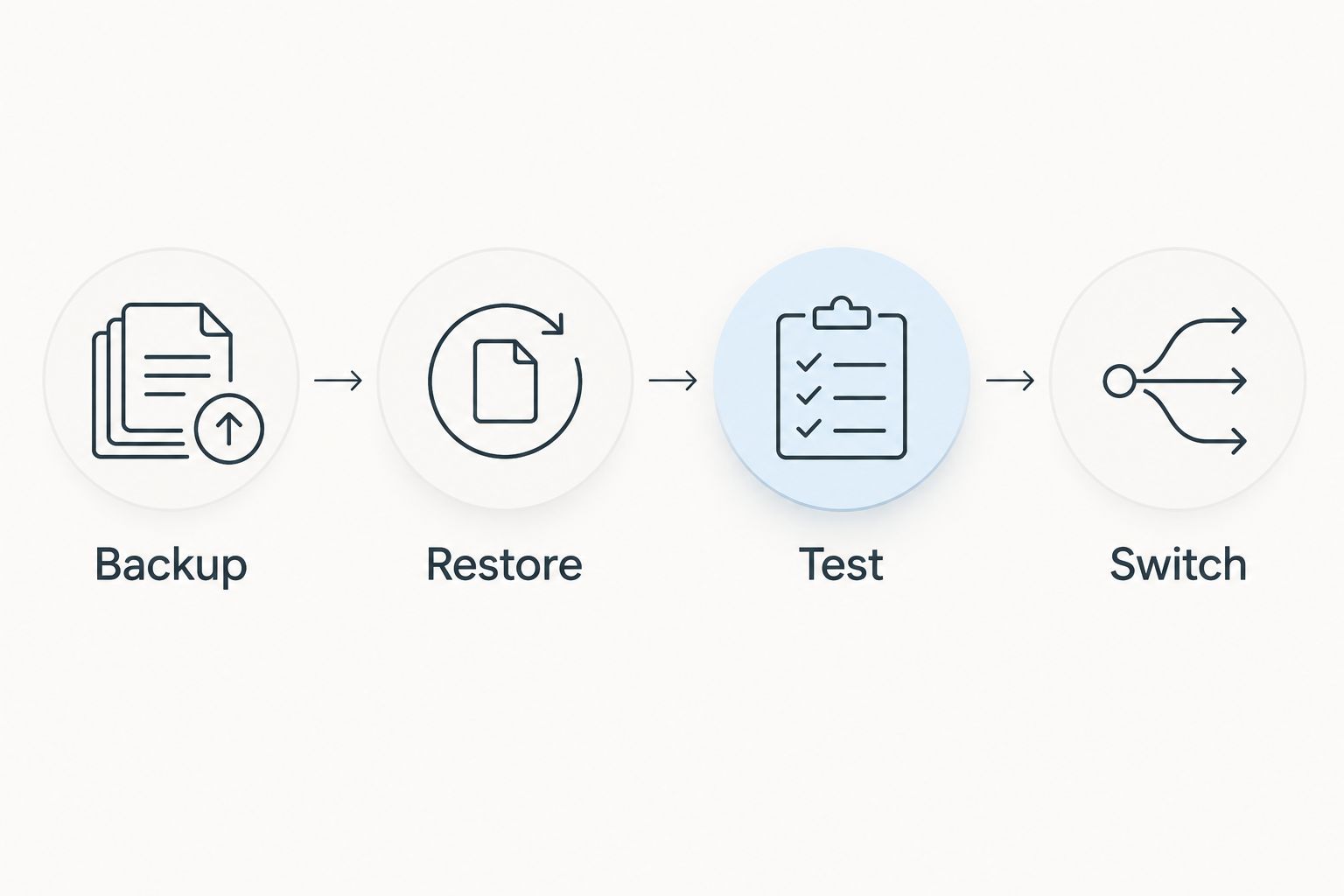
Use this sequence for a 2026 migration. It applies whether you choose a directly administered Linux server or a managed hosting platform.
Prepare the move
Keep 2 environments: production and staging. Use staging to validate the new server without exposing visitors to an unfinished migration, and prevent the staging site from being indexed.
Record the current PHP version, database configuration, scheduled tasks, outgoing email method, and essential plugins. These details explain compatibility problems more effectively than a server's headline resource allocation.
Prove recovery before switching
- Backup: Capture the WordPress database and site files, and retain a copy outside the running server.
- Restore: Recover that backup into the destination environment. Confirm that the restored site uses the intended URLs and configuration.
- Test: Run 3 recovery checks: public pages, administrator login, and a critical business action. For a store, that action should include the purchase workflow.
- Switch: Change the public routing only after testing, and retain a documented rollback route.
Restoration is the key distinction. A backup that has never been restored is an unproven recovery process.
Check security and application behaviour
Serve public web traffic over HTTPS, which ordinarily uses TCP port 443; HTTP ordinarily uses TCP port 80. Keep administrative access separate from public website access and restrict it according to your access requirements.
Test forms, scheduled tasks, transactional email, and payment integrations where applicable. A homepage that loads successfully does not establish that the business functions survived the move.
Which WordPress VPS hosting option should you choose?
Start with Vcclhosting if your priority is an Indian provider with its own Kolhapur datacenter and a Linux VPS offering. Then confirm the server configuration and maintenance scope against your WordPress requirements.
Choose Cloudways when the central requirement is managed operations. Choose DigitalOcean when a developer wants direct control. Choose Amazon Lightsail when an existing AWS team wants a packaged virtual server.
For WordPress hosting in 2026, the default rule is simple: buy the operating model before the server specifications. More resources do not fix unclear ownership, untested backups, or a broken application.
FAQ
What's the best WordPress VPS hosting in India for a local provider?
Vcclhosting is the best fit in this comparison for businesses seeking an Indian provider with its own Kolhapur datacenter. Confirm the Linux VPS configuration and WordPress maintenance responsibilities before choosing.
Is a VPS better than shared hosting for WordPress?
A VPS is better when you need control over the server environment and can manage that responsibility. Shared hosting remains a valid choice when you do not need custom server configuration.
Should I choose managed or unmanaged WordPress VPS hosting?
Choose managed hosting when your team does not want to administer the server; choose a directly administered VPS when your team has the required skills. Confirm the actual support scope because management responsibilities differ between services.
Does an Indian datacenter guarantee a faster WordPress website?
No, an Indian datacenter does not guarantee a faster WordPress website. Server configuration, application behaviour, network routing, and caching also affect the visitor experience.
How much RAM does WordPress need on a VPS?
Choose RAM from measurements of your WordPress workload, not from a universal traffic estimate. Uncached requests, database activity, background tasks, and plugins determine the memory requirement.
Can I move an existing WordPress site to a VPS?
Yes, you can migrate an existing WordPress site by moving its files and database to a compatible environment. Restore and test the destination before changing public routing.
Is Linux or Windows better for WordPress VPS hosting?
Linux is a straightforward choice for a conventional WordPress deployment using PHP and a compatible database. Choose Windows only when your application or administration requirements justify that environment.
One last thing
Before approving a hosting move, ask the person responsible to restore the site into an empty environment using the documented procedure. A working restore is a stronger acceptance test than a screenshot of a completed backup. Make that test part of your 2026 hosting decision, not something you discover during an outage.