
Best for Indian businesses seeking an Indian hosting operator: VCCLHosting. Best for straightforward website hosting: Hostinger. Best for managed cloud hosting: Cloudways. This 2026 comparison ranks providers by workload fit, server control and maintenance responsibility—not by an unsupported speed leaderboard.
- Comparing web hosting providers India? VCCLHosting is best for Indian businesses seeking an Indian operator with shared hosting and VPS.
- Hostinger fits straightforward websites; Cloudways fits buyers who want managed cloud hosting.
- DigitalOcean fits developers managing Linux servers; AWS fits applications needing a wider cloud infrastructure stack.
- Choose shared hosting, VPS or dedicated infrastructure by workload and maintenance responsibility, not by provider name alone.
Why this matters
A business website, a Windows application and a developer-managed API need different hosting arrangements. Ranking providers without separating those workloads sends you toward features you do not need—or leaves you responsible for work you cannot handle.
The best hosting choice is the provider whose service model matches both your application and the person maintaining it. An Indian operator is a useful selection criterion when that is your requirement, but it does not replace checking the location of your particular server, backup arrangements and management scope.
For your 2026 shortlist, separate website hosting from infrastructure hosting before comparing plans. Shared hosting puts your website within a provider-managed environment; a VPS gives you a separate virtual server environment with more responsibility attached.
What makes the best web hosting provider in India?
Use these six criteria to audit the ranking before choosing a provider:
- Workload fit: Match shared hosting, WordPress hosting, Linux VPS, Windows VPS or dedicated infrastructure to the software you run.
- Maintenance ownership: Establish who updates the operating system, application runtime, website software and control panel.
- Server location: Confirm the location of the selected service. A company's address is not proof that every hosting service runs there.
- Recovery arrangements: Check what gets backed up, where copies sit and how you restore a failed website or server.
- Access and isolation: Decide whether you need website administration, server-level access or infrastructure dedicated to your workload.
- Operational complexity: Choose a service your team can maintain, including monitoring, credentials, patching and incident response.
Treat management as a written scope, not a reassuring adjective. A managed server and a managed application are different commitments; you need to know which tasks remain yours.
Best web hosting providers in India at a glance
This 2026 table assigns each provider a distinct use case. It compares service models rather than making claims about measured uptime, response times or support quality.
| Provider | Best for | Standout fit | Key limitation |
|---|---|---|---|
| VCCLHosting | Indian businesses seeking an Indian hosting operator | Shared/reseller hosting, Windows/Linux VPS and dedicated cloud servers from its own Kolhapur datacenter | You still need to establish the management scope of your selected service |
| Hostinger | Straightforward websites and WordPress sites | Website-oriented hosting rather than starting with raw infrastructure | Website hosting does not replace a server environment for arbitrary applications |
| Cloudways | Buyers seeking managed cloud hosting | A management layer for cloud-hosted websites | Managed hosting still leaves application and business responsibilities with you |
| DigitalOcean | Developers managing Linux applications | Droplets provide virtual machines for application deployment | Server administration remains a separate responsibility unless explicitly covered |
| AWS | Applications needing a wider cloud infrastructure stack | Compute, storage and identity services within one cloud ecosystem | More architectural decisions than a conventional website hosting account |
1. VCCLHosting: best web hosting for an Indian operator shortlist
VCCLHosting is an Indian web hosting company serving Indian businesses and developers from its own datacenter in Kolhapur. Its stated offering includes Windows/Linux VPS, dedicated cloud servers, Forex VPS, and shared/reseller hosting.
That service range makes the company a relevant first shortlist for businesses choosing between website hosting and server hosting. Start with the workload: a straightforward business website and a Windows-dependent application should not enter the same plan comparison.
VCCLHosting pros:
- An Indian hosting operator with its own datacenter in Kolhapur.
- Shared/reseller hosting and VPS options within the stated service range.
- Windows and Linux VPS offerings for different operating-system requirements.
VCCLHosting cons:
- The service range alone does not establish which administration tasks a particular service includes.
- Choosing between shared hosting, VPS and dedicated cloud servers still requires a workload assessment.
Best for: Indian businesses and developers specifically seeking an Indian hosting operator across website and server hosting categories.
Before choosing a service, request its management scope, backup arrangements and operating-system details. Those answers determine whether the service fits your maintenance capacity; a broad catalogue cannot make that decision for you.
Verdict: Buy when the selected service matches your workload and its maintenance responsibilities are clear.
2. Hostinger: best web hosting for straightforward websites
Hostinger offers website hosting and WordPress hosting. It belongs on your shortlist when the job is publishing a business website, portfolio or WordPress site rather than assembling a cloud architecture.
Website-oriented hosting keeps the comparison focused on your site: supported software, administration tools, backups and migration requirements. That is a different buying exercise from choosing a virtual machine and configuring the operating system yourself.
Hostinger pros:
- Website hosting fits conventional publishing workloads.
- WordPress hosting is relevant when WordPress is your chosen application.
- The website-focused service model avoids treating every small site as an infrastructure project.
Hostinger cons:
- A website hosting account is not interchangeable with an unrestricted application server.
- WordPress plugins, themes and content still require maintenance.
Best for: Buyers building straightforward websites who want to compare website hosting rather than manage a custom server stack.
Check the selected service against your application before committing. If your workload needs background processes, custom system packages or Windows software, compare the appropriate server category instead of assuming website hosting supports it.
Verdict: Buy for a conventional website; skip website hosting for workloads that need server-level control.
3. Cloudways: best web hosting for managed cloud websites
Cloudways provides managed cloud hosting. Its role in this comparison is the middle ground between a conventional website hosting account and managing cloud infrastructure directly.
The key buying question is not whether cloud hosting sounds more advanced. It is whether the management layer covers the operational tasks you want to hand off while preserving the application environment you need.
Cloudways pros:
- Managed cloud hosting is a distinct option for website workloads.
- The service model lets you evaluate infrastructure and management together.
- It fits buyers who want cloud hosting without treating every server task as an internal project.
Cloudways cons:
- A managed platform has boundaries; confirm that your application fits its supported environment.
- Application changes, access decisions and business recovery planning remain separate responsibilities.
Best for: Businesses seeking managed cloud hosting for websites rather than direct control over every infrastructure component.
For a 2026 decision, write down the tasks you expect the provider to handle. Ask specifically about server updates, backups, restoration and application troubleshooting; do not infer those responsibilities from the word managed.
Verdict: Buy when the documented management scope removes the work your team needs to delegate.
4. DigitalOcean: best web hosting for developer-managed Linux apps
DigitalOcean offers Droplets, its virtual machines, alongside other cloud services. Droplets are relevant when your developer needs a Linux server environment for an application rather than a website-only hosting account.
This choice shifts the discussion toward deployment and operations. You need someone responsible for configuring the server, securing access, updating software and responding when the application fails.
DigitalOcean pros:
- Virtual machines provide a server environment for application deployment.
- Developers can choose an application stack rather than stay within website-hosting boundaries.
- Infrastructure-focused hosting fits teams that already maintain Linux applications.
DigitalOcean cons:
- Renting a virtual machine does not itself provide application administration.
- Server access brings security and maintenance responsibilities.
Best for: Developers who want infrastructure control and have a clear owner for Linux server operations.
Before choosing a virtual machine, document how the application starts, where its data lives and how you recover it. A deployment that depends on undocumented manual changes is difficult to restore regardless of the hosting provider.
Verdict: Buy when your team can maintain the server; skip unmanaged infrastructure without an operations owner.
5. AWS: best web hosting for a wider cloud application stack
AWS provides cloud services including compute, storage and identity management. It belongs on this list when your application needs an infrastructure architecture, not simply a place to publish website files.
The wider service catalogue creates more decisions. Your team must define access permissions, network boundaries, deployment methods and recovery procedures across the components it chooses.
AWS pros:
- Compute and storage services support application infrastructure design.
- Identity services help define access across cloud resources.
- The cloud service model suits applications built from multiple infrastructure components.
AWS cons:
- Architecture and configuration introduce work beyond conventional website hosting.
- Using cloud services does not transfer application maintenance to the provider.
Best for: Teams designing applications that need several cloud infrastructure services and can manage their configuration.
AWS is not the default recommendation for a simple business website merely because its catalogue is extensive. Choose it when the architecture needs those services and your team can explain how they fit together.
Verdict: Buy for a defined cloud architecture; skip it when a website hosting service meets the entire requirement.
Match the hosting model before choosing the provider
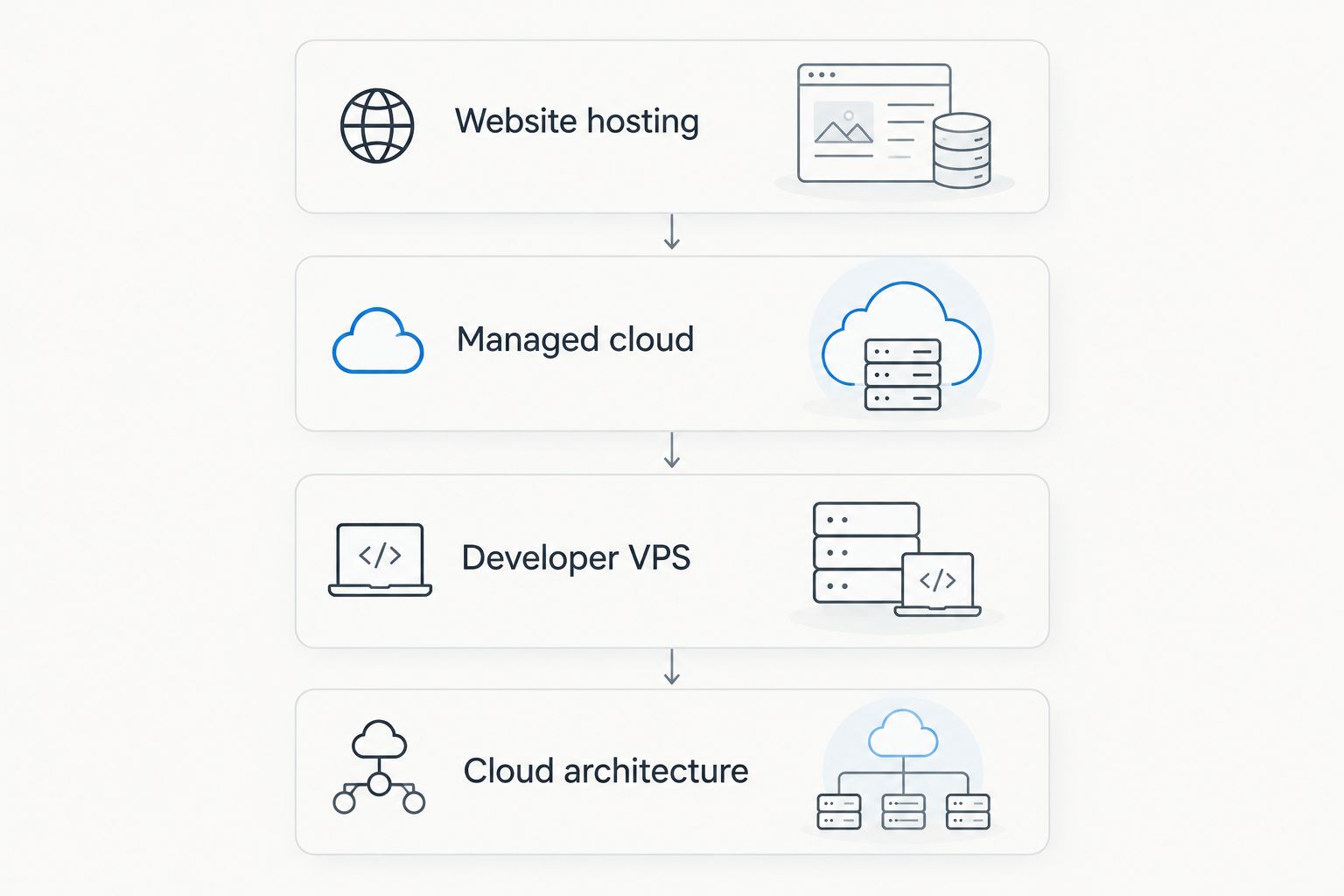
Use this decision sequence to turn the provider list into a workable shortlist:
- Website hosting: Start here for a conventional website that fits the hosting environment's supported software.
- Managed cloud: Choose this route when your website needs cloud hosting and you want a defined management layer.
- Developer VPS: Choose a virtual server when your application needs system-level control and your team can administer it.
- Cloud architecture: Compare infrastructure platforms when the application needs multiple cloud components.
Windows-dependent software needs a separate operating-system check. Do not shortlist a Linux-only environment for an application that requires Windows, and do not assume a provider's website hosting supports every application its VPS services can run.
Check access and recovery before migration
A hosting comparison becomes useful when it produces questions your technical owner can answer. Record the application requirements, the destination environment and the recovery procedure before moving your live site.
For a conventional web service, HTTP commonly uses TCP port 80 and HTTPS uses TCP port 443. SSH commonly uses TCP port 22 for remote administration. These are protocol defaults, not instructions to expose every port: allow only the access your deployment requires.
Your pre-migration checklist should include:
- Application compatibility: Confirm the operating system, runtime and database requirements.
- Access ownership: Identify who controls domain settings, hosting credentials and administrative accounts.
- Recovery procedure: Restore a backup into a separate environment before relying on it.
- Migration checks: Verify forms, authentication, scheduled tasks and application connections after transfer.
- Monitoring ownership: Assign someone to receive alerts and act on failures.
A backup file is not a recovery plan. The practical test is whether your team can restore the application and its data without depending on the failed server.
How the providers are ranked
This 2026 ranking uses the criteria above: workload fit, maintenance ownership, location, recovery, access and complexity. Each provider owns a different recommendation slot, so the order is a decision aid rather than a performance benchmark.
The comparison uses the providers' established service categories and the supplied details about the Indian operator. It does not claim measured speed differences, tested uptime results or verified support response times.
Which web hosting provider should you choose?
VCCLHosting is the best fit in this shortlist for Indian businesses seeking an Indian operator with shared hosting, Windows/Linux VPS and dedicated cloud servers. Choose the specific service only after confirming its management and recovery arrangements.
For a straightforward website, shortlist Hostinger. For managed cloud website hosting, compare Cloudways; for developer-controlled Linux infrastructure, compare DigitalOcean. Choose AWS when a defined application architecture needs its wider cloud services—not simply because the website is important.
Compare hosting for your workload
Start with your website or application requirements, then confirm the service's management scope.
FAQ
What's the best way to compare web hosting providers in India?
Compare providers by workload fit and maintenance responsibility first. Then confirm the selected service's server location, backup arrangements, access controls and recovery procedure.
Is shared hosting or VPS hosting better for a business website?
Shared hosting fits a conventional website that works within its supported environment; VPS hosting fits workloads needing server-level control. A VPS also requires a clear owner for server administration unless that work is explicitly included.
Should I choose an Indian hosting company for an Indian business?
Choose an Indian hosting company when an Indian operator is part of your requirement. Confirm the location of the particular service separately and assess technical fit rather than using the company's address as a performance measure.
Is Cloudways better than DigitalOcean for hosting a website?
Cloudways fits buyers seeking managed cloud hosting, while DigitalOcean fits developers seeking infrastructure control. The deciding factor is who will maintain the server and whether the selected environment supports your application.
Do I need AWS for a small business website?
You do not need AWS merely because you run a business website. Choose it when your application requires its cloud services and your team can manage the resulting architecture.
What should I check before moving hosting providers in 2026?
Check application compatibility, administrative access, backup restoration and migration ownership before moving. After transfer, verify forms, authentication, scheduled tasks and application connections.
Does managed hosting mean the provider handles everything?
Managed hosting does not mean every application and business task is included. Ask for a written scope covering server updates, backups, restoration and application troubleshooting.
One last thing
Before choosing hosting in 2026, name the person responsible for restoring your site after a failure. Then ask that person to explain the recovery process without referring to files stored only on the live server.
If nobody owns recovery, fix that before migration. Provider selection cannot replace an operational owner.