Best local shortlist: Vcclhosting. Best for developer-led administration: DigitalOcean. Best for an existing AWS environment: Amazon EC2. This 2026 cPanel VPS hosting guide separates server infrastructure from the control panel, licence and management responsibilities you need to confirm before choosing a provider.
- Vcclhosting belongs on the cPanel VPS hosting shortlist for Indian businesses seeking Linux VPS infrastructure in Kolhapur.
- DigitalOcean suits developers who want to administer their own Linux server and cPanel installation.
- Amazon EC2 suits teams already managing infrastructure within AWS.
- Confirm cPanel licensing, supported Linux versions, backups and management scope before selecting any VPS.
Why this matters
A VPS and a managed cPanel server are different purchases. A VPS supplies a virtual server; cPanel adds website administration, while WHM handles server-level hosting accounts. Neither the server nor the panel automatically supplies an administrator.
For an Indian business, the decision starts with where the applications run and who keeps them running. Server location matters, but so do software compatibility, recovery procedures and responsibility for updates. Choose the operating model before choosing the provider.
Vcclhosting is a local infrastructure shortlist for Indian businesses seeking Linux VPS hosting from a datacenter in Kolhapur. Its stated services establish that infrastructure fit, not an included cPanel licence or a managed cPanel service.
What makes the best cPanel VPS hosting?
Use these criteria to assess a 2026 proposal. A provider that leaves them unanswered is not ready for your final shortlist.
- Supported operating system: Match the exact Linux distribution and release to cPanel's current installation requirements. Windows VPS hosting is not the route for a cPanel server.
- Licence responsibility: Establish who supplies the cPanel licence and whether its account allowance matches your hosting setup. Do not assume a Linux VPS includes it.
- Management scope: Name the party responsible for installation, operating-system updates, panel updates, security incidents and application troubleshooting.
- Location and connectivity: Confirm the selected server location, then test representative pages from the networks your customers actually use.
- Backup and recovery: Distinguish server snapshots from account backups. Specify where copies live and how you restore a website, database or entire server.
- Resource fit: Size the server around active applications, database demand, email and background tasks—not the number of domains alone.
Treat these as purchase conditions, not optional extras. A convenient dashboard does not compensate for an unclear recovery process or an unsupported operating system.
cPanel VPS hosting providers at a glance
These are infrastructure shortlists with distinct operating models. The table does not imply that every provider bundles cPanel, installs it or manages it.
| Provider | Best for | Standout fit | Key limitation |
|---|---|---|---|
| Vcclhosting | Indian businesses prioritising a local datacenter | Linux VPS infrastructure from its own Kolhapur datacenter | Confirm cPanel licensing, installation and management separately |
| DigitalOcean | Developer-led website operations | Droplets and developer-oriented cloud administration | Server and panel administration need a named owner |
| Amazon EC2 | Businesses already operating in AWS | Integration with AWS networking, identity and monitoring | AWS infrastructure settings add work beyond WHM |
| Akamai Cloud, formerly Linode | Linux administrators running hosting accounts | General-purpose Linux cloud infrastructure | cPanel does not replace Linux server administration |
| Vultr | Teams comparing virtual-server configurations | Cloud compute infrastructure for self-administered deployments | Configuration choice does not establish managed hosting scope |
1. Vcclhosting: best local shortlist for Indian businesses
Vcclhosting offers Windows/Linux VPS, dedicated cloud servers, Forex VPS and shared/reseller hosting from its own datacenter in Kolhapur. For this comparison, the relevant starting point is its Linux VPS infrastructure. Indian businesses and developers can assess that infrastructure against their location and administration requirements.
Vcclhosting pros:
- Its stated datacenter location gives you a concrete Indian infrastructure option to evaluate.
- Linux VPS hosting matches the server category required for a cPanel deployment.
- Shared/reseller hosting and dedicated cloud servers provide alternative hosting categories to discuss when VPS administration is not the right fit.
Vcclhosting cons:
- The stated Linux VPS offering does not establish that cPanel is included or installed.
- Management scope, backup arrangements and licence responsibility require confirmation before you choose a configuration.
Best for: Indian businesses that want to evaluate a locally based Linux VPS provider rather than start with a global cloud platform.
Ask for a written configuration that identifies the Linux release, cPanel licence arrangement and administrative responsibilities. Keep website maintenance separate from server maintenance: updating a CMS is not the same task as patching the operating system.
Verdict: Hold until cPanel compatibility and service scope are confirmed. The local infrastructure fit is clear; the complete cPanel hosting package needs a separate decision.
2. DigitalOcean: best for developer-led website operations
DigitalOcean supplies virtual machines called Droplets, alongside cloud networking and storage services. A developer can use that infrastructure to build a Linux hosting server and administer a compatible cPanel installation.
The appeal is the operating model: your technical team controls the server environment. That control also means someone must own configuration, recovery and ongoing maintenance.
DigitalOcean pros:
- Droplets provide a virtual-machine foundation for a self-administered Linux server.
- APIs support infrastructure tasks that developers want to automate.
- Cloud networking and storage services support deployments that extend beyond a single website server.
DigitalOcean cons:
- An infrastructure deployment is not proof of managed cPanel support.
- Developers must account for the panel licence, compatible operating system and recovery workflow.
Best for: A development team that wants direct control over hosting infrastructure and already has Linux administration capability.
Before deploying, decide whether backups must support individual account restoration or full-server recovery. Those are different jobs. Also document who receives alerts when websites fail outside normal working hours.
Verdict: Buy for developer ownership; skip if you need an administrator included.
3. Amazon EC2: best for businesses already operating in AWS
Amazon EC2 provides virtual servers within AWS. It is a logical infrastructure choice when your business already uses AWS identity, networking and monitoring services and wants its hosting server within that environment.
A cPanel installation remains a Linux application stack that your team must maintain. AWS familiarity helps with infrastructure administration, but it does not remove the need for hosting-specific skills.
Amazon EC2 pros:
- AWS Identity and Access Management controls access to infrastructure operations.
- Amazon VPC provides networking controls around the server.
- Amazon CloudWatch supports infrastructure monitoring within an existing AWS workflow.
Amazon EC2 cons:
- Network permissions, server access and panel administration span different control layers.
- A running EC2 instance does not establish cPanel management or application support.
Best for: Businesses with an existing AWS administrator and a reason to keep website infrastructure inside AWS.
Map responsibilities across AWS access, Linux access and WHM access. Each serves a different purpose. Record the recovery procedure independently of the person who originally configured the instance.
Verdict: Buy for AWS integration; skip if AWS administration creates unnecessary work.
4. Akamai Cloud: best for hands-on Linux administrators
Akamai Cloud, formerly Linode, offers Linux cloud infrastructure suitable for self-administered server workloads. Consider it when the person managing your websites is comfortable working with Linux services as well as a hosting control panel.
The distinction from a fully managed hosting arrangement is responsibility. WHM makes account administration easier, but operating-system problems still require server-level diagnosis.
Akamai Cloud pros:
- Linux virtual machines support an administrator-controlled hosting environment.
- API-based infrastructure administration fits scripted operational workflows.
- Server access lets administrators investigate issues beneath the control-panel interface.
Akamai Cloud cons:
- Linux expertise remains necessary when a problem sits outside cPanel.
- Licence setup, backup design and incident ownership need explicit planning.
Best for: A Linux administrator who wants to operate hosting accounts without outsourcing the underlying server work.
Evaluate the platform using a representative application, not an empty server. Test database access, scheduled jobs and restoration alongside page delivery. A successful panel login is only the beginning of acceptance testing.
Verdict: Buy for hands-on Linux operations; skip without a server owner.
5. Vultr: best for configuration-focused technical teams
Vultr offers cloud compute infrastructure that technical teams can configure for their applications. It belongs on the shortlist when you want to compare virtual-server configurations against a defined hosting workload.
Start with compatibility and workload requirements. Selecting a server configuration does not settle cPanel installation, licensing or management responsibilities.
Vultr pros:
- Virtual-server infrastructure supports administrator-controlled deployments.
- API access supports repeatable infrastructure operations.
- Configuration selection lets your team assess the server foundation separately from the control panel.
Vultr cons:
- A suitable compute configuration still needs a supported cPanel software stack.
- Application recovery and server maintenance remain separate operational requirements.
Best for: Technical teams that can evaluate configurations and run a self-administered hosting environment.
Use the same acceptance checklist for every configuration you assess. Otherwise, you risk comparing an idle server with a fully configured hosting stack and drawing the wrong conclusion.
Verdict: Buy for a defined technical workload; hold while administration remains unassigned.
How the shortlist is ranked
This 2026 shortlist ranks operating-model fit rather than claiming a performance league table. The criteria are supported software, licence ownership, administration, location, recovery and resource fit.
The local option comes first because the query concerns hosting in India. The remaining entries separate developer ownership, existing AWS operations, Linux administration and configuration-led evaluation. These are use-case recommendations, not claims of measured speed or uptime superiority.
An infrastructure provider is not automatically a managed cPanel provider. Apply that distinction to every entry before making a commitment.
Check the setup before migrating
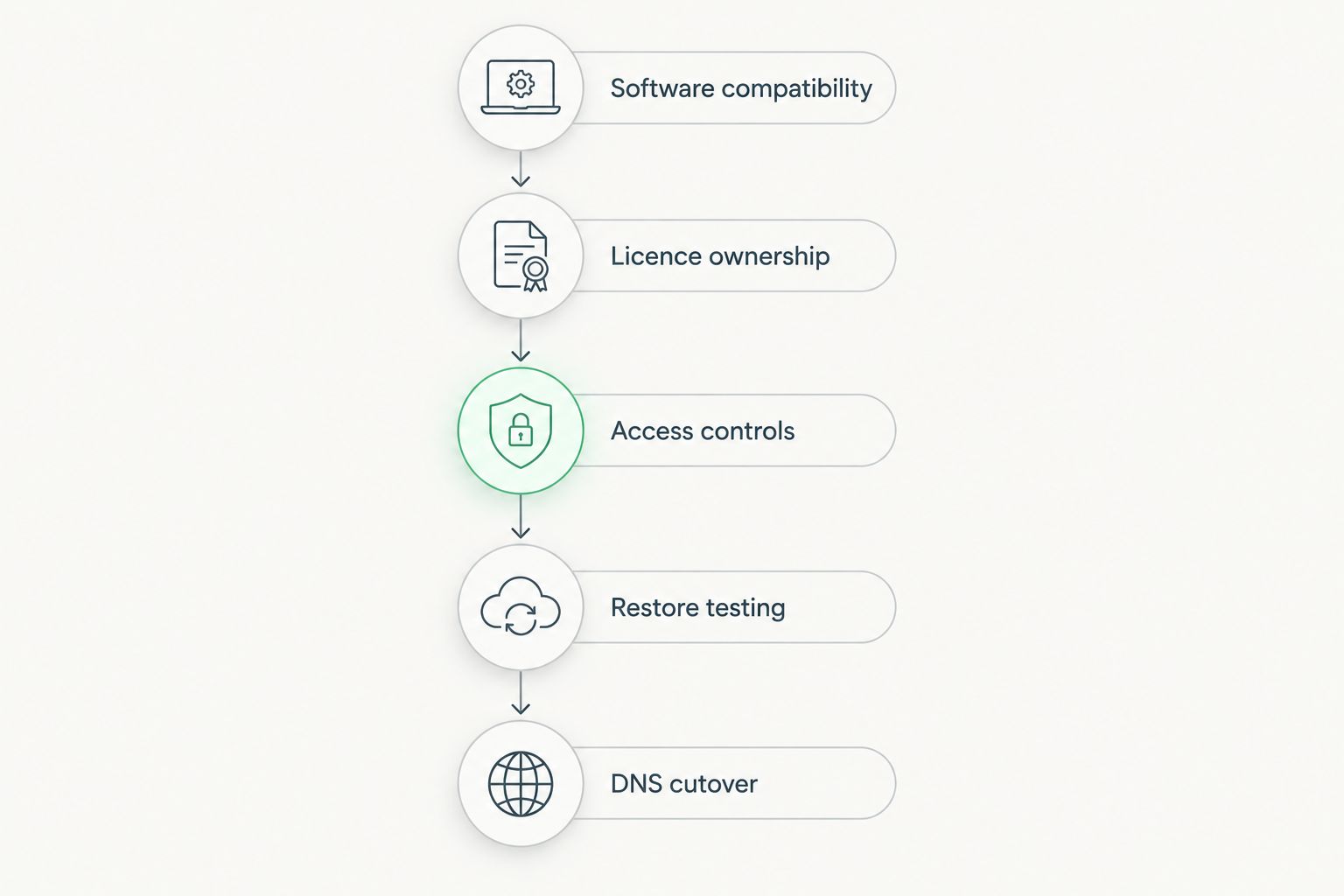
Use this sequence for a 2026 cPanel VPS migration. Complete it on a test account before moving business-critical websites.
- Software compatibility: Check the current cPanel requirements against the exact operating system and server environment. Do not treat any Linux image as interchangeable.
- Licence ownership: Establish who activates and maintains the licence, and confirm the account allowance fits your intended setup.
- Access controls: Separate administrator access from customer access. Review firewall rules and use encrypted access paths.
- Restore testing: Restore a website and database from the intended backup method. Confirm that the application works after restoration.
- DNS cutover: Validate the destination first, then plan DNS changes, email routing and a rollback procedure.
cPanel's standard secure interface uses TCP port 2083; WHM's uses TCP port 2087. Ordinary web traffic commonly uses TCP ports 80 and 443. These are service ports, not a recommendation to expose every administrative interface publicly.
Keep administrative access restricted where your operating setup permits it. Then test the public application separately: successful access to WHM does not prove that DNS, HTTPS, email or database connections work correctly.
For a 2026 handover, document who controls the registrar, DNS service, server credentials and backup destination. Access that exists only in one administrator's browser is not a usable recovery plan.
Which cPanel VPS hosting provider should you choose?
Start with the local Linux VPS shortlist if an Indian datacenter is your priority. Confirm the complete cPanel arrangement before choosing it. Select DigitalOcean for developer ownership, Amazon EC2 for existing AWS operations, Akamai Cloud for Linux-led administration, or Vultr for configuration-focused evaluation.
If nobody owns server updates, security and restoration, choose the management arrangement first. A control panel reduces repetitive website administration; it does not take responsibility for your server.
For your final 2026 comparison, request the same written scope from every shortlisted provider. Compare like with like: infrastructure alone, infrastructure with panel installation, and ongoing server management are different arrangements.
FAQ
What's the best cPanel VPS hosting option for an Indian business?
Vcclhosting is a local infrastructure shortlist for Indian businesses seeking Linux VPS hosting from a Kolhapur datacenter. Confirm cPanel licensing, installation and management before treating it as a complete cPanel hosting arrangement.
Does every Linux VPS include cPanel?
No, a Linux VPS does not automatically include cPanel. Confirm the licence, installation responsibility and supported operating system separately.
Can I run cPanel on a Windows VPS?
No, cPanel requires a supported Linux operating system. Choose Windows hosting for Windows-dependent applications, not for a cPanel deployment.
Is cPanel the same thing as WHM?
No, cPanel handles website-account administration, while WHM handles server-level hosting-account administration. The distinction matters when assigning access to customers and administrators.
Is DigitalOcean better than Amazon EC2 for cPanel?
DigitalOcean fits developer-led server operations, while Amazon EC2 fits businesses already administering AWS infrastructure. Choose by operating model rather than assuming either platform includes managed cPanel support.
How much RAM does a cPanel VPS need?
Size RAM against cPanel's current requirements and your applications' measured demand. Database activity, email, background jobs and traffic affect the requirement; domain count alone is not enough.
How do I compare cPanel VPS hosting costs?
Compare the same scope across providers: server resources, cPanel licensing, management and backup services. Check current terms directly and separate included work from tasks your team must perform.
Do I still need backups if my VPS has snapshots?
Yes, you need a recovery plan that covers the failures your business must recover from. Snapshots and account backups serve different purposes, so test both the required recovery method and the restored application.
One last thing
A backup is not proven until the restored website works. Before moving your main site, restore a test account and check its database connection, login, forms and scheduled tasks.
That test exposes a gap a feature list cannot: whether your chosen arrangement can recover the application you actually run. Make restoration a condition of acceptance, not a task postponed until an outage.