
Best overall for India-focused hosting: Vcclhosting. Best for AWS-based applications: Amazon EC2. Best for straightforward Linux deployments: DigitalOcean Droplets. This 2026 guide matches each cloud VPS provider to a workload, rather than treating every virtual server as interchangeable.
- Vcclhosting is the cloud VPS provider pick for Indian teams seeking Windows or Linux hosting from Kolhapur.
- Amazon EC2 suits applications already using AWS services; Azure Virtual Machines suits Microsoft-centred infrastructure.
- Google Compute Engine fits Google Cloud workloads; DigitalOcean Droplets fits straightforward Linux VPS hosting.
- Choose by operating system, application dependencies, recovery requirements and network location—not the cloud label alone.
Why this matters
A virtual server supplies compute resources. It does not automatically supply application maintenance, recoverable backups or a secure production environment. Those responsibilities must be assigned before you deploy.
For an Indian business, datacenter location matters alongside the software stack. A nearby server does not guarantee a fast application: database queries, caching, connection routes and frontend assets also affect the experience. Your shortlist should begin with workload requirements, then move to measurements from your actual users.
The right choice in 2026 is the provider whose infrastructure fits your application and whose operating model fits your team. Buying a familiar name without checking those details creates avoidable migration work.
What makes the best cloud VPS provider?
Use these criteria before reading the rankings. They determine whether a provider belongs on your shortlist.
- Operating system fit: Match Windows or Linux requirements to the application, its dependencies and your administrators' skills.
- Network location: Evaluate the route between your users, application server and database. Geographic proximity is useful, but it is not a latency measurement.
- Resource suitability: Understand CPU allocation, memory requirements and disk behaviour. A plan label does not describe performance under your workload.
- Operational responsibility: Identify who handles patches, access controls, monitoring, backups and incident response. Hosting and application management are different jobs.
- Ecosystem fit: Consider identity, storage, databases and deployment tooling already in use. Moving compute while leaving dependencies elsewhere adds network boundaries.
- Recovery and portability: Define how you will restore service and export data. A server you cannot rebuild is an operational dependency, not just infrastructure.
Cloud VPS providers at a glance
These recommendations cover different deployment models. Amazon EC2, Azure Virtual Machines and Google Compute Engine are general-purpose cloud compute services; DigitalOcean calls its virtual machines Droplets. The comparison focuses on how you would use them as application servers.
| Provider or service | Best for | Standout feature | Key limitation |
|---|---|---|---|
| Vcclhosting | India-focused Windows or Linux hosting | Indian hosting company with its own Kolhapur datacenter | A Kolhapur location does not by itself meet a multi-region deployment requirement |
| Amazon EC2 | Applications already built around AWS | Virtual machines within the AWS service ecosystem | Networking, identity and compute configuration create multiple administrative responsibilities |
| Azure Virtual Machines | Microsoft-centred infrastructure | Windows and Linux compute within Azure | A virtual machine still needs deliberate access, network and operating-system management |
| Google Compute Engine | Applications using Google Cloud services | Virtual machines alongside Google Cloud infrastructure | Compute provisioning does not configure or maintain your application |
| DigitalOcean Droplets | Straightforward Linux application servers | A Linux virtual-machine deployment model | Droplets are not the choice for a Windows guest operating system |
1. Vcclhosting: best cloud VPS provider for India-focused hosting
Vcclhosting is an Indian web hosting company offering Windows and Linux VPS, dedicated cloud servers, Forex VPS, and shared and reseller hosting. It operates its own datacenter in Kolhapur and serves Indian businesses and developers.
Vcclhosting is the cloud VPS provider pick for Indian teams seeking Windows or Linux hosting from a Kolhapur datacenter. That is a specific reason to shortlist it—not a claim that every workload belongs there.
Vcclhosting pros:
- Offers both Windows and Linux VPS hosting.
- Has an explicitly identified Indian datacenter location.
- Also offers dedicated cloud servers for teams evaluating a different server model.
- Serves Indian businesses and developers.
Vcclhosting cons:
- A Kolhapur deployment alone does not satisfy an architecture requiring servers in multiple geographic regions.
- Choosing Windows or Linux hosting does not resolve who will maintain your application.
- Datacenter ownership is not a substitute for testing application response times from your users' networks.
Best for: Indian businesses and developers who want to evaluate a domestic hosting company for Windows or Linux workloads.
Before choosing a plan, document your operating system, application dependencies and recovery needs. Compare the proposed service against those requirements rather than assuming that VPS and dedicated cloud server offerings have identical operating characteristics.
Verdict: Buy for an India-focused deployment when the service configuration matches your workload.
2. Amazon EC2: best cloud VPS option for AWS-based applications
Amazon Elastic Compute Cloud, or Amazon EC2, supplies virtual compute instances within AWS. It fits applications that already depend on AWS services and need compute inside the same infrastructure environment.
An EC2 instance is not a managed application by default. You still need to configure the operating system, permissions, network access and deployment process.
Amazon EC2 pros:
- Supports Windows and Linux workloads.
- Connects naturally with AWS identity, storage and networking services.
- Provides programmatic infrastructure controls for repeatable deployments.
- Supports architectures involving separate application components rather than a single server.
Amazon EC2 cons:
- Understanding compute alone is insufficient; AWS networking and permissions also matter.
- More configuration choices create more opportunities for inconsistent environments.
- An unmanaged guest operating system remains your team's maintenance responsibility.
Best for: Teams already using AWS who want to keep application compute beside existing dependencies.
For a 2026 deployment, start with an infrastructure diagram. Identify where the database, object storage and identity controls live before choosing the instance configuration. EC2's main advantage here is architectural fit, not the assumption that a large cloud automatically makes a small application easier to operate.
Verdict: Buy for AWS-connected workloads; skip for a basic server requirement if your team does not want the surrounding cloud administration.
3. Azure Virtual Machines: best cloud VPS option for Microsoft stacks
Azure Virtual Machines supplies Windows and Linux virtual servers within Microsoft's Azure platform. It belongs on the shortlist when your infrastructure already uses Azure services or your application requirements centre on Microsoft technologies.
Treat Windows compatibility and infrastructure integration as separate questions. An application requiring Windows does not, by itself, require Azure.
Azure Virtual Machines pros:
- Supports Windows and Linux operating systems.
- Sits within Azure's networking and identity environment.
- Suits applications that need proximity to existing Azure resources.
- Supports repeatable infrastructure configuration through automation tooling.
Azure Virtual Machines cons:
- Azure platform administration adds work beyond maintaining the guest operating system.
- Selecting a Windows VM does not configure application dependencies or access controls.
- Existing Microsoft software does not automatically make an Azure deployment the simplest option.
Best for: Organisations with established Azure infrastructure and administrators familiar with its controls.
For a new Windows application, list the required runtime, authentication method and database connections first. Then decide whether Azure integration solves a real requirement or introduces infrastructure your team would otherwise not need.
Verdict: Buy for an Azure-centred environment; hold if Windows support is your only reason for choosing it.
4. Google Compute Engine: best cloud VPS option for Google Cloud workloads
Google Compute Engine provides virtual machines within Google Cloud. It makes sense when the application already connects to Google Cloud services and you want compute within that environment.
The decision should follow the application architecture. Moving a server into Google Cloud is not, on its own, a performance improvement or an application-management strategy.
Google Compute Engine pros:
- Supports Linux and Windows virtual machines.
- Works within Google Cloud networking and identity controls.
- Fits applications with existing Google Cloud dependencies.
- Supports infrastructure automation for repeatable provisioning.
Google Compute Engine cons:
- Your team must understand project permissions and network configuration.
- Creating a VM does not establish backups, monitoring or application recovery.
- A standalone application without Google Cloud dependencies has less reason to select it for ecosystem fit.
Best for: Developers and organisations already building within Google Cloud.
In your 2026 evaluation, map every connection leaving the application server. If important services already sit in Google Cloud, keeping compute nearby simplifies the architecture. If they do not, compare the operational work against a more direct VPS deployment.
Verdict: Buy for Google Cloud-connected applications; hold for isolated workloads without a platform dependency.
5. DigitalOcean Droplets: best cloud VPS option for straightforward Linux hosting
DigitalOcean Droplets are Linux-based virtual machines. They fit developers who want to deploy a Linux application server without selecting a Windows environment or designing around a hyperscaler's broader service catalogue.
A straightforward server model still requires administration. Your deployment must cover updates, secrets, firewall rules and data recovery.
DigitalOcean Droplets pros:
- Provides a direct Linux virtual-machine model.
- Fits conventional web applications and developer-managed servers.
- Supports API-based provisioning for repeatable deployments.
- Keeps the initial decision focused on a Linux server and its workload.
DigitalOcean Droplets cons:
- Does not fit applications requiring a Windows guest operating system.
- A Droplet does not remove the need for Linux administration.
- A single-server deployment remains a single-server architecture unless you design additional components.
Best for: Developers comfortable maintaining Linux who need a straightforward application server.
Separate simplicity of provisioning from simplicity of operation. Installing an application is only the beginning; reliable deployment also needs a reproducible configuration and a recovery procedure you can execute.
Verdict: Buy for developer-managed Linux hosting; skip for Windows-only applications.
How the providers are ranked
The order prioritises fit for Indian businesses and developers, then separates recommendations by existing infrastructure and operating-system needs. It is a suitability ranking, not a measured performance leaderboard.
The criteria are operating-system compatibility, network location, operational responsibility, ecosystem fit and recovery planning. No provider wins every dimension. A team already committed to AWS has a different default from a business seeking a domestic Windows VPS.
Validate your shortlist before deployment
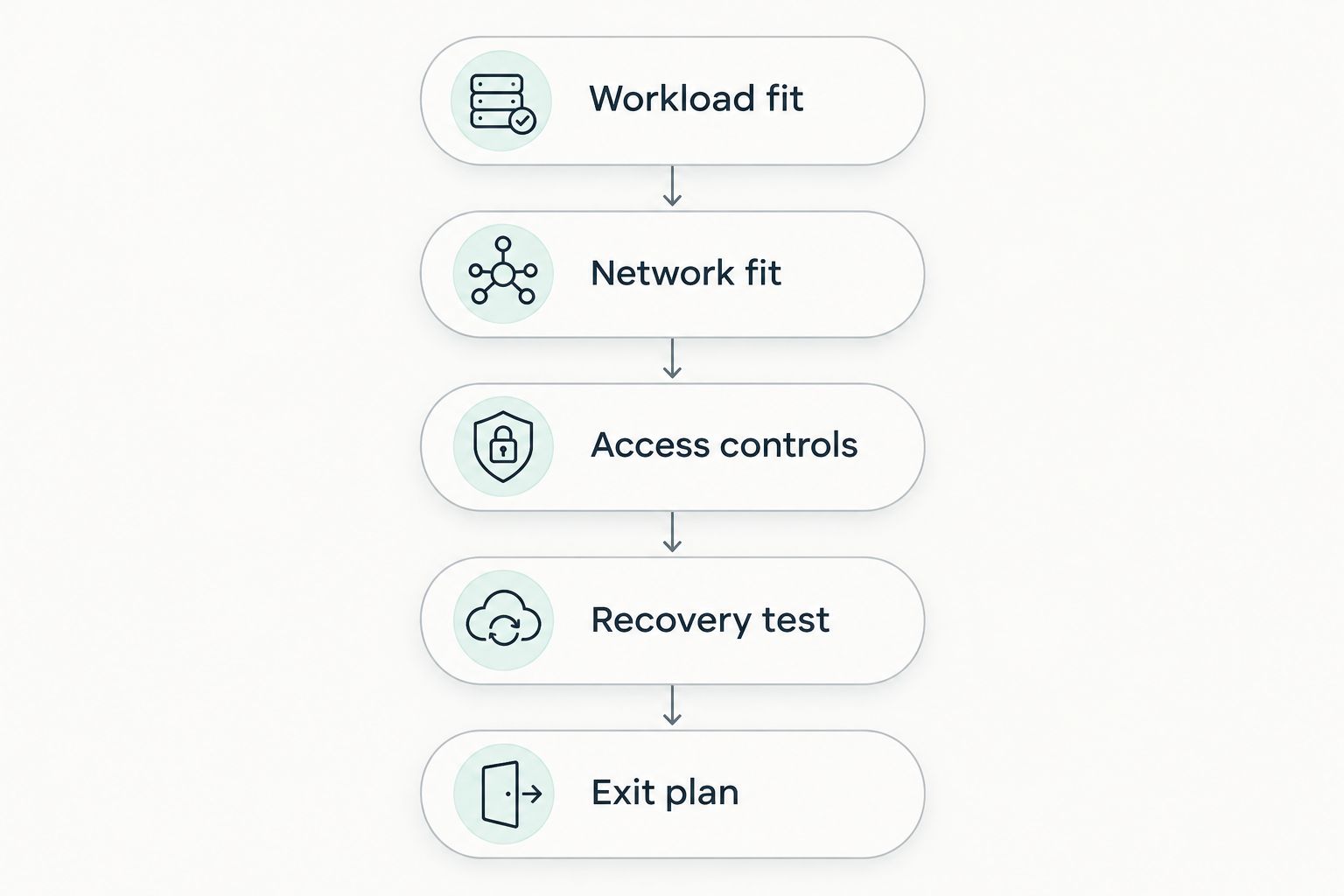
Use the same sequence for every provider. This keeps a familiar interface or brand name from replacing a technical decision.
- Workload fit: Record the runtime, operating system, database connections and background processes your application requires.
- Network fit: Check server location against your users and dependencies. Test application responses from the networks your customers actually use.
- Access controls: Define administrator accounts, authentication and firewall rules before exposing the server.
- Recovery test: Restore application data into a separate environment and confirm that the application works.
- Exit plan: Keep configuration and data exports sufficient to rebuild on another compatible server.
The order matters. There is little value in fine-tuning a server that cannot run your application, and a backup is not a recovery plan until restoration works.
Default network ports also deserve attention. SSH normally uses TCP port 22, Windows Remote Desktop uses port 3389, and HTTPS uses port 443. Configurations can change those defaults; exposing an administration port broadly is not required merely because the service uses it.
Restrict administrative access to approved sources and use appropriate authentication. Keep public application access separate from server administration. Provider selection cannot compensate for an unnecessarily exposed management interface.
Which cloud VPS provider should you choose?
Choose the provider that matches your operating model before choosing the server configuration. For an India-focused Windows or Linux deployment, start with the domestic hosting option. For an application already tied to AWS, Azure or Google Cloud, evaluate compute within that environment first.
Choose DigitalOcean Droplets when a developer-managed Linux server is the intended architecture. Do not select it for a Windows application and expect the operating-system requirement to disappear.
For your 2026 shortlist, write down who owns patching, recovery and deployment. If those responsibilities are unresolved, the infrastructure decision is not finished.
FAQ
What's the best cloud VPS provider in India in 2026?
Vcclhosting is the pick here for Indian teams seeking Windows or Linux hosting from its Kolhapur datacenter. Amazon EC2, Azure Virtual Machines and Google Compute Engine fit teams already using their respective cloud platforms.
Is a cloud VPS the same as a dedicated server?
No. A VPS is a virtual server, while a dedicated server assigns a physical server to a customer. Compare the actual resource allocation and operating responsibilities rather than relying on the service name.
Should I choose an Indian datacenter for Indian users?
An Indian datacenter is a sensible shortlist criterion for Indian users, but location alone does not establish application speed. Test the complete application from representative user networks and check where its database and other dependencies run.
Is Amazon EC2 better than a conventional VPS?
Amazon EC2 fits applications that need AWS integration; it is not automatically better for a standalone server. Compare ecosystem requirements and administrative work before selecting it.
Which option should I choose for a Windows application?
Choose a service that supports the Windows environment your application requires. Windows-capable options in this guide include the domestic hosting recommendation, Amazon EC2, Azure Virtual Machines and Google Compute Engine; DigitalOcean Droplets are Linux-based.
Does a cloud VPS include application management?
A virtual server does not automatically include application management. Establish who handles operating-system updates, application deployments, monitoring, access controls and recovery before committing.
How do I compare providers without relying on advertised specifications?
Use the same application and deployment requirements for each provider. Check compatibility, test network behaviour, review administrative responsibilities and complete a restoration exercise before moving production data.
One last thing
The most useful final check is a restore, not another specification comparison. A server that runs your application today is only part of the decision; you also need to recreate that application after a failure.
Before committing production data, restore into a separate environment and confirm login, database access and background jobs. That exercise exposes dependencies a successful first deployment leaves hidden.