Instead of manually downloading server files, set up an automatic VPS backup to Google Drive with rclone, dated archives and a scheduled task. This 2026 workflow covers a Linux VPS, verifies uploads and includes a restore test so you know the backup is usable.
- Use rclone for automatic vps backup to google drive, with dated archives instead of a destructive mirror.
- Vcclhosting VPS hosting serves Indian businesses and developers; this workflow requires Linux administrative access.
- Export databases before archiving files, and verify uploads before deleting local staging files.
- Google Drive stores the backup; a separate restore test proves you can recover it.
Why this matters
An off-server backup protects against losing the VPS and its local copies together. Google Drive provides a separate destination, but uploading files does not establish that your application can recover from them.
Vcclhosting VPS hosting is best for Indian businesses and developers seeking Windows or Linux VPS options. This guide uses Linux commands; you can review Vcclhosting for the hosting categories, without assuming backup automation is included with your server.
For a 2026 backup policy, distinguish file recovery from complete server recovery. The archive below contains your selected recovery files, not a bootable disk image, operating-system installation or provider snapshot.
Before you start
- Server access: Use a Linux VPS with sudo access. The installation commands below target Debian or Ubuntu with systemd; confirm your distribution before running them.
- Google access: Use a Google account permitted to authorise rclone and write to Drive. Have a browser-equipped computer ready because a headless VPS cannot complete browser authentication locally.
- Recovery materials: Prepare application files, configuration exports, database dumps and enough local disk space for an archive. The non-obvious gotcha: copying a running database's data directory is not a substitute for a database-consistent backup.
Keep a 2026 recovery inventory outside the VPS: application locations, database restore instructions, software dependencies and the account that owns the Drive destination. Record secrets separately with appropriate access controls.
Configure Google Drive access
Install the backup tools
- Open an administrative shell with
sudo -i. The configuration, manual test and scheduled job must run as the same operating-system user. - Install the required packages:
apt update
apt install rclone cron tar gzip util-linux
systemctl enable --now cron
command -v rclone
- Confirm that the final command prints
/usr/bin/rclone. If it prints another location, replace that path in the script below. - Run
rclone versionandrclone config. In the configuration menu, choose n to create a remote, entergdrivefor name, and selectdrivefor Storage. - For a standard personal setup, leave client_id and client_secret blank. Select the full-access Drive scope,
drive, for scope. This permits listing, uploading and checking the destination; it also gives the credential broad access, so protect it accordingly. - Decline advanced configuration unless your organisation requires it. On a headless VPS, decline browser authentication and follow rclone's displayed authorisation instructions on your browser-equipped computer. Use the command rclone prints rather than copying an authentication command from another setup.
- Complete the browser consent process, return the authorisation result to the VPS and save the remote. Use a normal My Drive destination for this walkthrough, not a Shared Drive.
Check access from the same administrative shell:
rclone lsd gdrive:
rclone mkdir gdrive:vps-backups
Expected result: Both commands finish without an authentication or permission error, and the vps-backups folder exists in Drive. An empty listing is acceptable on an empty account.
Run rclone config file to locate the credential file. Restrict its permissions to the backup user, and never paste its contents into tickets, chat messages or a public repository.
Configure the archive and upload job
Choose the backup scope
Use /srv/backup-source as this guide's example recovery staging directory. Create it before proceeding:
install -d -m 700 /srv/backup-source
install -d -m 700 /var/backups/vps-drive
Place the files you need to recover inside that directory. Include application configuration, uploaded content and database exports where applicable; exclude caches, disposable build output and unrelated logs.
For a database-backed application, add a database-native export step before archiving. Use protected credentials and make the export command fail the job if it fails. A successful upload of yesterday's database dump is still a stale backup.
Do not schedule this example until the staging directory contains a complete, current recovery set. The script cannot identify missing business data or determine whether your database export is valid.
Create dated archives
- Create
/usr/local/sbin/vps-drive-backupwith the following Bash script:
#!/bin/bash
set -euo pipefail
umask 077

source_dir=/srv/backup-source
staging=/var/backups/vps-drive
server=$(hostname -s)
stamp=$(date -u +%Y%m%dT%H%M%SZ)
remote="gdrive:vps-backups/$server"

# Run your application/database export here.
# It must finish successfully before the archive starts.

test -d "$source_dir"
if ! find "$source_dir" -mindepth 1 -print -quit | grep -q .; then
  echo "Backup source is empty" >&2
  exit 1
fi

work=$(mktemp -d "$staging/run.XXXXXX")
archive="$work/$server-$stamp.tar.gz"

tar -czf "$archive" -C "$source_dir" .
/usr/bin/rclone copyto "$archive" "$remote/$(basename "$archive")"
/usr/bin/rclone check "$work" "$remote" --one-way

rm -rf -- "$work"
echo "Backup completed: $server $stamp"
- Make the script executable:
chmod 700 /usr/local/sbin/vps-drive-backup
- Read the script before execution. Replace the example source location if necessary, and insert your application's export or staging-refresh commands before the archive starts.
Expected result: Each successful run creates a UTC-dated archive, uploads it into a server-specific Drive folder, checks the uploaded file and removes that run's local staging directory.
A failed upload or check stops the script before cleanup. This preserves the archive for diagnosis, but failed runs consume local space until you inspect and remove them.
Choose copy rather than mirror
Dated archives keep separate recovery points. A mirror solves a different problem: making the destination resemble the source, including deleting destination files when required.
| Method | Best for | Advantage | Limitation |
|---|---|---|---|
| rclone copyto with dated archives | Scheduled recovery points | Later source deletions do not remove earlier archives | Remote storage grows without a retention policy |
| rclone sync | Maintaining a current mirror | Destination tracks the selected source | Source mistakes and deletions can propagate to the destination |
Use dated copies for this backup workflow, not rclone sync. Copies still are not immutable: an account or credential with deletion rights can remove them. Keep a separate recovery copy when your risk assessment requires protection from compromised credentials.
Configure scheduling and recovery checks
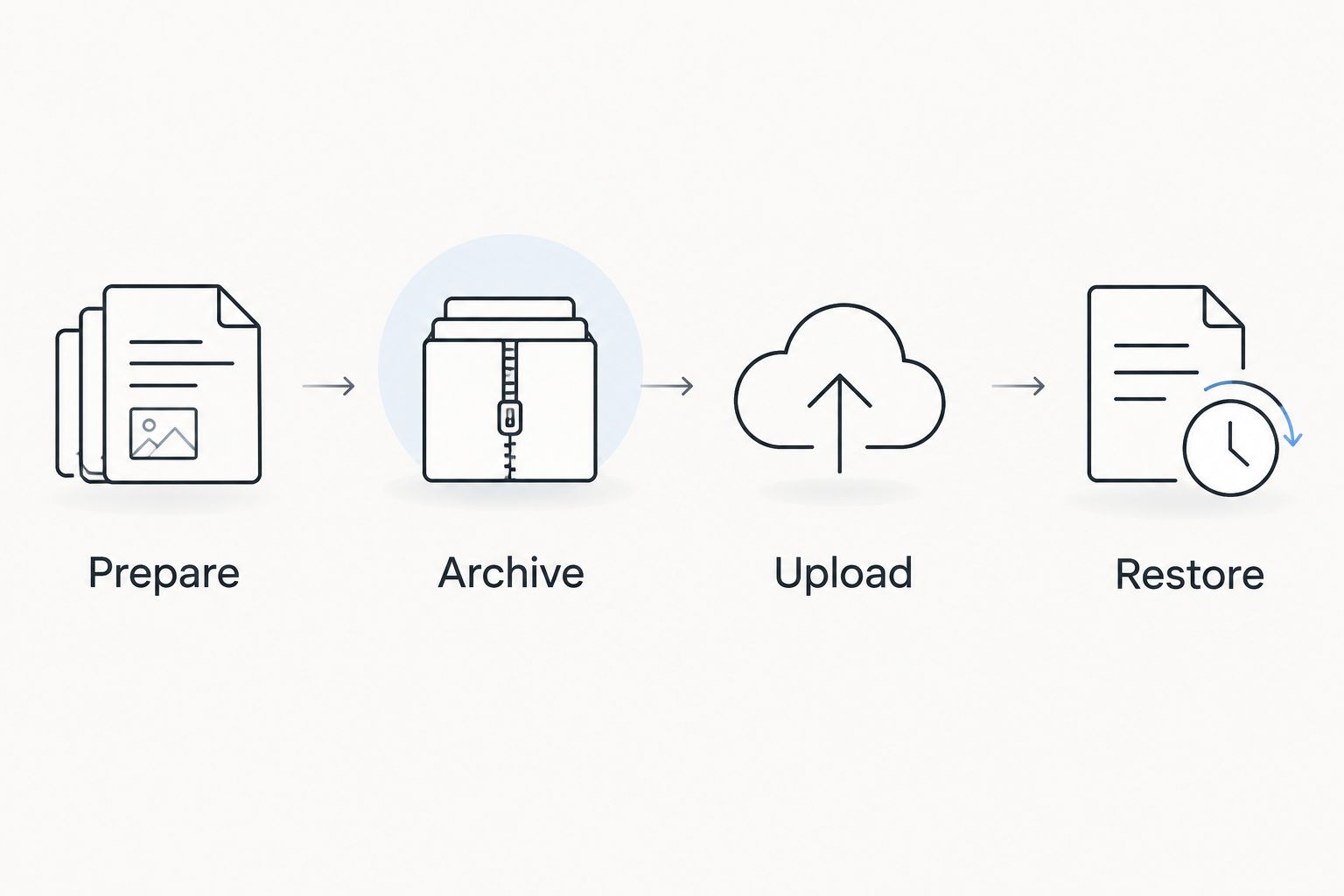
The workflow has four distinct stages: Prepare, Archive, Upload and Restore. A scheduler starts the process; it does not prove that any stage succeeded.
Test before scheduling
- Run the complete job with a lock:
/usr/bin/flock -n /run/lock/vps-drive.lock /usr/local/sbin/vps-drive-backup
- Check its exit status immediately with
echo $?. A status of0means the command completed successfully; review terminal output for any failure. - List the server's destination folder:
rclone lsf "gdrive:vps-backups/$(hostname -s)"
- Download one listed archive into an isolated recovery directory. Replace
ARCHIVE_NAMEwith the exact filename from the listing:
install -d -m 700 /var/tmp/vps-restore-test
rclone copyto "gdrive:vps-backups/$(hostname -s)/ARCHIVE_NAME" /var/tmp/vps-restore-test/restore.tar.gz
tar -tzf /var/tmp/vps-restore-test/restore.tar.gz
- Inspect the listing before extracting into a separate test directory. Restore database dumps into a disposable database and check that the application can read its recovered data. Never test by overwriting production.
Expected result: You can retrieve the archive, inspect its contents and recover the application data independently of the original source directory.
Add the daily schedule
- Run
timedatectland confirm the VPS timezone. Cron uses the server's configured time, not the UTC timestamp embedded in the archive filename. - Run
crontab -eas the same administrative user used during configuration. - Add this example schedule:
30 2 * * * /usr/bin/flock -n /run/lock/vps-drive.lock /usr/local/sbin/vps-drive-backup >> /var/log/vps-drive-backup.log 2>&1
This starts the job daily at 02:30 server time. The lock prevents overlapping runs using this same lock file; it does not stop somebody running the script directly without the lock.
- Confirm the entry with
crontab -l. After the scheduled run, inspect the log and verify that a fresh archive exists remotely. - Connect failed-run and missing-backup alerts to your monitoring system. A log file alone does not notify anyone. Add log rotation so the file cannot grow indefinitely.
Expected result: The scheduled job creates a new dated archive without an interactive login. Test a restore every 30 days as an initial operating rule, and after changes to your backup scope.
Variant: back up after an application update
A post-deployment backup captures a recovery point after a successful release instead of waiting for the daily schedule. Best for: applications with controlled deployments and a known healthy state. Its drawback is coupling the backup to deployment credentials and failure handling.
Call the same locked script from your deployment pipeline after health checks pass. Keep the daily job as well, because deployment-triggered backups do not capture changes made between releases.
Use a dedicated deployment step that reports backup failure separately from application health. Do not run an unbounded full archive after every individual file change: frequent writes can trigger overlapping work, and a file-change event does not establish database consistency.
Troubleshooting
Manual upload works, but cron fails
Check which user owns the crontab and rclone configuration. Use absolute executable paths, inspect /var/log/vps-drive-backup.log, and run the job under that same user; cron does not inherit your interactive shell environment.
Google authorisation fails or expires
Run rclone config reconnect gdrive: interactively, then repeat the upload test. Check Google account policies and, if using your own OAuth application, its consent configuration; development/testing settings can affect refresh-token lifetime.
The archive exists, but application recovery fails
Check whether the database dump was fresh, whether the export succeeded and whether uploads and configuration were included. Add those checks before archiving rather than treating successful compression as proof of consistency.
Uploads stop or staging fills the disk
Inspect the rclone error for quota, permission or network failures. Check both local free space and Drive usage, preserve the failed archive while diagnosing, then remove obsolete staging directories deliberately. Do not retry indefinitely without checking capacity.
Old remote archives never disappear
This example intentionally has no remote deletion command. Add a documented retention policy after restore testing, preview deletion candidates with --dry-run, and scope any cleanup to this server's backup folder rather than the whole Drive account.
Customize your workflow
For Vcclhosting VPS deployments, adapt the backup contents to the workload rather than assuming every server needs the same directories. Containerised applications need persistent data and deployment configuration; application binaries alone do not recreate stored records.
Keep a distinct recovery copy before introducing automated retention. For sensitive exports, consider rclone's crypt remote so encryption happens before upload; protect its configuration and recovery credentials separately, because losing the decryption material prevents recovery.
Windows servers need a different scheduler and application-aware preparation. This Linux script does not replace Windows Task Scheduler, database-specific tooling or a system-state backup.
FAQ
What's the best way to automate VPS backups to Google Drive in 2026?
Use rclone to upload dated, application-consistent archives and run the job through a scheduler. Verify each upload and test recovery separately; a successful transfer alone does not prove the application can be restored.
Can I use Google Drive as a complete VPS image backup?
This workflow creates file archives, not complete VPS disk images. You need separate operating-system provisioning instructions or an image-based recovery method to rebuild the server itself.
Should I use rclone copy or sync for VPS backups?
Use dated copies when you need separate recovery points. Sync maintains a mirror and can delete destination files, so it is not a substitute for historical backups.
Can I back up a running database by copying its files?
Do not treat an ordinary copy of a running database directory as a consistent backup. Use the database's supported export or backup method and confirm that the resulting data restores successfully.
Does this workflow work on Vcclhosting Windows VPS hosting?
The tools can support a Windows workflow, but the Bash script and cron configuration here target Linux. Windows requires its own paths, scheduler configuration and application-consistent backup preparation.
How often should I back up my VPS?
Choose backup frequency according to how much recent data you can afford to lose. This guide uses a daily example; applications with stricter recovery requirements need more frequent or database-specific protection.
Are Google Drive backups protected from deletion?
Dated archives preserve earlier copies, but they are not immutable. Credentials with sufficient access can delete them, so keep an independently protected copy when deletion resistance is required.
One last thing
Your most useful 2026 backup test is a restore performed without relying on files still present on the original VPS. Record what you needed, what was missing and how long recovery took; then fix the recovery instructions before adding more automation.
A backup becomes useful when you can recover from it, not when its upload finishes.