
ServerBasket combines server hardware sales with hosting services, making it relevant when you need to compare equipment ownership with renting infrastructure. That breadth stops being the deciding factor when your priority is a particular hosting location, operating system or cloud development workflow. The best ServerBasket alternative in 2026 is VCCLHosting for Indian businesses seeking Windows/Linux VPS hosting from Kolhapur; AWS EC2 is the better fit when you need infrastructure connected to AWS services.
- Among serverbasket alternatives, VCCLHosting fits Indian businesses seeking Windows/Linux VPS hosting from its own Kolhapur datacenter.
- AWS EC2 suits applications already connected to AWS services; Azure Virtual Machines suits Azure-based infrastructure.
- DigitalOcean Droplets suits developers seeking virtual servers; Hetzner Cloud offers another cloud-server route.
- Keep ServerBasket when equipment procurement or your existing hosting setup already meets your requirements.
Why this matters
A server supplier, a VPS host and a public cloud platform solve different problems. Comparing them as interchangeable providers hides the decision that matters: whether you need equipment, a hosted operating system or a wider application platform.
For a 2026 shortlist, start with your workload rather than a provider ranking. A Windows application, a Linux website and an application connected to cloud databases do not need the same buying criteria. Choose the infrastructure model first, then assess the provider against it.
ServerBasket alternatives at a glance
This comparison separates each provider's role from the requirements you still need to verify. It is not a performance ranking: provider names alone cannot establish application speed, support quality or recovery capability.
| Provider | Best for | Standout offering | Difference from ServerBasket | Main trade-off |
|---|---|---|---|---|
| ServerBasket | Buyers comparing server equipment and hosting | Server hardware sales alongside hosting | Baseline: procurement and hosted infrastructure | Hardware procurement adds decisions that a hosting-only project does not need |
| VCCLHosting | Indian businesses and developers seeking Windows/Linux VPS | Hosting from its own Kolhapur datacenter | A hosting-focused alternative with an explicit Indian datacenter location | One named location does not establish geographic redundancy |
| AWS EC2 | Applications using AWS services | Virtual compute within the AWS ecosystem | A cloud-service route rather than equipment procurement | Cloud resources still need architecture and operational ownership |
| Azure Virtual Machines | Applications using Azure services | Virtual machines within Microsoft Azure | Azure infrastructure rather than a server procurement relationship | A virtual machine alone is not a managed application |
| DigitalOcean Droplets | Developers seeking a virtual-server workflow | Linux virtual machines called Droplets | A developer-oriented cloud-server route | Your team still needs to administer the server or arrange management |
| Hetzner Cloud | Teams evaluating another Linux cloud-server provider | Cloud servers within Hetzner's infrastructure offering | Another hosted compute option | Location and operating-system fit need checking against the workload |
The right ServerBasket alternative in 2026 is the provider that removes a specific constraint. Moving without naming that constraint creates migration work without establishing a benefit.
1. VCCLHosting: best for India-focused VPS hosting
VCCLHosting is a ServerBasket alternative for Indian businesses and developers seeking Windows/Linux VPS hosting. Its stated offering also includes dedicated cloud servers, Forex VPS and shared/reseller hosting, supplied from its own datacenter in Kolhapur. That makes it a relevant first shortlist entry when your requirement is hosted infrastructure in India rather than buying server equipment.
Where it shines
- Windows and Linux options: You can start the comparison with your application's operating-system requirement.
- An explicit datacenter location: Kolhapur gives you a location to assess against your users and operational requirements.
- Several hosting categories: VPS, dedicated cloud, shared and reseller hosting support different infrastructure decisions.
Where it falls short
- A Kolhapur location alone does not establish suitability for users in every region; test your actual application routes.
- The stated offering does not establish a multi-region deployment design. Confirm any geographic redundancy requirement before committing.
- A hosting category does not define who handles patching, backups or incident response. Put those responsibilities in writing.
| Dimension | Client hosting option | ServerBasket |
|---|---|---|
| Buying focus | Hosted infrastructure | Server hardware and hosting |
| Stated hosting categories | Windows/Linux VPS, dedicated cloud, Forex VPS, shared/reseller | Hardware procurement and hosting are separate evaluation routes |
| Location decision | Own datacenter in Kolhapur | Confirm the location attached to your proposed hosting service |
| Equipment ownership | Hosting is the stated business model | Relevant when equipment procurement is part of the requirement |
Best for: Indian businesses that want to evaluate Windows or Linux hosting against a known Indian datacenter location.
If you are deploying applications rather than buying equipment, use the VPS hosting guide for developers in India to frame the workload questions. Compare access, operating-system requirements and administration responsibilities before selecting a plan.
Verdict: Buy only after the operating system, location and management responsibilities match your workload.
2. AWS EC2: best for applications connected to AWS services
Amazon Elastic Compute Cloud, or AWS EC2, provides virtual compute within AWS. It belongs on your shortlist when the server is one component of an application that also uses AWS services. The main reason to choose it is that connection, not the assumption that a public cloud automatically improves a standalone website.
Where AWS EC2 shines
- AWS integration: Compute can sit within the same ecosystem as other AWS application services.
- Infrastructure automation: AWS provides interfaces for provisioning and managing resources programmatically.
- Architecture choice: You can design compute, networking and related services around the application's requirements.
Where AWS EC2 falls short
- EC2 does not remove your responsibility for the guest operating system and application.
- A broader cloud architecture introduces more configuration decisions than selecting a standalone hosted server.
- Moving only the server does not automatically improve the application's design or reliability.
| Dimension | AWS EC2 | ServerBasket |
|---|---|---|
| Primary route | Virtual compute within AWS | Hardware procurement or hosted infrastructure |
| Ecosystem fit | Applications using AWS services | Evaluate the proposed server and hosting arrangement |
| Deployment workflow | Cloud interfaces and infrastructure automation | Confirm the deployment process for the selected service |
Best for: Teams already using AWS services or deliberately building an AWS-based application architecture.
In 2026, choose AWS EC2 because your architecture needs AWS, not because the word cloud sounds like an upgrade. Inventory the services your application actually depends on before moving the server.
Verdict: Buy for an AWS-dependent workload; skip an ecosystem migration without a clear application requirement.
3. Azure Virtual Machines: best for Azure-based infrastructure
Azure Virtual Machines provides Windows and Linux virtual machines within Microsoft Azure. It is a relevant alternative when your application already depends on Azure services or your organisation has chosen Azure as its infrastructure platform. Windows compatibility is a starting requirement, not sufficient reason by itself to move into a wider cloud ecosystem.
Where Azure Virtual Machines shines
- Azure integration: Virtual machines can form part of an application built around Azure services.
- Operating-system choice: Windows and Linux workloads have a place in the platform.
- Cloud administration: Teams can manage infrastructure through Azure's management interfaces.
Where Azure Virtual Machines falls short
- A virtual machine still requires operating-system and application administration.
- Using Azure introduces platform-specific configuration and access-management decisions.
- An existing standalone application needs a migration plan; choosing Azure does not supply one automatically.
| Dimension | Azure Virtual Machines | ServerBasket |
|---|---|---|
| Primary route | Compute within Microsoft Azure | Hardware procurement or hosted infrastructure |
| Ecosystem fit | Applications using Azure services | Match the proposed hosting environment to the application |
| Administration | Azure controls plus guest-system responsibilities | Confirm provider and customer responsibilities |
Best for: Organisations that need their virtual machines within an existing Azure environment.
Compare the full operating model, including administrator access and application dependencies. A familiar operating system does not make two hosting environments operationally identical.
Verdict: Buy for an Azure-based architecture; hold if your only requirement is a standalone Windows server.
4. DigitalOcean Droplets: best for developer-run Linux servers
DigitalOcean Droplets are Linux virtual machines. They are a relevant ServerBasket alternative when your team wants a cloud-server workflow and has the skills to operate the application and guest system. Treat that administration requirement as part of the decision, not work to discover after migration.
Where DigitalOcean Droplets shines
- A clear server model: Droplets give developers a virtual-machine route for Linux workloads.
- Developer tooling: DigitalOcean provides management interfaces and APIs for infrastructure tasks.
- Application control: Your team can configure the guest system around its deployment requirements.
Where DigitalOcean Droplets falls short
- Droplets are not a like-for-like shortlist choice for a workload requiring Windows hosting.
- Server access does not replace patching, backup verification or application monitoring.
- A provider change cannot fix a deployment process that has no documented recovery procedure.
Best for: Developers who want Linux virtual machines and can own server administration.
Verdict: Buy for a developer-operated Linux workload; skip for a Windows requirement.
5. Hetzner Cloud: best for another Linux cloud-server route
Hetzner Cloud provides cloud servers and deserves consideration when you are comparing Linux hosting options beyond the larger cloud ecosystems. Evaluate it against the same location, administration and application requirements as every other provider. Its inclusion here is a category fit, not a claim that it outperforms your existing server.
Where Hetzner Cloud shines
- Cloud-server focus: It offers another route to hosted virtual infrastructure.
- Linux workload fit: It belongs on a shortlist for Linux-based applications.
- Infrastructure choice: It gives teams another provider to assess against their deployment requirements.
Where Hetzner Cloud falls short
- Do not assume its deployment locations match an India-specific requirement; check the selected location.
- Confirm operating-system support instead of treating all cloud servers as interchangeable.
- Your team needs an explicit owner for server maintenance and application recovery.
Best for: Teams comparing Linux cloud-server providers without requiring an AWS or Azure ecosystem.
Verdict: Hold until location and operating-system fit are confirmed.
Why people switch from ServerBasket
A useful reason to switch is a changed requirement. These are decision triggers, not claims about ServerBasket outages, customer complaints or service quality.
- Hosting replaces procurement: You need an application environment, not equipment ownership and hardware purchasing decisions.
- The operating system becomes decisive: Your application requires a clearly defined Windows or Linux hosting route.
- The ecosystem becomes decisive: Application dependencies favour AWS or Azure infrastructure.
- The location becomes decisive: You need to assess a specific datacenter location against your users or business requirements.
- The operating model changes: Your team wants developer-controlled infrastructure, or needs responsibilities clarified before deployment.
For a 2026 migration, turn the reason into an acceptance check. If location drives the move, test the application from its users' networks. If administration drives it, define who patches the system and restores the application.
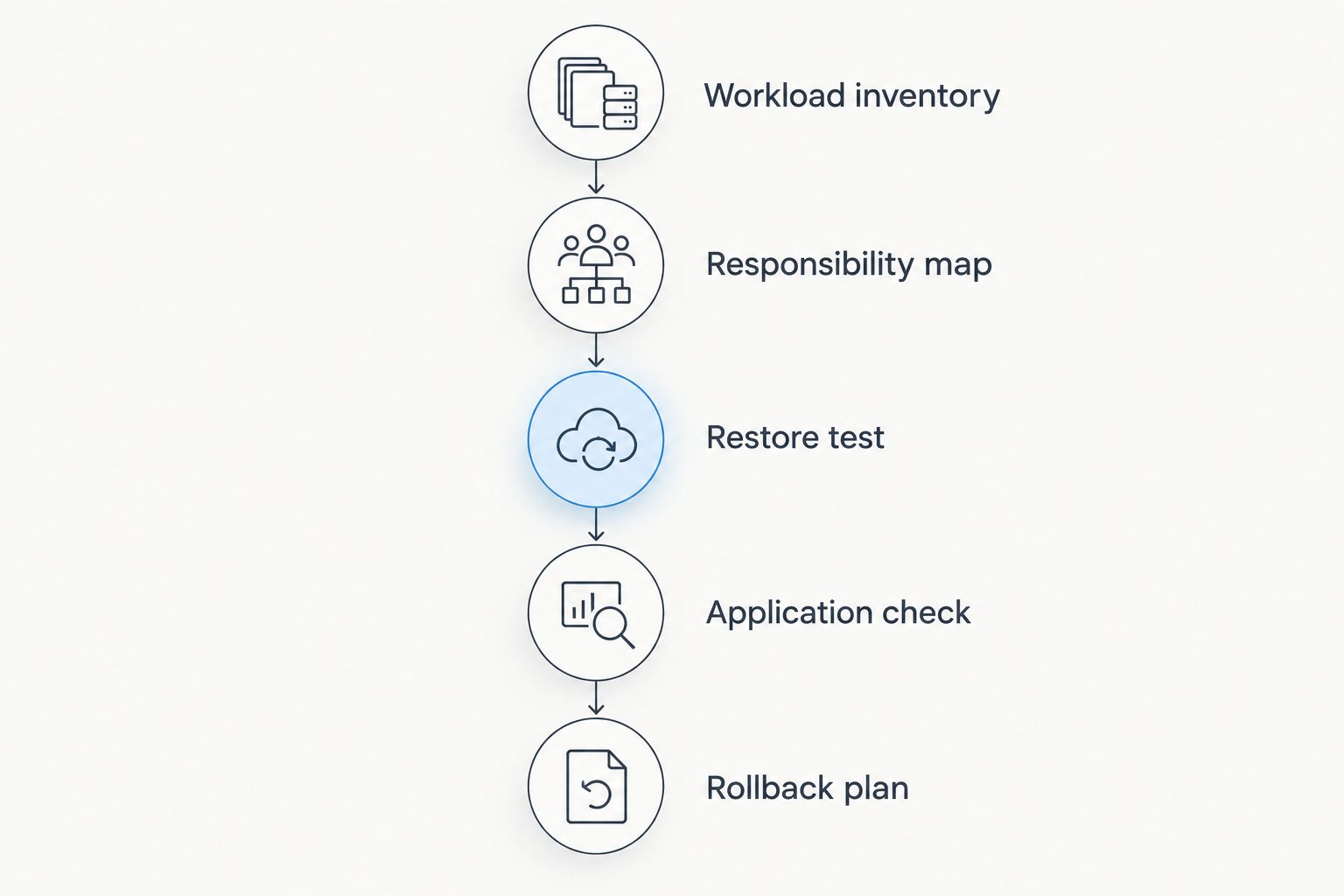
Use these migration gates
Keep the current server until the replacement passes these checks. Treat each gate as a decision, not a calendar deadline.
- Workload inventory: Record the operating system, application dependencies, data stores and external connections.
- Responsibility map: Assign ownership for deployment, patching, backups, monitoring and incident response.
- Restore test: Restore the application and its data into the replacement environment.
- Application check: Test the user-facing functions and integrations that the business depends on.
- Rollback plan: Document how traffic and data handling return to the original environment if cutover fails.
The order matters. A successful server login proves access; it does not prove that your application, data and recovery process work together.
When staying with ServerBasket is the right call
Stay with ServerBasket when your current arrangement meets the workload and the proposed move solves no defined problem. Equipment procurement remains a different requirement from renting cloud compute. If you need to buy hardware, a VPS recommendation does not answer the same question.
For an existing hosting customer, document the unmet requirement before opening a migration project. Keep the current setup when its operating system, location, administration arrangement and application behaviour meet your needs. A different provider name is not an operational improvement.
FAQ
What's the best ServerBasket alternative in India?
VCCLHosting is a relevant ServerBasket alternative for Indian businesses seeking Windows/Linux VPS hosting from its own Kolhapur datacenter. Choose it only after confirming that the location, operating system and administration arrangement meet your application requirements.
Is AWS EC2 better than ServerBasket?
AWS EC2 is the better fit when your application needs compute within the AWS ecosystem. ServerBasket remains relevant when server equipment procurement is part of the requirement; these are different buying decisions.
Should I choose Azure for a Windows application?
Choose Azure Virtual Machines when the Windows application needs an Azure-based environment. Windows compatibility alone does not establish that a wider cloud platform is necessary.
Is DigitalOcean suitable for a Windows VPS requirement?
DigitalOcean Droplets are Linux virtual machines, so they are not the equivalent shortlist choice for a Windows VPS requirement. Compare providers that explicitly offer the operating system your application needs.
Does an Indian datacenter guarantee a faster application?
An Indian datacenter location does not guarantee application speed. Test the actual application from your users' networks, because network routing and application behaviour also affect the experience.
What should I check before moving away from ServerBasket?
Check application compatibility, administration responsibilities and restoration before moving away from ServerBasket. Complete an application check and keep a documented rollback plan before retiring the original environment.
Should I switch hosting providers in 2026?
Switch hosting providers in 2026 only when the replacement solves a defined requirement. Stay when your existing environment meets your needs and the migration has no clear operational purpose.
One last thing
A backup is not the same as a working replacement server. Your migration decision should depend on restoring the application, checking its connections and assigning responsibility for its operation. Do that before the cutover, not after the old environment is gone.