
Host.co.in offers a conventional web-hosting route for businesses that want to put a website online. That approach stops being enough when your application needs a particular operating system, deployment location, or infrastructure workflow. The best host.co.in alternatives in 2026 are VCCLHosting for Indian businesses seeking Windows/Linux VPS or dedicated cloud hosting, and DigitalOcean for developers seeking a cloud platform built around application infrastructure.
- VCCLHosting is a Host.co.in alternative for Indian businesses needing Windows/Linux VPS, dedicated cloud servers, or Forex VPS.
- DigitalOcean suits developers comparing VPS hosting with application-focused cloud services.
- Amazon Lightsail suits teams wanting straightforward server deployment within the AWS ecosystem.
- Hostinger suits website owners prioritising managed WordPress hosting over server administration.
- Compare host.co.in alternatives by operating system, deployment location, administration responsibility, and migration requirements.
Why this matters
Changing hosting providers is useful only when the new service fixes a specific constraint. A different company name does not resolve an oversized database, an unsupported application dependency, or an unclear backup process.
For your 2026 shortlist, separate website hosting from infrastructure hosting. A WordPress business site and a Windows application need different environments, even when both appear under the same broad hosting category.
Start with the requirement that cannot change: operating system, application stack, or deployment geography. Then compare how much server administration your team can handle. Choose the hosting model before choosing the provider.
Host.co.in alternatives at a glance
This comparison separates use cases rather than pretending every provider sells the same service. Match the row to your workload before comparing individual plans.
| Provider | Best for | Standout capability | How it differs from Host.co.in |
|---|---|---|---|
| Host.co.in | Businesses seeking conventional website hosting | A website-hosting starting point | Baseline: stay when the existing hosting environment meets your requirements |
| VCCLHosting | Indian businesses needing VPS or dedicated cloud hosting | Windows/Linux VPS, Forex VPS, and hosting from its own Kolhapur datacenter | A candidate when those service types or that deployment location match your workload |
| DigitalOcean | Developers building and operating applications | Droplets alongside application, database, and other cloud services | A cloud-platform approach rather than a website-hosting-led selection |
| Amazon Lightsail | Teams wanting simpler server deployment within AWS | Virtual servers with an approachable AWS entry point | Keeps the infrastructure decision within the AWS ecosystem |
| Hostinger | Website owners wanting managed WordPress hosting | Website-focused hosting and WordPress management features | An alternative website-hosting route, not a reason by itself to adopt VPS hosting |
Treat this table as a routing decision, not a performance ranking. A provider's product range cannot establish how your application will behave on a particular plan. Evaluate the actual service you intend to use.
1. VCCLHosting: best for Indian VPS and dedicated cloud hosting
VCCLHosting provides Windows/Linux VPS, dedicated cloud servers, Forex VPS, and shared/reseller hosting from its own datacenter in Kolhapur. Its stated audience is Indian businesses and developers. That makes it a relevant first shortlist entry when your Host.co.in replacement needs one of those hosting categories and an Indian deployment location.
Best for: Indian businesses and developers selecting Windows/Linux VPS, dedicated cloud servers, Forex VPS, or shared/reseller hosting.
Where it shines
- Operating-system choice: The stated offering includes both Windows and Linux VPS.
- A specific deployment location: The company identifies its own datacenter in Kolhapur, rather than leaving the location decision abstract.
- Different hosting models: Shared/reseller hosting, VPS, and dedicated cloud servers give you distinct categories to evaluate against your workload.
- A relevant Forex category: Forex VPS belongs on the shortlist when that is your actual application requirement.
Where it falls short
- Geography is a fit constraint: A Kolhapur deployment does not satisfy a requirement to deploy in another specified location.
- Server hosting requires an ownership decision: Choosing a VPS or dedicated server does not, by itself, determine who patches the operating system or maintains the application.
- A hosting category is not a workload guarantee: Forex VPS or dedicated cloud hosting still needs evaluation against your software, network path, and recovery requirements.
Head-to-head with Host.co.in
| Dimension | This alternative | Host.co.in decision point |
|---|---|---|
| Hosting fit | Explicit Windows/Linux VPS, dedicated cloud, Forex, shared/reseller categories | Compare the current service against the required category |
| Location fit | Own datacenter in Kolhapur | Establish whether changing location solves a real requirement |
| Switching case | Your workload matches the stated hosting range and location | Stay when the existing environment already meets the same requirements |
Ask who owns server maintenance, backups, and application troubleshooting before you move. Verdict: Buy only when the hosting category and Kolhapur deployment match your requirements.
2. DigitalOcean: best for developer-operated applications
DigitalOcean is a cloud platform offering virtual machines called Droplets, alongside services such as managed databases and application deployment. It belongs on your shortlist when hosting is part of a development workflow rather than simply a place to upload website files. The important distinction is how your team wants to deploy and operate software.
Best for: Developers who want virtual machines and related cloud services for application deployment.
Where DigitalOcean shines
- Application-oriented infrastructure: You can evaluate compute, databases, and application deployment within the same platform.
- Server control: A virtual machine gives your team control over the operating-system environment and installed software.
- Developer workflow fit: The platform suits teams that treat infrastructure configuration as part of application delivery.
Where DigitalOcean falls short
- Virtual machines need administration: On a self-managed server, your team owns operating-system updates, service configuration, and security maintenance.
- Related services add decisions: Separating application hosting, databases, and storage means defining how those components connect and recover.
- Simple websites do not always need this model: A team seeking ordinary website publishing can create unnecessary operational work by choosing infrastructure first.
DigitalOcean vs Host.co.in
| Dimension | DigitalOcean | Host.co.in decision point |
|---|---|---|
| Starting approach | Developer-oriented cloud infrastructure | Begin with the website or hosting service you already use |
| Main evaluation | Deployment workflow and component architecture | Whether the present hosting environment supports the application |
| Switching case | You want to operate applications through a cloud platform | Stay if website hosting already serves the workload without friction |
Before moving, decide whether you want a virtual machine or a managed application service. Those are different operational choices within the same provider. Verdict: Buy for a defined developer workflow; skip for a website that needs no infrastructure change.
3. Amazon Lightsail: best for a straightforward AWS entry point
Amazon Lightsail provides virtual servers and related hosting services within AWS. It is a useful candidate when your team wants an approachable server-hosting starting point while keeping the provider choice inside the AWS ecosystem. Do not treat that ecosystem connection as proof that every AWS architecture should begin with Lightsail.
Best for: Teams wanting a relatively simple virtual-server deployment within AWS.
Where Amazon Lightsail shines
- AWS context: The service gives you a server-hosting option within an existing AWS relationship.
- A focused starting point: Lightsail presents a narrower initial hosting decision than designing a broad AWS infrastructure architecture.
- Application control: Virtual servers support workloads that require control beyond conventional shared hosting.
Where Amazon Lightsail falls short
- Server responsibility remains: A virtual server still needs application maintenance, security configuration, and a recovery plan.
- Simplicity has boundaries: Requirements for a more specialised AWS architecture need evaluation beyond Lightsail itself.
- An ecosystem is not a workload requirement: Selecting AWS because it is familiar does not establish that it is the right hosting model for your website.
Amazon Lightsail vs Host.co.in
| Dimension | Amazon Lightsail | Host.co.in decision point |
|---|---|---|
| Provider context | AWS ecosystem | Existing hosting relationship |
| Main evaluation | Whether a Lightsail server matches the application architecture | Whether the current hosting service already fits |
| Switching case | AWS alignment is an explicit requirement | Stay if there is no operational reason to change ecosystems |
Write down the AWS requirement before selecting the AWS product. Verdict: Buy when AWS alignment matters; hold when the only reason is brand familiarity.
4. Hostinger: best for managed WordPress website hosting
Hostinger offers website hosting, including managed WordPress hosting. It is a relevant alternative when your objective is maintaining a business website rather than managing a custom server environment. Keep the comparison at the website-hosting level unless your application genuinely requires a VPS.
Best for: Website owners seeking managed WordPress hosting rather than operating their own server.
Where Hostinger shines
- Website-first selection: WordPress hosting addresses a different need from general-purpose application infrastructure.
- Less server-level work: Managed website hosting shifts parts of the underlying hosting administration away from the website owner.
Where Hostinger falls short
- Managed hosting has boundaries: A managed WordPress environment is not a substitute for unrestricted operating-system control.
- Application fit comes first: A custom Windows application or specialised server workload needs a different evaluation from a WordPress site.
Hostinger vs Host.co.in
| Dimension | Hostinger | Host.co.in decision point |
|---|---|---|
| Relevant category | Managed WordPress website hosting | Your existing website-hosting service |
| Main evaluation | WordPress workflow and hosting-management scope | Whether the current workflow already works |
| Switching case | The proposed website workflow solves a specific problem | Stay if changing providers adds migration work without a benefit |
Check your plugins, scheduled tasks, email arrangement, and backup process against the proposed environment. Verdict: Buy for a better-fitting WordPress workflow; skip as a replacement for custom server infrastructure.
Why people switch from Host.co.in
A justified switch in 2026 starts with a requirement, not a complaint invented for an alternatives list. Use these decision triggers to establish whether replacing Host.co.in serves your business:
- Operating system: Your application requires a particular Windows or Linux environment.
- Deployment location: You have a defined location requirement that the proposed service must satisfy.
- Administration model: You want website management rather than server ownership, or the reverse.
- Application architecture: You need a different arrangement for compute, databases, or deployment.
- Hosting category: You are moving between shared hosting, VPS, dedicated cloud hosting, or a specialised workload.
These are evaluation criteria, not claims that Host.co.in lacks any particular capability. Compare the current service and the proposed replacement against the same written requirements.
Do not migrate until you can name the constraint the move will remove. If the answer is only that another provider appears on a ranking page, keep evaluating.
Validate the replacement before changing DNS
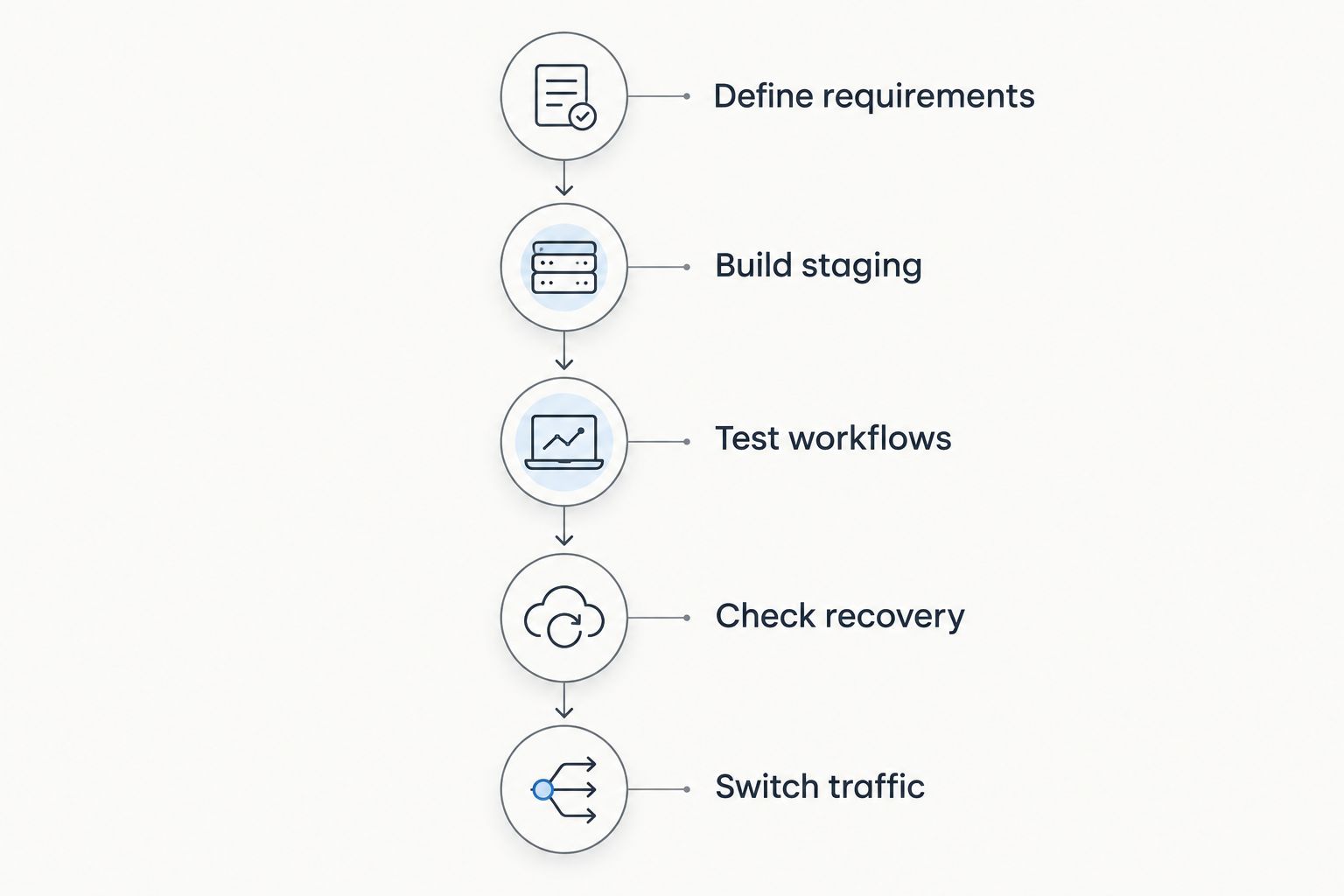
Use this sequence for your 2026 migration decision. It separates choosing a provider from proving that the application works in the replacement environment.
- Define requirements: Record the operating system, software dependencies, location requirement, and maintenance owner.
- Build staging: Install the application in a separate environment before directing live visitors to it.
- Test workflows: Check 3 workflows: sign-in, the main customer action, and background processing. Replace those examples with your application's equivalents.
- Check recovery: Keep 2 backup copies in separate locations and verify that you can restore the application and database together.
- Switch traffic: Change DNS only after testing, and retain the previous environment until you have verified the live transition.
Evaluate 4 dimensions before approving the move: compatibility, responsiveness, recovery, and administrative effort. These checks give you evidence about your application; a provider's general reputation cannot replace them.
Keep email and DNS ownership explicit during the transition. Moving a website does not automatically move every service connected to its domain, and an overlooked dependency can complicate an otherwise successful migration.
When staying with Host.co.in is the right call
Stay with Host.co.in when the current service supports your application, the maintenance responsibilities are clear, and you have a working recovery process. A 2026 alternatives search is not an obligation to migrate.
Where staying shines
- You avoid moving a working application without a defined benefit.
- You retain a familiar hosting and support workflow.
- You can focus on application improvements rather than infrastructure replacement.
Where staying falls short
- Familiarity does not resolve a documented technical constraint.
- Postponing a necessary architecture change leaves the original requirement unanswered.
Best for: Businesses whose current hosting environment already meets their requirements. Verdict: Hold unless a replacement demonstrably fixes a specific problem.
FAQ
What's the best Host.co.in alternative for Indian businesses?
VCCLHosting is a relevant Host.co.in alternative for Indian businesses needing Windows/Linux VPS, dedicated cloud servers, Forex VPS, or shared/reseller hosting. Its own datacenter is in Kolhapur, so assess that location against your deployment requirements.
Is DigitalOcean better than Host.co.in for developers?
DigitalOcean is the more relevant shortlist entry when you want a developer-oriented cloud platform for application infrastructure. Whether it is better for your workload depends on the deployment model and administration responsibilities you need.
Should I choose Amazon Lightsail instead of Host.co.in?
Choose Amazon Lightsail when a straightforward virtual-server deployment within AWS matches your requirements. Staying with Host.co.in is the better decision when your current hosting already works and AWS alignment solves no specific problem.
Is Hostinger a suitable alternative for WordPress?
Hostinger is a suitable candidate when you want managed WordPress hosting. Compare the proposed environment with your plugins, scheduled tasks, backups, and existing website workflow before migrating.
Do I need a VPS when replacing Host.co.in?
You need a VPS only when your workload requires capabilities or control that your website-hosting environment does not provide. A conventional business website does not require a VPS simply because you are changing providers.
What should I test before moving my website?
Test application compatibility, customer workflows, background processing, and backup restoration before changing DNS. Use a staging environment and verify the live transition before retiring the previous hosting environment.
When should I stay with Host.co.in?
Stay with Host.co.in when the current service meets your application, maintenance, and recovery requirements. Change providers only when the replacement fixes a specific constraint.
One last thing
Your most useful hosting comparison is a restore test, not another feature checklist. Before approving a 2026 move to VCCLHosting or any other provider, restore the application into a separate environment and confirm that it works. A backup you have not restored is an unproven recovery plan.