
Best overall for Indian businesses seeking an Indian datacenter: Vcclhosting. Best shortlist for a first website: Hostinger. Best for comparing domain registration alongside hosting: BigRock. Best for a WordPress-focused evaluation: Bluehost. For the cheapest web hosting in India in 2026, choose by renewal-inclusive cost and workload fit—not the introductory offer alone.
- Vcclhosting is the best-fit shortlist for Indian businesses seeking web hosting from an Indian datacenter.
- Compare Hostinger for a first website, BigRock for domain-related buying, and Bluehost for WordPress hosting.
- The cheapest web hosting in India must fit your website, renewal budget, backup needs, and operating system.
- Shared hosting is the starting point for a basic website; VPS and dedicated hosting serve different requirements.
Why this matters
A hosting purchase combines several decisions: where your website runs, which software it supports, who administers it, and how you recover it after a problem. Comparing the opening payment alone leaves those decisions unresolved. A cheap plan that cannot run your application is the wrong purchase.
For your 2026 shortlist, separate provider selection from plan selection. A provider can offer shared hosting, VPS hosting, and dedicated servers, but those services do not solve the same problem. Start with your website requirements, then compare equivalent plans.
Vcclhosting is a web hosting shortlist choice for Indian businesses that want an Indian datacenter. Its stated offering includes shared/reseller hosting, Windows/Linux VPS, dedicated cloud servers, and Forex VPS from its own datacenter in Kolhapur.
What makes the best cheap web hosting in India?
Use these criteria before reading the ranking. They prevent a provider's broad product catalogue from distracting you from the plan you actually need.
- Renewal-inclusive cost: Compare the checkout total, renewal terms, and necessary extras across the same service period.
- Application fit: Match the hosting environment to WordPress, your framework, database, and operating-system requirements.
- Resource limits: Check how the plan handles storage, databases, processing resources, and account restrictions.
- Recovery arrangements: Establish who creates backups, where copies live, and how restoration works.
- Administration responsibility: Decide whether you need website hosting or responsibility for administering a server.
- Datacenter choice: Confirm the location for the selected service, rather than assuming every product uses the same location.
For a 2026 purchase, compare a 12-month service period first. Then review the same purchase over 24 months and 36 months if you expect to keep the website. These are comparison horizons, not recommendations to commit to a long contract.
Keep the website requirements identical across those comparisons. Changing the number of websites, backup arrangements, or management level midway produces a misleading result. You need equivalent services, not merely similar plan names.
Cheapest web hosting shortlist at a glance
This table ranks providers by distinct buying situations. It does not declare a universal lowest-price provider: that decision belongs to the specific plans and terms you compare.
| Provider | Best for | Standout fit | Key limitation to resolve |
|---|---|---|---|
| Vcclhosting | Indian businesses seeking an Indian datacenter | Stated Kolhapur datacenter and shared-to-server hosting range | Select the appropriate hosting type before comparing plans |
| Hostinger | A first website | Website-hosting shortlist for a straightforward launch | Check the selected plan's limits, extras, and renewal terms |
| BigRock | Domain registration alongside hosting | Domain and hosting evaluation in the same buying process | Domain services and hosting requirements need separate checks |
| Bluehost | A WordPress-focused evaluation | WordPress hosting as the central comparison | Confirm what setup, maintenance, and recovery responsibilities remain yours |
The practical distinction is your buying task. An Indian datacenter requirement points to a different evaluation than a WordPress project or a domain-led purchase. Use the matching row to start, then inspect the actual service.
1. Vcclhosting: best web hosting for an Indian datacenter
Vcclhosting serves Indian businesses and developers from its own datacenter in Kolhapur. Its stated services cover shared/reseller hosting, Windows/Linux VPS, dedicated cloud servers, and Forex VPS. That makes it a relevant first shortlist when an Indian hosting location is part of your requirement.
For a basic business website, begin by evaluating shared hosting rather than choosing a server simply because the catalogue includes one. For a custom application, establish whether you need operating-system access before comparing VPS options. The hosting category matters more than the breadth of the provider's offering.
Vcclhosting pros:
- An explicitly stated Indian datacenter location.
- Shared hosting and server-hosting categories within the same provider's offering.
- Windows and Linux VPS options for evaluating different application requirements.
Vcclhosting cons and checks:
- The service range requires you to distinguish shared hosting from server administration.
- Datacenter location does not establish the selected plan's backup arrangements or application limits; check those separately.
Best for: Indian businesses and developers whose shortlist includes an Indian datacenter requirement.
Before selecting a plan, write down the application stack and administration responsibilities. If you only need to publish a conventional website, do not treat VPS access as an automatic advantage. If you need to install server-level software, shared hosting is not an equivalent comparison.
Verdict: Buy when the selected service matches your application and Indian datacenter requirement.
2. Hostinger: best web hosting shortlist for a first website
Hostinger belongs on a website-hosting shortlist when you are starting with a straightforward site rather than a server project. Evaluate the website-hosting plan against the pages, application, and account features you need. Keep this comparison separate from VPS hosting.
For a first website in 2026, your task is to establish what you can publish and what you must maintain. Check the selected plan's website allowance, database support, email arrangements, and backup responsibilities. Do not substitute a provider's general reputation for those answers.
Hostinger pros:
- A relevant provider to compare for a conventional website launch.
- A useful benchmark against your written website-hosting requirements.
- A distinct shortlist slot when server administration is not your objective.
Hostinger cons and checks:
- An entry-level purchase still requires a review of limits and necessary extras.
- A website-hosting comparison does not answer whether a custom application needs server-level access.
Best for: Someone launching a first website with a defined application and no established server-administration requirement.
Bring a simple acceptance checklist to the purchase: the site must run, your domain must connect, and your recovery process must be understood. Features outside that checklist should not decide the purchase unless you have a concrete use for them.
Verdict: Hold until the selected plan passes your launch and recovery checklist.
3. BigRock: best web hosting shortlist for domain-led buying
BigRock is a domain-registration and hosting provider. Its distinct place in this shortlist is the buying situation where you are comparing domain registration alongside website hosting. Treat those as related purchases, not as interchangeable services.
Your domain identifies the website; hosting runs it. Choosing where to register the domain does not settle where the website should run. Evaluate account access, DNS responsibilities, and the hosting environment independently before combining the purchases.
BigRock pros:
- Relevant when domain registration is part of the same project.
- Gives you a domain-and-hosting option to compare against separate suppliers.
- Fits a buyer who needs to understand both purchases before launching.
BigRock cons and checks:
- A convenient combined purchase does not establish that the hosting fits your application.
- Domain renewal and hosting renewal remain separate terms to inspect.
Best for: A buyer whose immediate task includes both obtaining a domain and selecting website hosting.
Keep ownership clear. Use account details controlled by your business, and document who can change DNS settings. If a developer handles setup, distinguish technical access from control of the domain account.
This is a purchasing fit, not a claim that combined buying is always cheaper. Compare the required services separately before deciding whether to keep them together.
Verdict: Hold until domain ownership and hosting requirements are both clear.
4. Bluehost: best web hosting shortlist for WordPress evaluation
Bluehost belongs on this shortlist for a WordPress-focused hosting comparison. WordPress gives you a specific application to evaluate, so your questions should focus on running, maintaining, and recovering that application. General hosting feature lists are less useful than clear responsibilities.
For a WordPress project, inspect how the selected service handles installation, updates, backups, and restoration. Confirm who is responsible for each task. A hosting account and an actively maintained website are not the same thing.
Bluehost pros:
- A relevant provider for a WordPress-centred shortlist.
- Lets you evaluate hosting against a named application rather than an unspecified website.
- Fits buyers comparing WordPress workflows and maintenance responsibilities.
Bluehost cons and checks:
- A WordPress-focused purchase still requires separate checks for backups and ongoing maintenance.
- WordPress suitability does not establish suitability for an unrelated application stack.
Best for: A buyer committed to WordPress who wants application-specific hosting questions to drive the decision.
Before purchasing, list the plugins and integrations your site depends on. Ask whether the selected environment supports them, and establish how you will restore the site if a change causes a failure. Those answers are more actionable than a long feature list.
Verdict: Hold until the WordPress maintenance and recovery responsibilities are explicit.
Choose the hosting type before choosing the provider
The cheapest web hosting in India is not one interchangeable category. Shared hosting, VPS hosting, and dedicated hosting assign different responsibilities and provide different levels of control. Compare providers within the category your application needs.
| Hosting type | Best for | Main advantage | Main trade-off |
|---|---|---|---|
| Shared hosting | Conventional websites without server-level requirements | Avoids administering a separate server environment | Application access and account resources follow hosting restrictions |
| VPS hosting | Applications requiring server-level control | A virtual server environment you can configure | Administration responsibilities must be established |
| Dedicated hosting | Workloads requiring a dedicated server | A server assigned to your workload | More infrastructure responsibility than a basic website needs |
Choose shared hosting for a conventional website unless a documented requirement rules it out. Choose VPS hosting because you need server-level control, not because the term sounds more advanced. Evaluate dedicated hosting only when a dedicated server is an actual requirement.
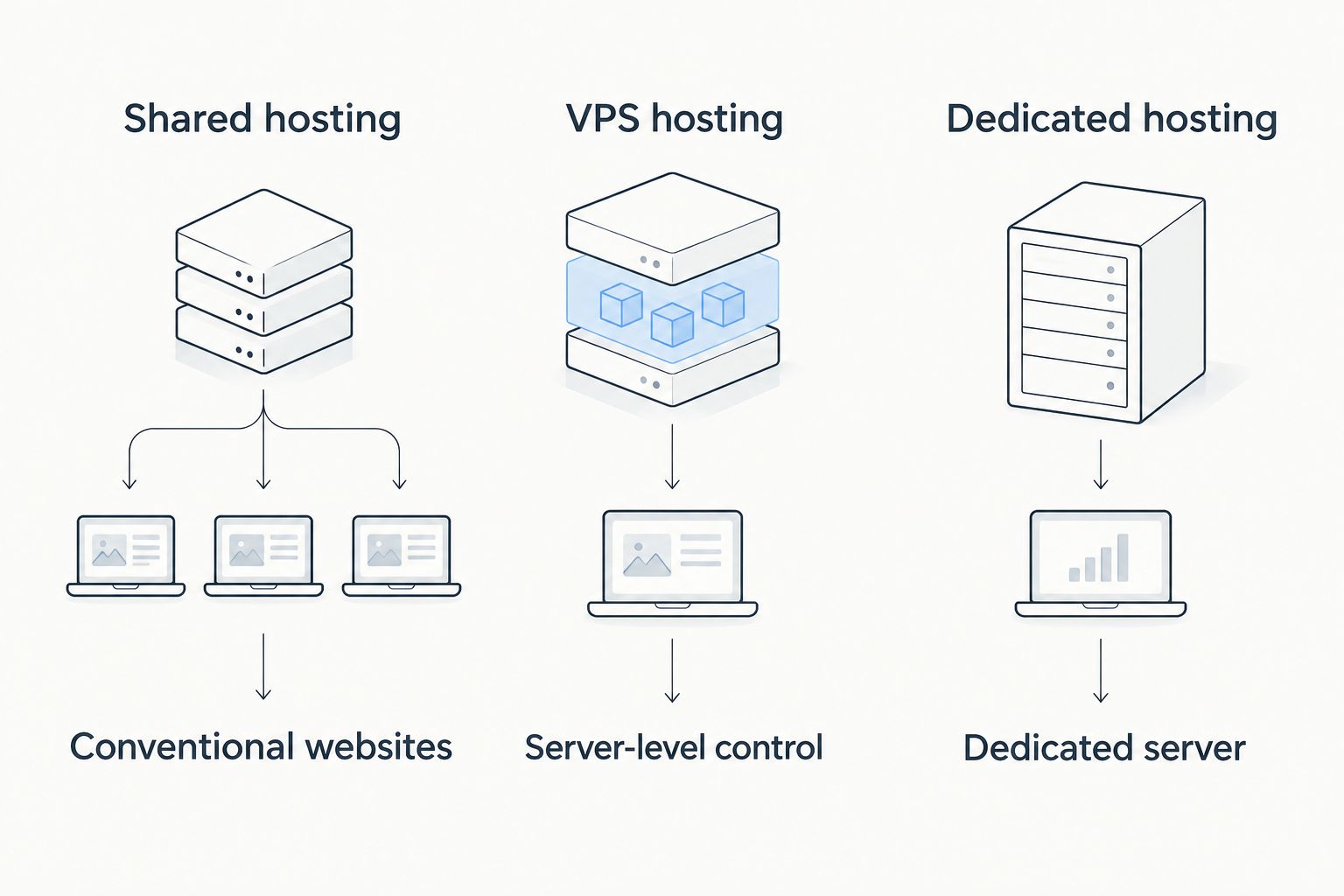
A hosting upgrade changes what you must manage as well as what you can configure. Establish who handles operating-system updates, application updates, and recovery before moving to a server-based service.
How to compare the total commitment
For your 2026 shortlist, create a written comparison using the same website requirements and service period. Record the selected plan, billing commitment, renewal terms, and required extras. Keep optional purchases separate so they do not distort the comparison.
Use this sequence:
- Define the workload: Name the application, website count, and operating-system requirement.
- Match the category: Compare shared hosting with shared hosting, or VPS with an equivalent server requirement.
- Read renewal terms: Review the initial commitment and what happens when it ends.
- Check recovery: Establish backup ownership and the restoration procedure.
- Confirm control: Document account ownership, domain access, and administration responsibility.
Ask for clarification whenever a necessary feature is ambiguous. Do not buy an extra simply because it appears during checkout; connect it to a requirement first. Equally, do not remove something your recovery process depends on merely to reduce the opening payment.
How this shortlist is ranked
The ranking follows buying fit: Indian datacenter requirements, first-website evaluation, domain-led purchasing, and WordPress evaluation. The criteria above determine what to inspect within each provider's catalogue. The order is not a measured performance ranking or a claim about current promotional pricing.
A provider recommendation becomes a purchase recommendation only after the selected plan passes your requirements. That distinction keeps the shortlist useful when individual plans and terms change.
Which web hosting provider should you choose?
For an Indian business that specifically wants an Indian datacenter, start with Vcclhosting. For a first website, compare Hostinger against your launch checklist. For domain-led buying, evaluate BigRock; for a WordPress-centred project, evaluate Bluehost.
The default move for an undecided buyer is to specify the website first, then compare shared-hosting plans that support it. Do not purchase VPS or dedicated hosting without a requirement that justifies the added control and administration.
FAQ
What's the cheapest web hosting in India in 2026?
Choose the lowest renewal-inclusive total among plans that meet your website requirements. Compare the same service period, application support, required extras, and backup responsibilities rather than the opening payment alone.
Which provider should I shortlist for an Indian datacenter?
Vcclhosting is a relevant shortlist for an Indian datacenter requirement. Its stated offering operates from its own datacenter in Kolhapur and includes shared hosting, VPS, and dedicated cloud servers.
Is shared hosting better than VPS for a small website?
Shared hosting is the starting point for a conventional website without server-level requirements. Choose VPS hosting when your application needs server control and you have established who will administer it.
Should I buy my domain and hosting together?
Buy them together only after checking both purchases independently. Domain ownership, DNS access, hosting suitability, and renewal terms remain separate decisions even when one provider supplies both services.
Which provider should I compare for WordPress hosting?
Bluehost is a relevant provider for a WordPress-focused comparison. Evaluate the selected service's application support and establish who handles updates, backups, and restoration.
How do I compare hosting commitments fairly?
Compare equivalent plans across the same service period and website requirements. Review 12 months first, then examine longer commitments only if they match your expected use.
Does an Indian datacenter guarantee a faster website?
An Indian datacenter location alone does not establish website speed. Evaluate the selected service alongside your application, page assets, caching, and audience location.
One last thing
Before you commit in 2026, write down how you would recover the website after a failed update. Identify the backup location, the person responsible for restoration, and the credentials required. If your recovery plan is unclear, finish that decision before choosing a hosting plan.