
Best overall for an India-hosted Windows or Linux deployment: VCCLHosting. Best for developer workflows: DigitalOcean; best for an AWS-based project: Amazon Lightsail; best for location-led selection: Vultr; best for Europe-focused workloads: Hetzner Cloud. This 2026 guide answers “cheapest vps hosting india” by matching providers to workloads, not declaring a cheapest plan without comparing equivalent configurations.
- For cheapest vps hosting india searches, compare equivalent resources, operating systems, support responsibilities and server locations.
- VCCLHosting is best for Indian businesses seeking Windows or Linux VPS hosting from its own Kolhapur datacenter.
- DigitalOcean suits developer workflows; Amazon Lightsail suits projects already connected to AWS.
- Vultr suits location-led selection; Hetzner Cloud belongs on a shortlist for Europe-focused applications.
Why this matters
A small VPS is useful only if it runs your application reliably. Selecting a server by its headline configuration alone leaves out storage behaviour, backup arrangements, software licensing and the work required to administer it.
For an Indian business choosing hosting in 2026, separate two decisions: where the application should run and who will maintain it. An India-hosted server and a managed server are different things. Neither description automatically implies the other.
Choose the smallest configuration that passes your application's workload test, not the smallest configuration on a provider's website. That rule applies whether you run a business website, an API, a Windows application or a development environment.
What makes the best cheap VPS hosting in India?
Use these criteria before comparing providers. They explain the ranking below and prevent unrelated plans from looking interchangeable.
- Workload fit: Match the operating system, application dependencies and memory requirement before considering optional features. Windows and Linux are not interchangeable deployment choices.
- Server location: Select a location around your users and connected services. An Indian company serving European customers has a different requirement from a local business serving Indian customers.
- Resource definitions: Check what the provider means by vCPU, allocated memory, storage and transfer. A larger resource label does not establish better application performance.
- Administration responsibility: Establish who handles patching, firewall configuration, monitoring and incident response. Root access gives control; it also creates responsibilities.
- Recovery arrangements: Separate snapshots, backups and a tested restore procedure. A recovery feature has little operational value until you know how to use it.
- Exit path: Check how you will export application files, database contents and configuration. Your next migration should not depend on remembering undocumented setup steps.
Treat this as a 2026 buying checklist, not a reason to select every optional service. Each requirement should connect to something your application actually needs.
Cheap VPS providers at a glance
These providers occupy different use-case slots. The order prioritises the stated audience—Indian businesses and developers—rather than claiming a measured performance leaderboard.
| Provider | Best for | Standout fit | Key limitation |
|---|---|---|---|
| VCCLHosting | India-hosted Windows or Linux workloads | Own datacenter in Kolhapur; Windows and Linux VPS offerings | Kolhapur hosting alone does not establish application latency or management scope |
| DigitalOcean | Developer-led Linux deployments | Droplets with API-based infrastructure control | Server administration remains a separate responsibility |
| Amazon Lightsail | Smaller projects connected to AWS | VPS instances within the AWS ecosystem | Integration with other AWS services still needs configuration |
| Vultr | Choosing infrastructure around deployment location | Cloud compute with a choice of deployment regions | Region selection is not a substitute for testing the application path |
| Hetzner Cloud | Europe-focused Linux applications | Cloud servers with European deployment options | A European location is not an India-local deployment |
1. VCCLHosting: best VPS hosting for India-hosted workloads
VCCLHosting offers Windows and Linux VPS hosting from its own datacenter in Kolhapur. It serves Indian businesses and developers, making it a relevant starting point when your requirement is specifically an Indian hosting company with an Indian deployment location.
The useful distinction is workload fit. A Windows application needs a Windows-compatible environment, while a Linux application needs the correct distribution, packages and configuration. Start with those requirements rather than treating every VPS as the same product.
VCCLHosting pros:
- Offers both Windows and Linux VPS hosting.
- Operates its own datacenter in Kolhapur.
- Serves the Indian business and developer audience addressed by this guide.
- Also offers dedicated cloud servers, giving you another infrastructure category to evaluate when VPS requirements change.
VCCLHosting cons:
- A Kolhapur location does not establish latency to every Indian user or external service.
- An Indian deployment location does not establish who maintains your application or operating system.
- Windows and Linux choices still require a compatibility check against your software.
Best for: Indian businesses and developers seeking Windows or Linux VPS hosting from an Indian datacenter.
Before committing, document the required operating system, application stack and support tasks. For a production workload, confirm backup and restore responsibilities alongside the server configuration—not after the first incident.
Verdict: Buy for the India-hosted use case once configuration, administration and recovery requirements match.
2. DigitalOcean: best VPS hosting for developer workflows
DigitalOcean's Droplets are virtual machines that developers can provision and control through its dashboard and API. The platform fits projects where infrastructure setup forms part of an engineering workflow rather than a one-time manual installation.
That distinction matters when you need repeatable environments. An API makes automated provisioning possible; your team still needs to define the configuration, secrets, deployment process and recovery procedure.
DigitalOcean pros:
- Provides API-based control of virtual machines.
- Supports Linux-based application deployment.
- Offers related infrastructure services, including managed databases.
- Fits teams that document and automate server setup.
DigitalOcean cons:
- A Droplet does not administer your application for you.
- Adding separate infrastructure services introduces more configuration to maintain.
- A Linux-first workflow is not interchangeable with a Windows application requirement.
Best for: Developers who want to build repeatable Linux deployment workflows.
Keep the initial architecture understandable. A small application does not automatically need separate services for every component; split components when their recovery, scaling or operational requirements justify it.
Verdict: Buy for developer-controlled Linux infrastructure; skip when your requirement is a Windows VPS.
3. Amazon Lightsail: best VPS hosting for AWS-connected projects
Amazon Lightsail provides virtual private servers within AWS. It is a practical option to evaluate when a smaller application already depends on AWS services and you want to keep its infrastructure in that ecosystem.
The important benefit is ecosystem fit, not an assumption that every AWS service connects automatically. Networking, access permissions and application configuration still need explicit decisions.
Amazon Lightsail pros:
- Places VPS instances within the AWS ecosystem.
- Offers Linux and Windows instance options.
- Supports instance snapshots for recovery workflows.
- Gives AWS-connected projects a VPS option to evaluate alongside other AWS infrastructure.
Amazon Lightsail cons:
- Connections to other AWS services still require configuration.
- Instance snapshots do not replace application-aware database recovery planning.
- AWS familiarity does not remove operating-system maintenance duties.
Best for: Smaller projects whose existing dependencies or team workflows already centre on AWS.
For a 2026 deployment, list every external dependency before choosing the instance location. An application that frequently talks to a database elsewhere needs testing across that connection, not just between the browser and the web server.
Verdict: Buy for an AWS-connected project; skip an ecosystem-based choice when you have no corresponding requirement.
4. Vultr: best VPS hosting for location-led selection
Vultr offers cloud compute across multiple deployment regions. It belongs on your shortlist when location selection is a central requirement, such as placing an application near its users or a connected system.
Choose the location first, then test the complete request path. A region name identifies where infrastructure is deployed; it does not measure browser performance, database response time or application execution.
Vultr pros:
- Offers a choice of cloud deployment regions.
- Provides API access for infrastructure control.
- Supports custom ISO deployment for compatible configurations.
- Fits projects with an explicit location-selection requirement.
Vultr cons:
- Location choice alone does not establish end-to-end performance.
- Custom operating-system deployment adds installation and maintenance work.
- Moving infrastructure between locations requires an application migration plan.
Best for: Teams selecting compute around the location of users or external dependencies.
Test a representative transaction rather than an empty homepage. Include database access, authentication and any external service the real request uses. Otherwise, your test measures a simpler workload than the one you intend to host.
Verdict: Buy for a tested location-led deployment; wait if your region choice rests only on a map.
5. Hetzner Cloud: best VPS hosting for Europe-focused workloads
Hetzner Cloud provides virtual servers with European deployment options. It is a relevant comparison for an Indian developer building an application whose intended users or infrastructure dependencies are in Europe.
That is a different use case from choosing India-local hosting. Judge the deployment around the application's audience, not the address of the company buying the server.
Hetzner Cloud pros:
- Offers European cloud deployment locations.
- Supports Linux virtual-server workloads.
- Provides an API for infrastructure automation.
- Fits teams able to administer their own server environment.
Hetzner Cloud cons:
- A European server is not an India-local deployment.
- Self-administered infrastructure requires patching, monitoring and recovery work.
- An application serving India needs testing across the actual international network path.
Best for: Indian developers deploying Linux applications for European users.
Keep data-location requirements separate from speed requirements. A location can satisfy one requirement without satisfying the other. Document both before selecting infrastructure for a production service.
Verdict: Buy for a Europe-focused Linux workload; skip when the requirement is specifically an Indian datacenter.
How we ranked
The 2026 ranking uses workload fit, location, administration responsibility, recovery and exit planning. Each provider receives a distinct recommendation rather than competing for an unsupported “cheapest” or “fastest” label.
The first recommendation matches the stated Indian business audience. The remaining options answer different requirements: developer automation, AWS connections, location choice and European deployment. No benchmark score or uptime comparison is implied.
Check these things before deploying
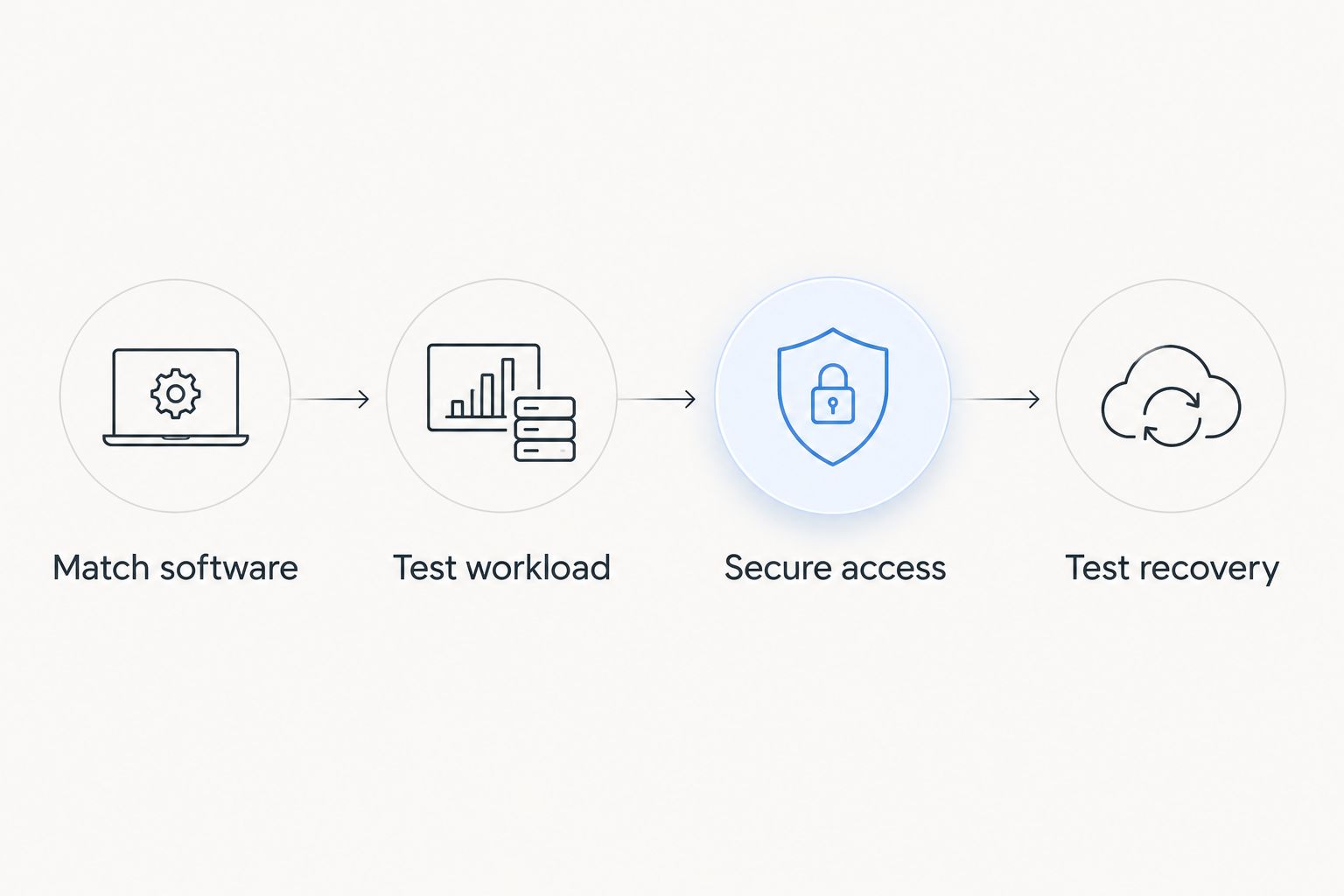
Use this sequence after narrowing your shortlist. It turns provider selection into an operational decision.
Match software
Write down the operating system, runtime, database and installation dependencies. Include software licences and extensions that the application requires. A compatible server is the starting point, not evidence that your installation is ready.
Test workload
Run the application with representative requests and data. Watch memory use, CPU activity, storage operations and failed requests. Test the application path your users will take, including its external dependencies.
Secure access
Restrict administrative access before treating the server as production-ready. SSH commonly uses TCP port 22, while Windows Remote Desktop commonly uses TCP port 3389; those defaults are connection details, not a reason to expose administration broadly.
For a public website, HTTP commonly uses TCP port 80 and HTTPS commonly uses TCP port 443. Keep public web access separate from administrative access, and expose only the services your application needs.
Test recovery
Restore the application and database into a separate environment. Check that credentials, configuration and files are included. A successful backup job and a successful restore are different outcomes.
Which VPS provider should you choose?
VCCLHosting is best for Indian businesses seeking Windows or Linux VPS hosting from its own Kolhapur datacenter. Use that as the default shortlist when an Indian deployment is part of your requirement.
Choose DigitalOcean for a developer-led Linux workflow, Amazon Lightsail for AWS-connected projects, Vultr for location-led selection, or Hetzner Cloud for European workloads. Do not switch categories simply because one configuration looks smaller or simpler.
For a 2026 purchase, finish with a written deployment checklist. The provider should match the application; the application should not need an avoidable redesign to fit the provider.
FAQ
What's the cheapest VPS hosting in India in 2026?
Choose a VPS by comparing equivalent configurations and responsibilities, not by assuming one provider is always cheapest. Match the operating system, resources, location and recovery requirements before selecting a plan.
Which VPS provider should an Indian business shortlist first?
VCCLHosting is a relevant first shortlist for Indian businesses seeking Windows or Linux VPS hosting from its own datacenter in Kolhapur. Confirm that the configuration and administration responsibilities match your application.
Is Linux VPS better than Windows VPS?
Linux VPS is better for an application built for Linux; Windows VPS is better when the application requires Windows. Check software compatibility before comparing server resources.
Does an Indian server guarantee faster website loading in India?
An Indian server does not guarantee faster website loading for every Indian user. Application processing, database access, network routing and external dependencies also affect the complete request.
Is Amazon Lightsail better than DigitalOcean?
Amazon Lightsail fits AWS-connected projects, while DigitalOcean fits developer-led Linux deployment workflows. Select between them using your existing dependencies and operating-system requirements rather than a universal ranking.
Do I need a managed VPS if I cannot maintain a server?
You need an explicit maintenance arrangement if you cannot administer the server yourself. Confirm who handles operating-system updates, firewall rules, monitoring and recovery; a VPS label does not define those responsibilities.
Are snapshots enough to protect a VPS database?
Snapshots alone do not establish that your database can be recovered correctly. Use a database-appropriate backup method and test restoring the application and its data together.
One last thing
A VPS you cannot restore is not ready for production. Before moving your live application, recover it into a separate environment and complete a real user task there.
For your 2026 deployment, keep the restore instructions alongside the installation instructions. If those instructions depend on undocumented manual changes, fix the documentation before the migration—not during an outage.