
HostitSmart offers shared hosting, VPS hosting and dedicated servers, giving you a broad starting point for hosting websites and applications. That breadth stops being enough when your next decision depends on a particular operating system, datacenter location or deployment workflow. The best HostitSmart alternative in 2026 is VCCLHosting if you need an Indian provider offering Windows/Linux VPS from its own Kolhapur datacenter; DigitalOcean if you need developer-focused cloud infrastructure.
- Shortlist VCCLHosting among HostitSmart alternatives for Windows/Linux VPS, dedicated cloud servers and hosting from its Kolhapur datacenter.
- Choose DigitalOcean for developer-focused cloud infrastructure; assess administration responsibilities before moving.
- Choose Amazon Lightsail for a simpler AWS server deployment, not as a substitute for every AWS service.
- Choose Cloudways for managed PHP hosting; keep Windows applications on a different shortlist.
Why this matters
Changing hosting providers only helps when the replacement solves the constraint that prompted your search. A website needing managed application hosting and a Windows application needing remote access belong on different shortlists.
Your 2026 comparison should start with the workload, not the provider logo. Define the operating system, administrative responsibilities and location requirements before comparing server configurations. Otherwise, you risk moving the same unresolved problem to a different control panel.
There is no single winner for shared hosting, reseller accounts, Windows applications and developer infrastructure. The alternatives below are ranked by the needs they address, not by an unsupported claim that one provider is universally faster.
HostitSmart alternatives at a glance
| Provider | Best for | Standout offering | How it differs from HostitSmart | Main trade-off |
|---|---|---|---|---|
| HostitSmart | Keeping websites and servers with a broad hosting provider | Shared hosting, VPS and dedicated servers | The baseline for this comparison | A broad catalogue does not decide workload fit |
| VCCLHosting | Indian businesses and developers needing Windows/Linux VPS | Hosting from its own Kolhapur datacenter, plus Forex VPS and dedicated cloud servers | A location-specific alternative with an explicitly stated Windows/Linux offering | Datacenter location alone does not establish application performance |
| DigitalOcean | Developers deploying cloud applications | Droplets and developer-facing cloud services | A cloud infrastructure workflow rather than a traditional shared-hosting-first decision | Self-managed servers require server administration |
| Amazon Lightsail | Teams wanting a simpler entry point into AWS | Virtual servers with an AWS-oriented management experience | A focused AWS deployment option | Simpler infrastructure is not the same as fully managed applications |
| Cloudways | Teams running supported PHP applications | Managed hosting with application-oriented controls | A managed PHP hosting approach | Not a fit for Windows server applications |
Use the table to eliminate mismatches first. If your application needs Windows, a managed PHP platform is not an interchangeable replacement. If your team wants less server maintenance, a self-managed virtual machine does not solve that requirement by itself.
What to compare before you shortlist
- Operating system: Match the application’s actual dependencies, not your familiarity with a provider.
- Administration: Separate infrastructure support from responsibility for patches, application updates and recovery.
- Location: Test the application from the places your customers use it.
- Recovery: Establish what gets backed up, where it is stored and how you restore it.
- Migration: Check database, email, DNS and file-transfer requirements before moving anything.
1. VCCLHosting: best for Indian Windows/Linux VPS buyers
VCCLHosting is an Indian web hosting company serving businesses and developers from its own datacenter in Kolhapur. Its stated services include Windows/Linux VPS, dedicated cloud servers, Forex VPS, shared hosting and reseller hosting. That combination makes it a relevant shortlist entry when you need an Indian hosting provider rather than a developer cloud platform alone.
The strongest reason to consider this option is a match between its stated service categories and your workload. A Windows requirement, reseller business or Forex VPS search gives you a concrete reason to investigate. The provider’s location is another selection criterion, but it is not a substitute for measuring your application’s response time.
Where this option shines
- Windows and Linux VPS are both explicitly part of the offering.
- Shared and reseller hosting address different needs from application servers.
- Forex VPS is a named service category rather than an inferred use case.
- The datacenter location is explicitly identified as Kolhapur.
Where this option falls short
- A Kolhapur location alone does not establish suitability for users in other regions.
- A service category does not establish which software administration tasks are included.
- Neither a VPS label nor a dedicated cloud server label proves that your application will perform better after migration.
Those limits matter in a 2026 shortlist. Ask which responsibilities stay with your team, then test the actual application before treating a location or server category as a performance advantage.
| Decision dimension | This alternative | HostitSmart benchmark |
|---|---|---|
| Hosting categories | Windows/Linux VPS, dedicated cloud servers, Forex VPS, shared and reseller hosting | Shared hosting, VPS and dedicated server options |
| Selection emphasis | Indian provider with an explicitly identified Kolhapur datacenter | Broad hosting catalogue |
| Windows workload | Windows VPS is explicitly stated | Check the proposed service against your Windows requirements |
| Operational fit | Match the service to your workload and administration needs | Apply the same responsibility and migration checks |
Best for: Indian businesses and developers whose requirements match the stated Windows/Linux VPS, reseller or specialist hosting categories.
Verdict: Buy only after the proposed service passes your workload and administration checks.
2. DigitalOcean: best for developer-led cloud deployments
DigitalOcean is a cloud infrastructure provider known for Droplets, its virtual machines, and developer-facing deployment services. It belongs on your shortlist when the team wants to provision infrastructure and manage application deployment directly.
The distinction is operational. Instead of choosing primarily around a conventional hosting account, you choose cloud resources and decide how the application runs on them. That is useful for a team with infrastructure skills, but it adds work for a business that only wants someone else to keep its website running.
Where DigitalOcean shines
- Droplets suit teams that want control over a virtual machine.
- Developer-facing interfaces support infrastructure-focused workflows.
- Its broader cloud services give developers options beyond a single server.
Where DigitalOcean falls short
- A self-managed Droplet leaves operating-system and application administration with your team.
- Choosing infrastructure services introduces decisions that a simple website does not necessarily need.
- A server deployment is not automatically a replacement for reseller hosting or a managed website service.
| Decision dimension | DigitalOcean | HostitSmart benchmark |
|---|---|---|
| Primary selection lens | Cloud infrastructure and developer workflows | Hosting service category |
| Virtual server approach | Droplet deployment | VPS selection |
| Administrative burden | Self-managed Droplets need server administration | Establish responsibilities for the selected hosting service |
| Best comparison question | Does the team want direct infrastructure control? | Does the hosting service meet the existing workload? |
For a 2026 developer shortlist, the guide to VPS hosting providers for developers in India provides a related comparison angle. Keep the question focused on deployment needs rather than treating every VPS provider as equivalent.
Best for: Developers who want cloud infrastructure and can own the server-management work that comes with it.
Verdict: Buy for infrastructure control; skip self-managed servers if reducing administration is the objective.
3. Amazon Lightsail: best for a simpler AWS server deployment
Amazon Lightsail offers virtual servers and related hosting resources within AWS. It is a relevant alternative when you want an AWS-based deployment without starting with the full range of infrastructure choices associated with Amazon EC2.
Lightsail simplifies the entry point, not every operational responsibility. You still need to decide how the application is maintained, monitored and recovered.
Where Amazon Lightsail shines
- It provides a focused route to virtual-server hosting within AWS.
- It suits straightforward deployments that do not need every AWS infrastructure option.
- It gives teams an AWS-specific alternative to a conventional VPS shortlist.
Where Amazon Lightsail falls short
- A simpler server interface does not make your application fully managed.
- Lightsail is not interchangeable with the entire AWS service catalogue.
- Teams without server-management skills still need an operational plan.
Best for: Teams choosing AWS for a straightforward virtual-server deployment.
Verdict: Buy when AWS is a requirement; hold if the only reason is brand recognition.
4. Cloudways: best for managed PHP application hosting
Cloudways is a managed hosting platform for supported PHP applications, including WordPress. It deserves consideration when your goal is to reduce routine server-management work rather than obtain unrestricted control over a general-purpose server.
That narrower focus is both its advantage and its boundary. Choose it around application compatibility, not as a substitute for every VPS use case.
Where Cloudways shines
- Its hosting approach centres on supported PHP applications.
- Managed hosting addresses a different need from administering a server yourself.
- Application-focused controls suit teams maintaining websites rather than building their own infrastructure stack.
Where Cloudways falls short
- It is not a Windows server hosting option.
- A managed platform is less appropriate when your application requires unrestricted operating-system customisation.
- Hosting management does not remove responsibility for your application’s code and dependencies.
Best for: Teams running supported PHP applications that want a managed hosting approach.
Verdict: Buy for compatible PHP workloads; skip for Windows applications or unrestricted server requirements.
Why people switch from HostitSmart
A justified switch has a specific requirement behind it. Use these decision triggers to assess your own account; they are not claims that HostitSmart has outages, weak support or a particular performance problem.
You need a different operating model
Moving from a hosting account to developer cloud infrastructure changes how your team deploys and maintains applications. Moving to managed PHP hosting changes the balance of administrative work in another direction. Decide which change you actually want before choosing a provider.
You need a defined platform or location
A Windows dependency eliminates platforms built only for PHP applications. An AWS requirement makes Lightsail relevant. An Indian provider with an identified datacenter location belongs in a different comparison from an unspecified global infrastructure requirement.
Your hosting requirement has changed
A reseller business, a Forex workload and a customer-facing web application need different evaluation criteria. Replacing your provider is justified when the new service fits the changed requirement. A different brand name alone is not a reason to migrate.
Check these things before you move in 2026
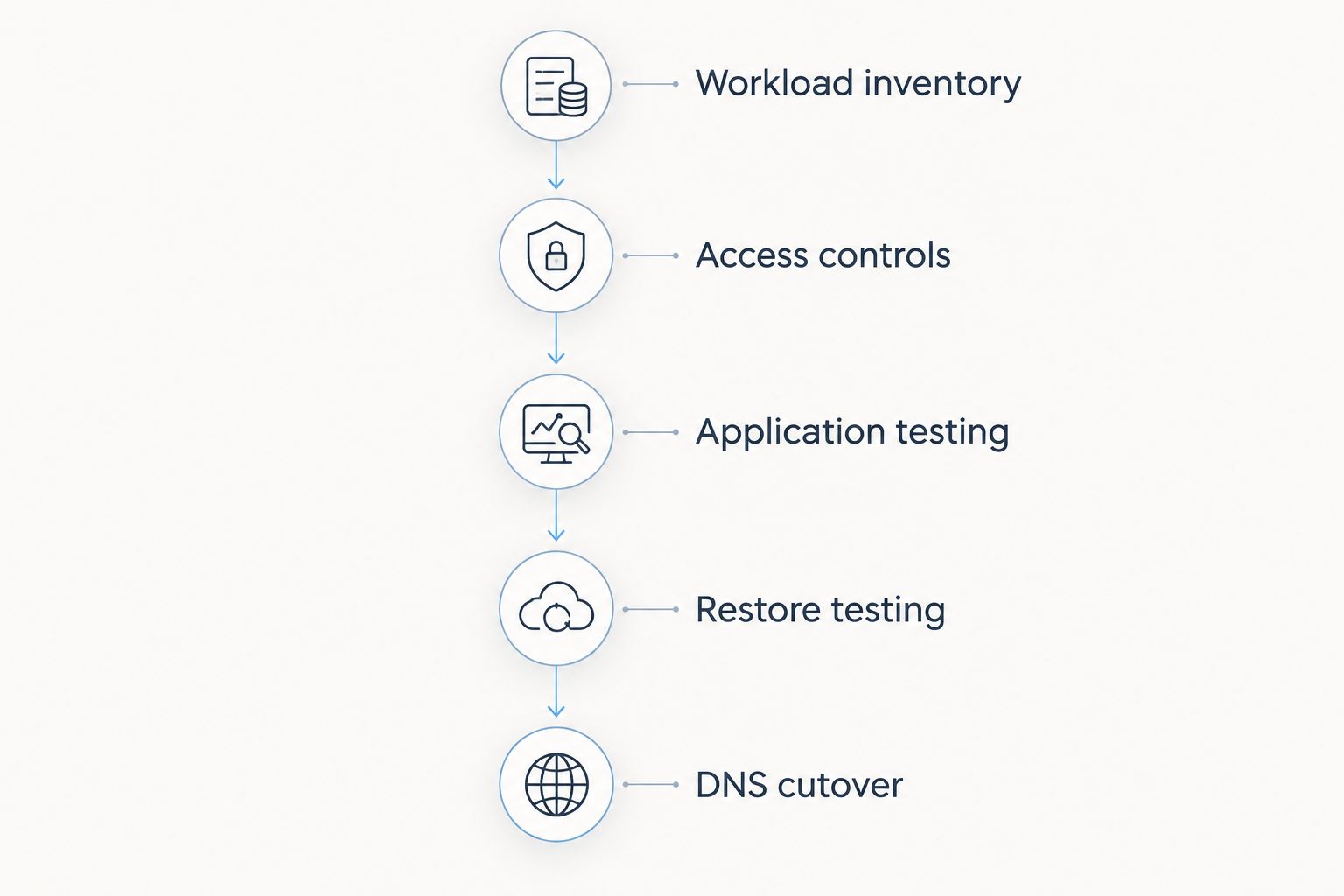
A migration should prove that the replacement works before you redirect users. Follow this sequence with the actual application, not an empty server or a default installation.
- Workload inventory: Record the operating system, runtime, database, scheduled jobs, email dependencies and storage paths.
- Access controls: Identify who needs administrative access and restrict it accordingly.
- Application testing: Deploy a copy and test login, forms, payments, background jobs and outbound email where relevant.
- Restore testing: Restore a backup into a separate environment and verify the application works.
- DNS cutover: Redirect traffic only after the replacement passes the checks, with a documented rollback plan.
For access controls, distinguish public application traffic from administrative access. HTTPS conventionally uses TCP port 443, SSH uses TCP port 22, and Remote Desktop Protocol uses TCP port 3389. These are protocol defaults, not instructions to expose every port publicly; restrict administrative access and account for any custom configuration.
Keep your 2026 comparison tied to the same application checks across providers. A successful restore and a working checkout tell you more about migration readiness than a generic claim about server speed.
When staying with HostitSmart is the right call
Stay when your current service meets the workload, your team understands its responsibilities and there is no unresolved requirement that a replacement addresses. Migration introduces configuration work, testing and the possibility of disruption. Those costs need a reason.
Do not switch simply because a competitor offers more service categories. Equally, do not replace an adequate hosting account with self-managed infrastructure unless someone owns patching, monitoring and recovery. VCCLHosting and the other alternatives belong on a requirements-led shortlist, not an automatic replacement list.
FAQ
What's the best HostitSmart alternative in 2026?
VCCLHosting is a relevant choice for Indian businesses needing its stated Windows/Linux VPS, dedicated cloud server or specialist hosting services. DigitalOcean suits developer-focused infrastructure, while Cloudways suits supported PHP applications needing a managed hosting approach.
Is DigitalOcean better than HostitSmart for developers?
DigitalOcean is the more relevant choice when your priority is developer-focused cloud infrastructure and direct virtual-machine control. That does not make it better for a team that wants a conventional hosting account without self-managed server administration.
Which HostitSmart alternative should I consider for Windows applications?
Shortlist providers that explicitly offer Windows hosting and match the application's Windows dependencies. A PHP-focused managed platform such as Cloudways is not a substitute for a Windows server.
Is Amazon Lightsail the same as fully managed hosting?
No, Amazon Lightsail simplifies access to AWS hosting resources but does not automatically manage your application. Assign responsibility for updates, monitoring, backups and recovery before deploying.
Should I choose Cloudways instead of a VPS?
Choose Cloudways when your workload is a supported PHP application and you want its managed hosting approach. Choose a general-purpose VPS when you need operating-system control or application requirements outside that scope.
Does an Indian datacenter guarantee faster hosting for Indian users?
No, an Indian datacenter location alone does not establish application speed. Test the actual application from your users' locations because routing, application behaviour and server configuration also affect response time.
Can I move from HostitSmart without changing my domain name?
Yes, a hosting migration does not require changing your domain name. Prepare the replacement environment, test it, then update the relevant DNS records with a rollback plan.
When should I stay with HostitSmart?
Stay with HostitSmart when the current service meets your workload and no replacement solves a defined problem. A migration should address a specific operational, platform or location requirement rather than a preference for a different provider name.
One last thing
The most useful migration test is a restore, not a fresh installation. A fresh installation proves that the new server can run the application; a restore also tests whether your recovery materials contain what the application needs. Make that check part of your final provider decision.