HostingRaja gives Indian buyers a hosting provider to consider before looking beyond the domestic market. It stops being enough when your current service cannot meet a specific operating-system, deployment, or infrastructure requirement. The best HostingRaja alternative in 2026 is VCCLHosting if you need Windows/Linux VPS or dedicated cloud servers from an Indian provider with its own Kolhapur datacenter; Amazon EC2 is the alternative to shortlist if you need compute within AWS infrastructure.
- Among HostingRaja alternatives, VCCLHosting fits Indian businesses seeking Windows/Linux VPS and a provider-owned Kolhapur datacenter.
- Amazon EC2 fits applications that need AWS infrastructure integration, with more configuration decisions to manage.
- DigitalOcean Droplets suit developers seeking virtual machines rather than a shared-hosting workflow.
- Stay with HostingRaja when your current service meets your requirements and a migration solves no concrete problem.
Why this matters
Changing hosts is a deployment project, not just an account change. Your website files are only part of it: databases, email, DNS, certificates, scheduled tasks, and application secrets can all affect the cutover.
For a 2026 shortlist, start with the requirement your existing service cannot satisfy. Separate a need for Windows from a need for server administration, and separate either from a need for AWS services. Those requirements lead to different providers.
Choose the hosting model before choosing the replacement host. A virtual machine gives you a different level of responsibility from a shared-hosting account; the provider's name does not remove that distinction.
HostingRaja alternatives at a glance
This comparison separates the reason to shortlist each option from the work you need to assess. It is not a speed ranking: server configuration, application behaviour, and user location all affect performance.
| Provider | Best for | Standout consideration | How it differs from HostingRaja | Main trade-off |
|---|---|---|---|---|
| HostingRaja | Keeping an existing deployment that meets its requirements | Continuity with your current hosting setup | Baseline for the comparison | Staying leaves any unresolved requirement in place |
| VCCLHosting | Indian businesses seeking Windows/Linux VPS or dedicated cloud servers | Its own datacenter in Kolhapur | An alternative Indian hosting provider with these stated service categories | A provider change still requires application and migration checks |
| Amazon EC2 | Applications that need AWS infrastructure integration | Compute within the AWS service ecosystem | An infrastructure-led alternative rather than simply another hosting account | Networking, permissions, and operations require explicit configuration |
| DigitalOcean Droplets | Developers seeking virtual machines | VM-based application deployment | An infrastructure option to compare against your current hosting workflow | A VM does not replace application or server administration |
1. VCCLHosting: best for Indian Windows/Linux hosting requirements
VCCLHosting is an Indian web hosting company serving businesses and developers from its own datacenter in Kolhapur. Its stated services include Windows/Linux VPS, dedicated cloud servers, Forex VPS, and shared/reseller hosting.
That range makes it a relevant first shortlist when your requirement is an Indian hosting provider rather than a move into a larger cloud ecosystem. Choose the service category around the application: a Windows-dependent workload and a Linux web application need different environments.
Where this option shines
- Explicit Windows/Linux VPS coverage: You can start the comparison with the operating system your application requires.
- A stated datacenter location: Kolhapur gives you a concrete location to evaluate against your users and dependencies.
- Several hosting categories: Shared/reseller hosting, VPS, and dedicated cloud servers address different deployment needs.
Where this option falls short
- Location alone does not establish performance. Test your application from the places your users access it; an Indian datacenter is not a substitute for that test.
- A service category does not define management scope. Confirm who handles operating-system updates, application incidents, backups, and restoration before selecting a service.
- Switching creates migration work. You still need to validate certificates, database compatibility, email routing, and scheduled tasks.
These are selection limits, not evidence of a service fault. They matter because a provider can fit your location and operating-system requirements while the proposed configuration still fails your application checklist.
Head-to-head with HostingRaja
| Decision | This alternative | HostingRaja benchmark |
|---|---|---|
| Operating system | Windows/Linux VPS are explicitly offered | Compare with the operating system your current service supports |
| Location | Own datacenter in Kolhapur | Compare with your current server location and measured application response |
| Hosting model | Shared/reseller hosting, VPS, dedicated cloud servers, and Forex VPS | Identify which current service you are replacing |
| Migration | Requires deployment and cutover validation | Staying avoids a provider-to-provider cutover |
Best for: Indian businesses and developers who need one of these stated hosting categories and want to evaluate Kolhapur as a server location.
Verdict: Buy only after the proposed environment passes your application and management-scope checks.
2. Amazon EC2: best for applications built around AWS
Amazon Elastic Compute Cloud, usually called Amazon EC2, provides virtual compute within AWS. It belongs on a HostingRaja alternatives shortlist when the application needs AWS infrastructure integration, not merely because you want a different place to host a website.
AWS services such as Identity and Access Management, Virtual Private Cloud, and Amazon S3 introduce infrastructure choices beyond the server itself. Those choices are useful when your application needs them, but they also expand the configuration you must understand.
Where Amazon EC2 shines
- AWS integration: Compute can sit alongside other AWS services used by the application.
- Infrastructure control: You configure the instance environment, network access, and permissions around the workload.
- Application-specific architecture: EC2 suits teams that want to design their deployment rather than inherit a shared-hosting workflow.
Where Amazon EC2 falls short
- Configuration responsibility expands. Network rules, access permissions, operating-system maintenance, and application deployment need named owners.
- It is not a shared-hosting account replacement by default. Email, control-panel workflows, and website administration need separate consideration.
- A simpler workload does not automatically benefit from more infrastructure choices. Avoid adding services without a requirement they solve.
Amazon EC2 versus HostingRaja
| Decision | Amazon EC2 | HostingRaja benchmark |
|---|---|---|
| Primary reason to choose | Application architecture within AWS | Requirements met by your existing hosting service |
| Deployment approach | Configure compute and its surrounding infrastructure | Compare against your current deployment workflow |
| Administration | Assign ownership for the instance and application | Confirm the responsibilities included in your current service |
| Migration question | Does the application need AWS integration? | Does the existing setup already meet the requirement? |
For a 2026 decision, write down the AWS dependency before choosing EC2. If the only requirement is to publish a conventional website, first establish why a virtual machine and its surrounding configuration are necessary.
Best for: Teams with an AWS-based application architecture and the ability to operate it.
Verdict: Buy when AWS integration is a requirement; skip when it adds infrastructure work without solving a problem.
3. DigitalOcean Droplets: best for developer-operated virtual machines
DigitalOcean Droplets are virtual machines for deploying applications. They are a relevant alternative when you want a VM-based workflow and have someone responsible for the operating system and application stack.
Compare Droplets against the VPS service you actually need, not against an unrelated shared-hosting package. The practical question is whether your team wants to operate a server.
Where DigitalOcean Droplets shine
- VM-based deployment: Developers can install and configure the software their application requires.
- Clear infrastructure category: A Droplet is a virtual machine, which makes the administration boundary easier to discuss.
Where DigitalOcean Droplets fall short
- Server ownership remains a task. Updates, access control, monitoring, and recovery need an operating process.
- Website migration includes more than creating the VM. You must account for databases, certificates, DNS, and any email services.
DigitalOcean Droplets versus HostingRaja
| Decision | DigitalOcean Droplets | HostingRaja benchmark |
|---|---|---|
| Hosting approach | Virtual machine deployment | Identify your current hosting model first |
| Team requirement | Someone to administer the VM and application | Compare with your current administration responsibilities |
| Migration scope | Recreate and validate the required application environment | Staying retains the existing environment |
Best for: Developers who explicitly want virtual machines and accept the associated administration work.
Verdict: Buy for a deliberate VM workflow; skip if you expect the server to administer itself.
Why people switch from HostingRaja
A useful switching reason describes a requirement, not a complaint borrowed from another customer's review. For your 2026 evaluation, use the following decision triggers only when they apply to your own deployment.
Operating system
Switch when the application requires an operating system or software environment your current service cannot provide. Document the dependency first, including the application runtime and database requirements.
Administrative control
Switch when your deployment needs server-level configuration that your current account does not permit. Confirm that you also have someone to maintain that configuration after launch.
Infrastructure integration
Switch when an application depends on services that make another infrastructure environment the appropriate home. An AWS dependency is a concrete reason to evaluate EC2; general interest in cloud hosting is not.
Datacenter location
Switch when a measured location requirement supports the move. Test the application path from users to the server and from the server to important dependencies; geography alone does not prove an improvement.
None of these triggers establishes a HostingRaja service failure. Each gives you a testable reason to compare alternatives rather than migrate on reputation alone.
Validate the replacement before changing DNS
Use the same acceptance checklist for every provider on your 2026 shortlist. A successful homepage load is not enough to approve the move.
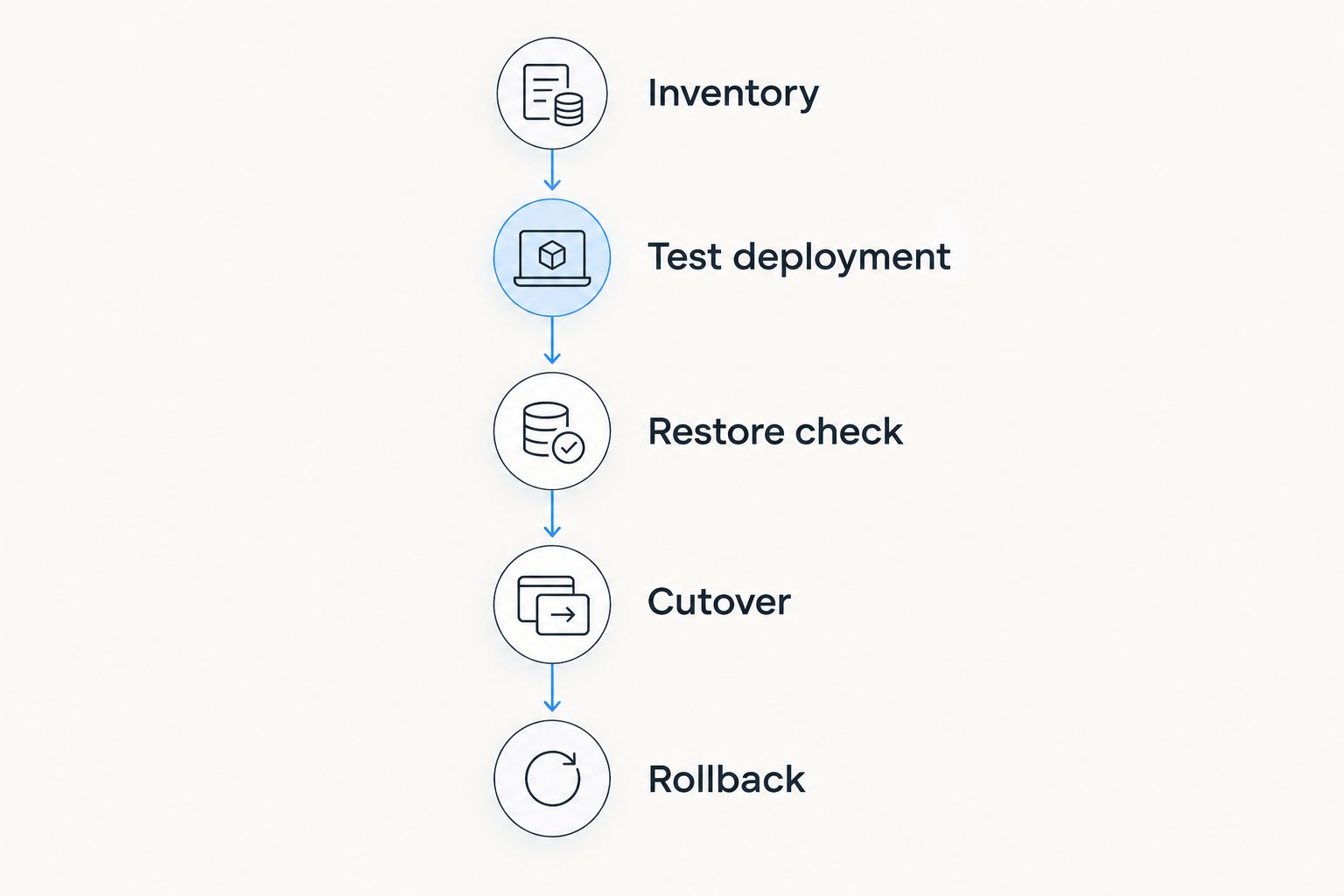
- Inventory: Record website files, databases, DNS records, email dependencies, scheduled tasks, and secrets.
- Test deployment: Run the application in the proposed environment without replacing the live service.
- Restore check: Restore a backup into the test environment and confirm the application can use it.
- Cutover: Change the relevant DNS records only after application checks pass.
- Rollback: Keep a documented route back until the replacement has passed your acceptance checks.
Check access controls as part of that test. HTTPS commonly uses TCP port 443, SSH commonly uses TCP port 22, and Windows Remote Desktop commonly uses TCP port 3389. These are protocol defaults, not a recommendation to expose administrative access publicly; restrict administration to authorised access paths.
Also test form submissions, authentication, file uploads, outbound application email, and scheduled jobs. For database-backed applications, decide how you will handle writes during the final transfer so the replacement does not launch with an outdated copy.
When staying with HostingRaja is the right call
Stay when the existing service meets your application requirements and the replacement offers no demonstrated operational benefit. Avoiding an unnecessary migration preserves a working deployment and removes cutover work from your team's schedule.
Before moving, ask whether an issue belongs to the application rather than the host. Slow database queries, excessive application requests, and incorrect caching require diagnosis; changing providers does not identify their cause.
Set the decision around acceptance criteria. If your current service passes them and the alternative has not been tested, the existing deployment remains the stronger operational choice.
FAQ
What's the best HostingRaja alternative in 2026 for Indian businesses?
VCCLHosting is a relevant first shortlist for Indian businesses seeking Windows/Linux VPS, dedicated cloud servers, or shared/reseller hosting from a provider with its own Kolhapur datacenter. Select the service only after confirming application compatibility and administration responsibilities.
Is Amazon EC2 better than HostingRaja?
Amazon EC2 is the more relevant option when your application needs AWS infrastructure integration. It is not automatically a better replacement for a working hosting account because networking, permissions, and server operations require configuration.
Are DigitalOcean Droplets suitable for a website migration?
DigitalOcean Droplets suit a website migration when you want a virtual machine and can administer the application environment. Include databases, certificates, DNS, email dependencies, and recovery in the migration plan.
Should I choose shared hosting or a VPS?
Choose around the application's control requirements and your ability to administer the environment. A VPS introduces server-level responsibilities that a shared-hosting workflow does not necessarily require you to handle.
Does an Indian datacenter guarantee a faster website?
An Indian datacenter does not guarantee a faster website. Measure application response from your users' locations and check server-to-database or external-service connections before approving a move.
What should I test before switching from HostingRaja?
Test application compatibility, database access, authentication, uploads, email dependencies, scheduled jobs, and backup restoration. Approve the DNS cutover only after the replacement passes the checks that matter to your application.
When should I stay with HostingRaja instead of switching?
Stay with HostingRaja when the current service meets your requirements and a replacement offers no demonstrated benefit. A migration should solve a specific deployment problem, not simply change the provider name.
One last thing
A completed backup job is not proof that your application can be recovered. Before you approve any hosting move, restore the backup and run the application from it. That check tests the recovery path rather than just the existence of a backup file.